With the February 2026 ArcGIS Online release, ESRI introduced “Replacement Items” to transition users from retiring apps — ArcGIS Configurable Apps and Classic Esri Story Maps. The workflow is documented here:
https://doc.arcgis.com/en/arcgis-online/manage-data/replacement-items.htm
This idea proposes expanding Replacement Items so they can be used for ANY item type within ArcGIS Online, especially maps and applications.
The existing "Replacement Item" experience on an item’s Settings page works well, but currently only takes effect when the retirement is triggered by an ArcGIS Online update. In the February 2026 update, Replacement Items could be configured ahead of time but did not activate until after the AGOL release. Item owners need more control over when and how these redirects go live.
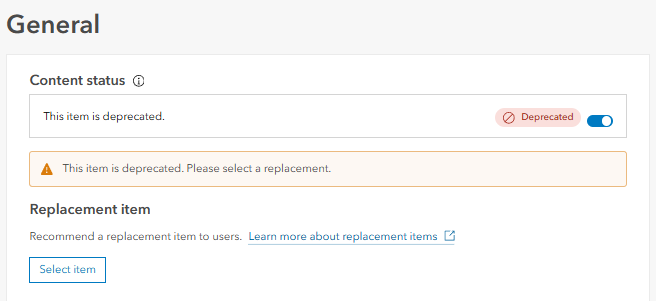
This idea proposes the following enhancements:
- When an item is marked as deprecated, the “Replacement Item” option becomes available to the item’s owner within Settings.
- When a replacement item is designated, the redirect takes effect immediately; OR
- Ideally, owners could specify a future date when the redirect begins.
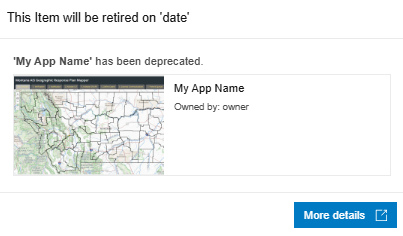
If a scheduled retirement date is set in the future, users could see a notification or pop‑up showing the planned retirement date, with options such as “View New App” or “Stay on Current App.”
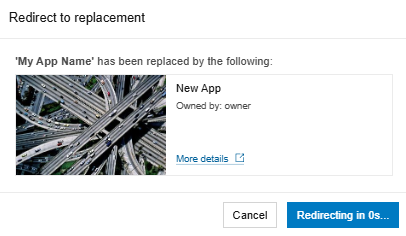
After the retirement date passes, users would automatically be redirected to the new item.
Why a scheduled date option is important:
Many organizations follow required notice periods for software, dataset, or application retirement — often 30 to 90 days. While item owners can manually apply deprecation or redirect on a given date, providing a built‑in user-facing warning and the ability to preview the new application creates a smoother transition and better user experience.
Even without a scheduled date option, the ability to set replacement items for any item type would provide immediate value and help organizations prepare for upcoming app retirements (for example, Web AppBuilder in 2027), ensure users access the most current resources, and maintain compliance with internal deprecation and sunsetting policies.
In short, broader support for Replacement Items would help:
- Prepare for and communicate future app retirements
- Redirect users to the most up‑to‑date maps and apps
- Deprecate items cleanly while guiding users to newer versions
- Improve the overall user experience by reducing confusion and broken links




