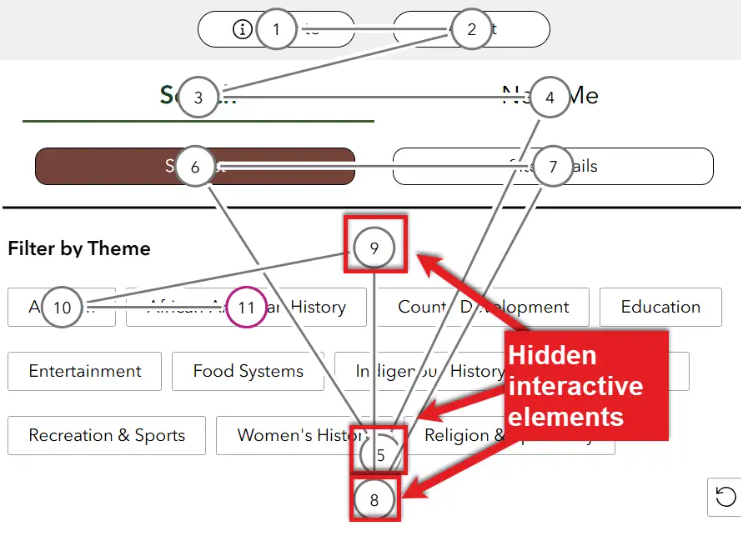
We just had our accessibility testing done on our Experience Builder application. We found that there is an issue flagged for column section. Each column section/widget seems to be a "hidden interactive element" where there is keyboard focus applied to that column section. However, that causes an accessibility issue because it's unclear what is being focused on and there is nothing the user can do, making it an unnecessary "stop".
Can anyone from Esri or users advise or provide guidance - is this something that can be resolved for column sections? Are columns generally not advised to be used for accessibility reasons?
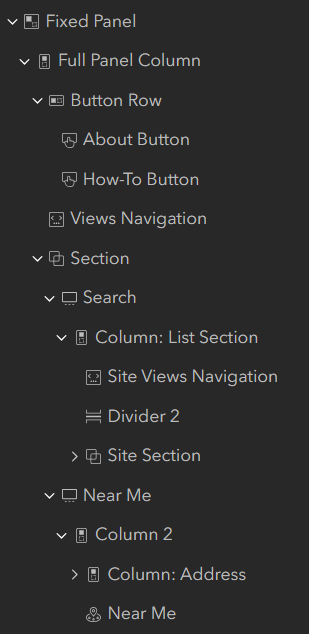
Shown in photo #1 is the error with the 9, 5, 8 as hidden interactive elements due to the column widget. Also some are nested within one another (in terms of how I built the app) - shown in photo #2 below.
I would love to learn more about best practices and any suggestions before I rearrange my app. Thank you!