Hi,
We have a MAUI iOS app that connects to the domain using a VPN connection.
The ArcGIS Enterprise uses a .loc Url and is signed using an internal Windows domain CA.
I am unable to get the OAuth to work successfully with this setup.
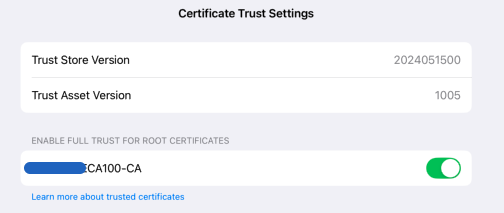
- I have added the root certificate to the simulator and it is trusted
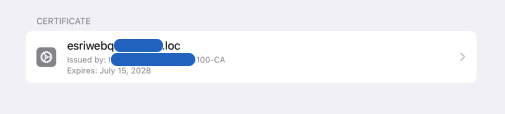
- I have added profiles for the private certificates used by the ArcGIS Enterprise. I don't think this should be necessary but thought would try
We have a WPF app will work without issue using OAuth and connecting and validating against the same ArcGIS Enterprise
We use SAML integrated security (Microsoft Live), when the app starts up it does go through the general SAML login. It will request user name, password, will do a MFA (Duo) request. But it does not return from the login request
_portal = await ArcGISPortal.CreateAsync(new Uri(PortalUrl), true);
// Never gets past above line - no exception just hangs
var license = await _portal.GetLicenseInfoAsync();
I get a lot in the console log which repeats this similar message
2025-03-05 09:43:11.327485-0700 gMobile.Maui[81491:1464952] [Default] Task <F4B63C40-600C-4BD5-ABCD-A766C0D75F00>.<1> finished with error [-1200] Error Domain=NSURLErrorDomain Code=-1200 "An SSL error has occurred and a secure connection to the server cannot be made." UserInfo={NSLocalizedRecoverySuggestion=Would you like to connect to the server anyway?, _kCFStreamErrorDomainKey=3, NSErrorPeerCertificateChainKey=(
"<cert(0x16e661400) s: esriwebq.mydomain.loc i: mydomain-WSVISSUING100-CA>",
"<cert(0x16e75aa00) s: mydomain-WSVISSUING100-CA i: WSV---CA100-CA>"
), NSErrorClientCertificateStateKey=0, NSErrorFailingURLKey=https://esriwebq.mydomain.loc/portal/sharing/rest/portals/self?f=json, NSErrorFailingURLStringKey=https://esriwebq.mydomain.loc/portal/sharing/rest/portals/self?f=json, NSUnderlyingError=0x600000cdee50 {Error Domain=kCFErrorDomainCFNetwork Code=-1200 "(null)" UserInfo={_kCFStreamPropertySSLClientCertificateState=0, kCFStreamPropertySSLPeerTrust=<SecTrustRef: 0x600003535b80>, _kCFNetworkCFStreamSSLErrorOriginalValue=-9802, _kCFStreamErrorDomainKey=3, _kCFStreamErrorCodeKey=-9802, kCFStreamPropertySSLPeerCertificates=(
"<cert(0x16e661400) s: esriwebq.mydomain.loc i: mydomain-WSVISSUING100-CA>",
"<cert(0x16e75aa00) s: mydomain-WSVISSUING100-CA i: WSV---CA100-CA>"
)}}, _NSURLErrorRelatedURLSessionTaskErrorKey=(
My thought is that there may be a problem because the certificates life is more than 2 years, which I think Apple does not like. On my development Mac once I put the Root CA in Keychain connecting to the ArcGIS Enterprise from Chrome was fine, but from Safari you get trust issues because the length of the certificate. I do not know if there is a may to override this. It will be quite an effort to change the certificates life so if there is something to try before that I would love to find what that is.
I found this post from a log while back but could not figure if there is something related
ArcGIS for iOS (100.x): NSURLSession/NSURLConnection HTTP load failed


