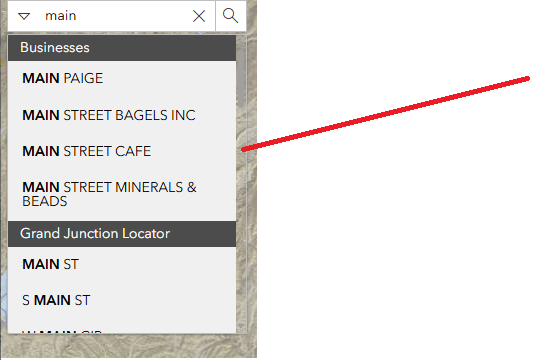
I am working on a custom search widget using the Search widget with multiple sources ArcGIS Maps SDK for JavaScript reference. The widget is working as expected. I have a bug that keeps persisting where the results list scroll navigation bar keeps an transparent background, where instead I would like it to have a white background. Below my image I have included the CSS style const used to style the widget. It is hard to see in the image but the scroll bar to the right has a transparent fill.
const STYLE = css`
  & {
    height: ${polished.rem(32)};
    margin-top: 0;
    margin-left: 0;
  }

  &.search-container {
    width: 300px !important;
  }

  /* Ensure the search sources menu has a solid background */
  .esri-search__sources-menu {
    background-color: #ffffff !important;
    border: 1px solid #dcdcdc;
    border-radius: 4px;
    box-shadow: 0px 4px 6px rgba(0, 0, 0, 0.2);
    overflow: auto !important;
  }

  /* Ensure individual list items have correct background */
  .esri-menu__list {
    background-color: #ffffff !important;
  }

  /* Ensure scrollbar is fully visible */
  .esri-search__sources-menu::-webkit-scrollbar {
    width: 10px;
    background-color: #f0f0f0 !important;
    border-radius: 4px;
  }

  .esri-search__sources-menu::-webkit-scrollbar-thumb {
    background: rgba(0, 0, 0, 0.4) !important;
    border-radius: 4px;
  }

  /* Firefox scrollbar (optional) */
  .esri-search__sources-menu {
    scrollbar-color: rgba(0, 0, 0, 0.4) #f0f0f0 !important;
    scrollbar-width: thin !important;
  }

  /* **Selected state (when a user selects an option)** */
  .esri-menu__list-item[aria-checked="true"],
  .esri-menu__list-item--active {
    background-color: #003A55 !important;
    color: #ffffff !important;
    font-weight: bold;
  }

  /* **Hover state (when a user hovers over an option before selecting)** */
  .esri-menu__list-item:hover,
  .esri-menu__list-item:focus {
    background-color: #003A55 !important;
    color: #ffffff !important;
  }
`;



