Hi, all,
I have another dumb question.
The goal is to convert XY table to Point, which is something I've done countless times. But in this case, I can't pull the Lat Long in, because I'm getting an error that says "the field is not of type SHORT-LONG-FLOAT-DOUBLE." I've never gotten this error before, and I can't figure out how to edit the integer attributes. I made sure that in the original table the pertinent columns are set to number format.
When I've added a field to a table in other projects, there's always the option to set the integer type. But I can't find a way to edit the existing attribute properties. I was able to open the Fields manager under the Standalone Table tab and see that my Lat Long are still set to text - but I can't change any properties. I know that different table functions are turned on or off depending on whether I'm in an Edit session or not. I figured out how to get my enable/disable Edit button back, and tried it each way. I can't edit the field data type.
Fields manager:
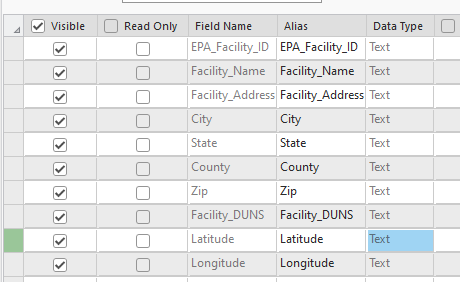
I'm sure I'm doing something dumb, but I'm not sure where to go from here. I tried starting a brand new empty map project and pulled the table in with no other layers in the map, and I still get all of the same problems. I tried copying the data from the original table into a new table, pasting just the value to eliminate any formulas or ties to underlying data. I tried setting the Lat Long columns in the original table to number, and to general, just to see if that made any difference. It didn't.
I'm working in Pro 3.3.1.
Thanks for any help you can provide!!


