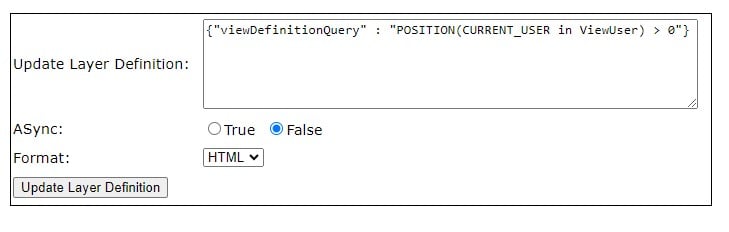
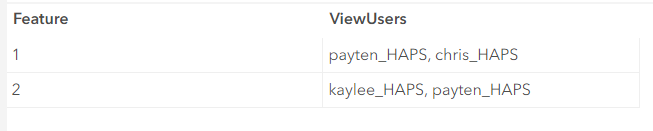
De instellingen van de gehoste feature service stellen de eigenaar van het item in staat te bepalen wie features kan zien en bewerken via de onderstaande instellingen. Het is heel gebruikelijk dat gebruikers meer moeten kunnen zien of bewerken dan "hun eigen" maar minder dan "alle features". Bijvoorbeeld, in een dataset op staatsniveau, kan een gebruiker uit County A alle features die aan County A zijn gekoppeld moeten kunnen zien en bewerken.<\/P><\/span>Een manier om aan deze behoefte te voldoen is door gebruik te maken van het CURRENT_USER keyword<\/A> dat deel uitmaakt van de REST API query-operatie. Dit kan worden toegepast op een gehoste feature service view in ArcGIS Online<\/A> of Enterprise 11.2+<\/A>. Hier zijn de stappen om dit te doen in ArcGIS Online:<\/P>Zorg ervoor dat je gehoste feature layer een veld heeft met een door komma's gescheiden lijst van gebruikersnamen voor gebruikers die toegang moeten hebben tot elk record, zoals dit voorbeeld:<\/span><\/LI>Ga in ArcGIS Online naar de Item Details van je gehoste feature service en klik op Create View Layer <\/STRONG> en volg dan de instructies hier.<\/A><\/span>NIEUWE OPTIE: <\/STRONG>wanneer je de view maakt, heb je de optie om een filter toe te passen voor "is current user" - dit neemt de gebruikersnaam van de huidige gebruiker die de data bekijkt en retourneert alleen records die hun gebruikersnaam bevatten in het geselecteerde veld. Dit is echter een EQUALs<\/STRONG> operator, dus het veld mag slechts één gebruikersnaam bevatten, anders dan de hieronder beschreven aanpak die werkt voor een veld met een string van meerdere gebruikersnamen.<\/span><\/LI><\/UL><\/LI><\/UL><\/LI>Ga naar de Item Details van de gehoste view layer. Scroll naar beneden en klik op View<\/STRONG> naast de URL<\/span><\/LI>Klik op Admin <\/STRONG>linksboven in het venster<\/span><\/LI>Klik op de laagnaam onder Layers:<\STRONG>Scroll naar beneden tot onderaan de pagina en klik op Update Definition<\STRONG><5/span5></5strong5>update layer definition dialog box5https://jsonlint.com5 to help define the json object to be passedupdate layer definition dialog box: {5viewDefinitionQuery5 : 5POSITION(CURRENT_USER in ViewUser) > 05}ViewUser with the field in your data which contains a comma separated list of usernames that should have access to each record, like this example:Click Update Service Definition.< /strong >
Nu, met de view-definitie toegepast, kan mijn gebruiker (payten_HAPS) alleen feature 1 en 2 zien, terwijl anderen alleen "hun eigen " features zouden zien.
Ik ben benieuwd hoe jij dit gaat gebruiken!Blijf op de hoogte voor volgende berichten/blogs met meer details over overwegingen en gebruikssituaties 😊
Thank you for posting this.This could be extremely useful for us. Particularly in managing community user access to specific features that they have not created / do not 'own' themselves, but we need to give them access to. Currently we use various hosted views and Groups as a middle ground for achieving this, but being able to fine-tune the access at a feature level would be a significant improvement.
Does the ViewUsers approach work regardless of organisation? I.e., if the user is from outside of the layer organisation, does that cause any issues?
From a practical point of view, we would be looking to manage access to 10's of features (from a pool of thousands) for each user, across several hundred different users. Therefore some way of automating the comma separated listed of users for each feature will be essential (e.g. pulling from a spreadsheet, or from Group membership).
Hi @DataOfficer - The CURRENT_USER keyword filter will work for users outside of the layer's organization. I've tested the above approach with my community members and other, external ArcGIS Online members 🙂 Side note: hosted feature layer views with a current_user filter applied should NOT be shared publicly. The caching of public layers impacts the layer's ability to filter by the specific user.
Agreed, you'll definitely need a way to efficiently manage the "access data" (field with string of usernames) for each feature.. We are working on another post or blog with some considerations / possible approaches. I will link it here when it's available!
@PaytenJarnagin thank you that's great.
Tried out but not working for me.
The "viewlayerquery" does not exist. Tried to add property using adddefinition function but no luck.
ViewDefinitionQuery property is working for me instead of ViewLayerQuery property.
I have applied the filter and it works correctly, thank you for sharing such a valuable solution.Filter limits layer editing?
Hi,
How complex can the SQL in the viewDefinitionQuery be? Could we map a selection of user names to some other attributes?
Thanks,
Marc
@LAG155 - applying a current user view definition would reduce the # of features a user can access and therefore edit; but users should have no issue editing what they can access!
You may want to consider a view definition like this to expose features where the username look-up field is null... which would otherwise be hidden in that view.
{"viewDefinitionQuery" : "POSITION(CURRENT_USER in EditUsers) > 0 OR (EditUser is NULL)"}
Hi @Marc_Graham - No, the usernames have to be in a field, and present for each record the user needs to see. You could log an ENH for the requested functionality. I can see how it would be useful! Instead of the current_user view, some users are leveraging a look-up table of user info to "personalize" Surveys and Dashboards - planning to write a post on this soon! Will share here once it's up 🙂
Hi @PaytenJarnagin
Thanks sounds great thanks, look forward to reading it.
Hi @PaytenJarnagin ,
Thank you.When modifying the capabilities in the view console, the editing process doesn't activate. I made the modification to the JSON and it works correctly.A real success for my need to filter entities based on the assignments made to the logged-in user.
],
  "capabilities" : "Create,Delete,Query,Update,Editing,Sync,ChangeTracking",
  "viewDefinitionQuery" : "POSITION(CURRENT_USER in userAGOL) > 0",
  "definitionQuery" : "POSITION(CURRENT_USER in userAGOL) > 0",
  "layerOverrides" : [
    "allowGeometryUpdates",
    "capabilities"
  ]
I am trying to filter some features based on the following:
I can get the first two to work but not the second.
This works:
{"viewDefinitionQuery" : "POSITION(CURRENT_USER in AGOL_UID) > 0 AND LiveStatus = 'N'"}
This doesn't:
{"viewDefinitionQuery" : "(POSITION(CURRENT_USER in AGOL_UID) > 0 OR CURRENT_USER = 'specific_username') AND LiveStatus = 'N'"}
It returns an error: "viewDefinitionQuery has invalid html content"
Any ideas?
@PaytenJarnagin totally epic feature!A few questions, trying to understand precisely what `CURRENT_USER` is and how it might be possible to extend in a large org with complex existing using groups, etc., here goes...1. What is `CURRENT_USER` and by what mechanism does it get evaluated? Is it simply replaced with the string value of the username, or is it an object with other properties? Assuming just a string, any plans to upgrade to something with properties (e.g., `.EMAIL_ADDRESS`)? Is there any developer-friendly way to preview the value, akin to the `test` feature for validating Arcade expressions?
2. Are there other ways to set this, besides the REST API or AGOL assistant? Is it possible to set on the desktop side (e.g., within an ArcGIS Pro definition query) before publishing?3. Do you know if folks have successfully set up relationship classes, and tested `CURRENT_USER` against related tables?I see mention of a planned blog post on some of this, any progress on that? Would love any further info on this feature!Linking docs for reference: https://doc.arcgis.com/en/arcgis-online/reference/sql-agol.htm
Just documenting my adventure & findings, RE questions 1-3 above^1. `CURRENT_USER` is a standard SQL function across many types of SQL databases. How it gets evaluated depends on the context (how it's set up / how data is accessed), more on this below. Since it's based in, and occasionally interoperable with database SQL (which doesn't have a concept of email addresses, like AGOL / Portal), it seems unlikely to be given added properties (like `.EMAIL_ADDRESS`) in AGOL SQL. I haven't found a developer-friendly way to preview what the value returns.2. Yes, but TLDR is that it's likely generally most practical to set at the web level (using ArcGIS REST API or AGOL Assistant). I did have success with setting it on the desktop side, both for FileGDB and SQL Server data, with FileGDB behaving most like what gets published to Portal (we're on Enterprise 11.2, for context). Specifically, if you set `POSITION(CURRENT_USER in ViewUser) > 0` on a FileGDB feature class and publish as a web layer, the CURRENT_USER variable remains dynamic in the web layer -- i.e., responds to who is viewing the data on the web. Alternate syntaxes like `ViewUser LIKE '%' || CURRENT_USER || '%'`, which work at the FileGDB level, do not seem to work after publishing to AGOL / Portal.It unfortunately also doesn't look like the definition query makes it into the ArcGIS Online Assistant JSON "definitionExpression", so you can't see or change it after publishing. It's just kinda invisibly doing its thing, which might work OK for some use-cases, if you want to manage def queries on the desktop side for FileGDB data.For data stored in SQL Server, on the other hand, the syntax "POSITION(CURRENT_USER in ViewUser) > 0" doesn't work -- ArcGIS Pro will reject it. You can work around this in Pro by doing something like `ViewUser LIKE '%' + CURRENT_USER + '%'`, but this will run your SQL at the database level, where CURRENT_USER has a different value (in my case, "DBO"). And after publishing to the web, this results in some gloriously buggy behavior, where popups and attribute table data is filtered (according to the SQL-level database user, not the user accessing on the web) but symbology isn't filtered at all!All this isn't a problem when setting using AGOL Assistant JSON or ArcGIS REST API, so that's still my preferred method -- e.g., in AGOL Assistant, adding `"layerDefinition": {"definitionExpression": "POSITION(CURRENT_USER in ViewUser) > 0"}`.3. It appears that web layer filtering generally doesn't see related data, even when a relationship class is set up inside the geodatabase before publishing. Nor is web filtering able to see fields generated with Arcade, of which there's some discussion here - either of these would enable really nice solutions where your user list comes from a related table (or system of tables). Deferring the evaluation of CURRENT_USER to the web-side when publishing referenced data from SQL Server, similarly would allow for (IMO, the most) elegant solutions like `project_code IN (SELECT project_code FROM user_access WHERE user = CURRENT_USER)`.For posterity, the workaround we'll use (because we need to manage our data in SQL server, maintain complex project-level user-access, and want to use a single app / web map), will be to store a `ViewUsers` text field inside the data and have it updated, by lots of different triggers, by a SQL stored procedure. And we'll set the user filter on the web side as bolded above.
Hi @Marc_Graham -
While I can't explain the invalid HTML content error.. I can suggest a possible solution:
It sounds like IF the current_user is User A you want to return ALL features, ELSE you only want to return features where current_user is present in AGOL_UID. The query doesn't support this level of conditional logic to NOT filter for User A but filter for everyone else 😞
To accomplish this, your view definition would filter features based on:
Then, to return all features for your User A, you would need to establish a workflow to get their username associated with each feature OR create a separate view for them.
Thanks for conducting those tests and sharing your results @SilasFrantz!
The follow-up blog is almost ready - hoping to get it posted before UC 🤞
Hope UC went well. Looking forward to your blog if it is ready to go.
Thanks @Marc_Graham - I'm working on the post right now! I'll update here when it's ready
In the meantime, check out this new post from @JenniferAcunto "Dashboards that Pop: Filter by Current User" The post I'm working on has expand examples for Method 3, and includes examples for Survey123.
Does this create issues viewing attachments in Field Maps? I tried applying this to a couple different hosted feature layers in AGOL and each time all attachments disappear from the app. They are still visible from Map Viewer though.
Hi @JasonJordanCV - there is a known issue with current user views with attachments and Field Maps - information here
If you log a tech support case, your number will be attached to this bug and you'll receive email update as it gets updated.
Just want to say this feature is awesome, finally got around to using it for something real and it works great. Having the ability to create a single view and a single dashboard with CURRENT_USER instead of maintaining numerous views and numerous dashboards (one for each group/user) is a huge timesaver.
@PaytenJarnagin
You are a rock star! This is what I was looking for in the past two years...
Thank you so much
This is excellent. Just what I needed.
Thanks, this is super helpful! I'm excited to use this functionality.
Just wanted to throw in a tip that may seem obvious to others, but it took me a minute to figure out. If you need to make an update survey connected to a feature layer with assigned users, you must connect the survey directly to the view, not the original hosted feature layer. Otherwise, they will be able to see all the data, not just those data assigned to their username.
I hope this helps someone else!
Dit is zo nuttig. Bedankt voor het plaatsen hiervan, ik gebruik het in een dashboard om gebruikers te helpen zien hoe ze hun items snel kunnen verbeteren.
Dit is geweldig! Bedankt voor het delen. Ik vraag me af of de query die wordt gebruikt om de gebruiker te controleren wat strikter moet zijn. Omdat POSITION een tekenreeks controleert, denk ik dat in de huidige opzet lee_HAPS toegang heeft tot alles wat kaylee_HAPS kan zien (zolang Lee ook toegang heeft tot de laag). Misschien is het beter om de opgeslagen gegevens te laten beginnen en eindigen met het scheidingsteken, dus ,haylee_HAPS,payten_HAPS, en de gebruiker vervolgens te controleren met iets als "," + CURRENT_USER + "," zodat je er zekerder van bent dat de gebruikersnaam exact overeenkomt en niet ook overeenkomt met gebruikersnamen die deelstrings van elkaar zijn.
lee_HAPS
kaylee_HAPS
,haylee_HAPS,payten_HAPS,
"," + CURRENT_USER + ","
Aangemelde leden kunnen berichten plaatsen, updates volgen en meer. Nieuw hier? Registreer een gratis account.
Find useful guides, FAQs, and documents to help you navigate and make the most of Esri Community.