The default esri SceneView (3D only) provides the NavigationToggle component which toggles between "Pan" and "Rotate" mode.
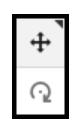
I have a task to update the appearance (using our own custom png images) and tooltip styles for this component. The core question is, is there a relatively simple way to specify my own buttons/images for the NavigationToggle interface, and also to specify the tooltip styles for the same?
I have created a CodePen which removes the esri built-in NavigationToggle and makes a naive attempt to implement my own by toggling the value of view.navigation.browserTouchPanEnabled. https://codepen.io/lawken/pen/RwmLaYV Of course, it doesn't work, but maybe this is enough of a platform to support discussion of the right way forward. The production version of this is a bit more complicated, of course, being in an Angular app, using Material for button styles, but if I can figure out how to customize the NavigationToggle in the CodePen, I can transfer the concept to the app.
Thank you.

