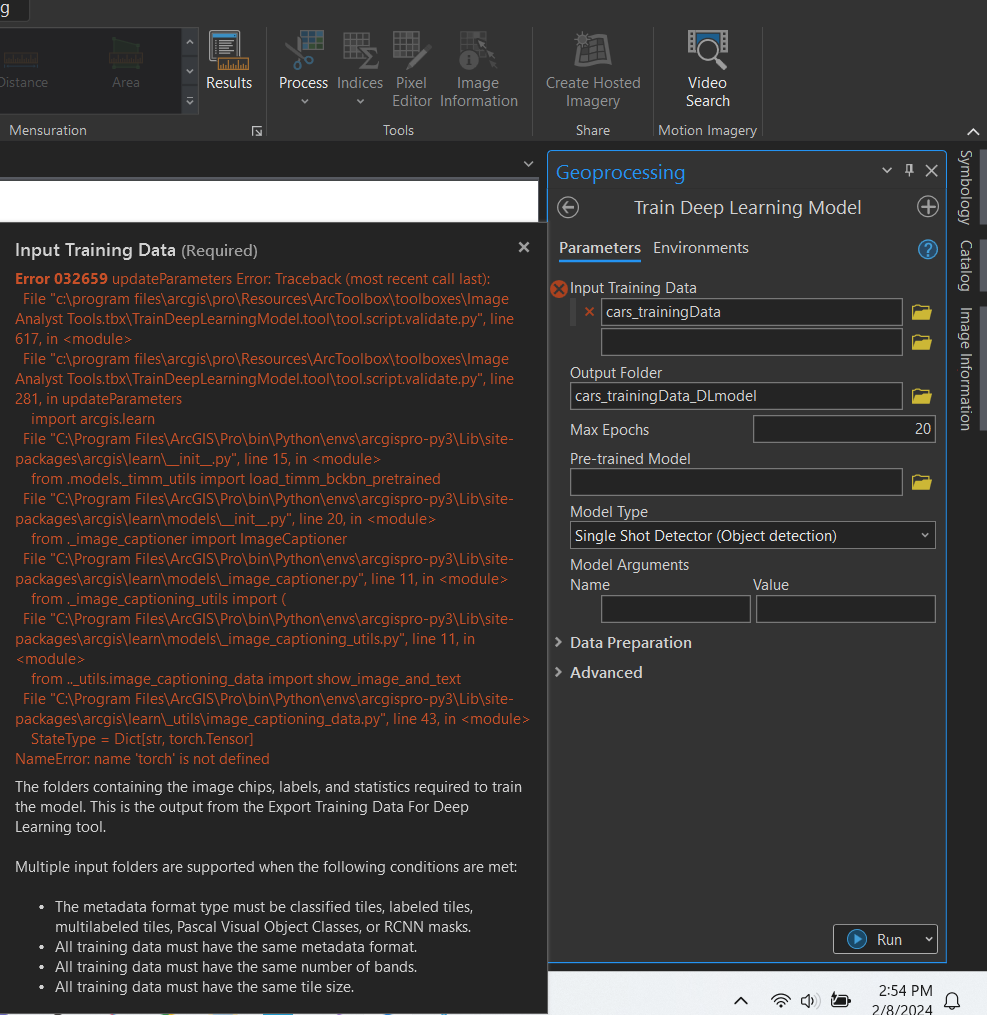
Hello (first post 🙂 ,
I am trying to run the 'Train Deep Learning Model' tool and when i add my training data, it either crashes Pro or throws error 032659 (pictured below).
I have successfully run this process on my desktop at work, but cannot get it to run on my personal computer. The major difference is, my laptop GPU is CUDA enabled.
I followed this process: https://www.esri.com/arcgis-blog/products/arcgis-pro/imagery/deep-learning-with-arcgis-pro-tips-tricks/
What i've done & confirmed so far:
I am using ArcGIS Pro v 3.2.2, and i have successfully (as of 2/8/2024) uninstalled and re-installed ArcGIS Pro & deep learning libraries. I am using the default "arcgispro-py3" environment. I have confirmed CUDA availability with "import torch->import fastai ->torch.cuda.is_available()" = true in a python window on Pro. I have tried the process of exporting training data numerous times, using old data and starting from scratch on a new project (all data used/edited was done so on Pro 3.2.2). The metadata format i use when exporting training data is PASCAL Visual Object Classes (i have also tried the Labeled_Tiles format). Regardless of the training data added to 'Train Deep Learning Model', it will not accept it.
At a loss for what to try next. Any tips or advice would be wonderful, thank you!