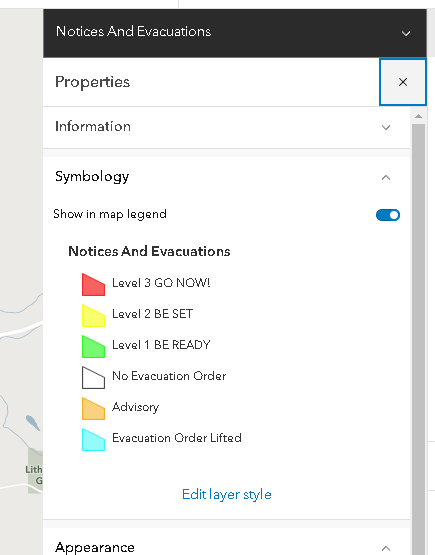
Ik probeer erachter te komen waarom de symbologie van mijn laag niet verandert wanneer ik deze probeer te bewerken in de AGOL-kaartviewer. Deze laag is gemaakt met de Emergency Management Operations Solution . Ik moest de laag Meldingen en evacuaties aanpassen aan mijn organisatie. De symbologie moet overeenkomen met mijn aangepaste keuzes en deze weergeven.Hier is de symbologie van de laag
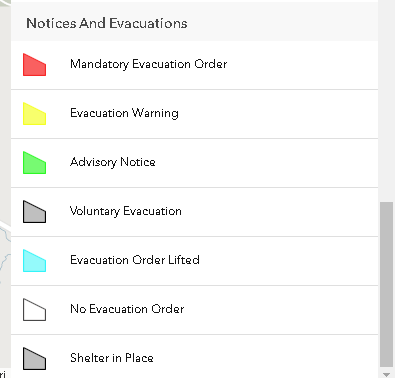
Hier is de symbologie tijdens het bewerken.
Hi @RickeyFight,
To update the choices in the Editor, you'll need to manage the feature templates. Support for managing feature templates within Map Viewer is on our future road map.In the mean time, you can use either Map Viewer Classic or the Field Maps Designer app.
To manage feature templates in the Field Maps Designer app, follow these steps:
Hope that helps!
@EmilyGeo Thank you for the help! I have not used Field Maps Designer.I am running into an issue on step 4. I do not see an 'Add Template' button.
I was able to change the template by using map viewer classic.
@EmilyGeo I their a webpage where we can track the current status of this new feature? Like Rickey, I have no option in Field Maps Designer to edit the existing template, or to create a new one.
Hi @BRENNEJM,
You should be able to manage templates for all layers that you own or administer. At this time, Templates can be managed in either Field maps or Map Viewer Classic.
To create a new template in Field Maps Designer, select an existing template and click the 'Duplicate' button, then update the attributes accordingly.
Ingelogde leden kunnen berichten plaatsen, updates volgen en meer. Nieuw hier? Maak gratis een account aan.
Find useful guides, FAQs, and documents to help you navigate and make the most of Esri Community.