ArcGIS Pro 3.1.1
I have a standalone table in an Oracle 18c XE database that is not an enterprise geodatabase.
I want to delete a field from the table using attribute table functionality. But when I right-click on a field in the attribute table, the Delete option is greyed out.
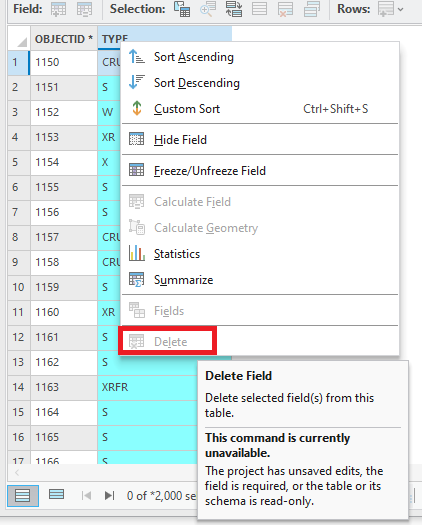
The hover-over text says:
This command is currently unavailable.
The project has unsaved edits, the field is required, or the table or its schema is read only.
I don't think any of those statements apply to this scenario.
Meanwhile, I am able to delete the field from the Catalog —> Fields view without issue.
Video:
Is that a known issue?
Shouldn't I be able to delete a field from the attribute table, just like I can do with a table from an enterprise geodatabase table (and when using the Catalog —> Fields view)?
Thanks.


