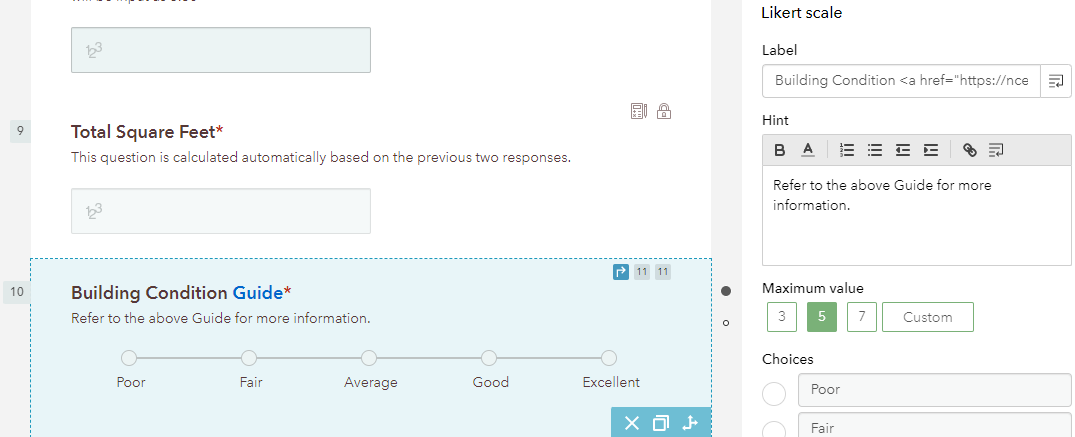
Hello, when I format an HTML link using Building Condition <a href="https://nces.ed.gov/pubs2006/ficm/content.asp?ContentType=Section&chapter=5§ion=5&subsection=4” target="_blank">Guide</a> in the web designer, it appears to function as it should in the canvas builder on the left side of the screen:
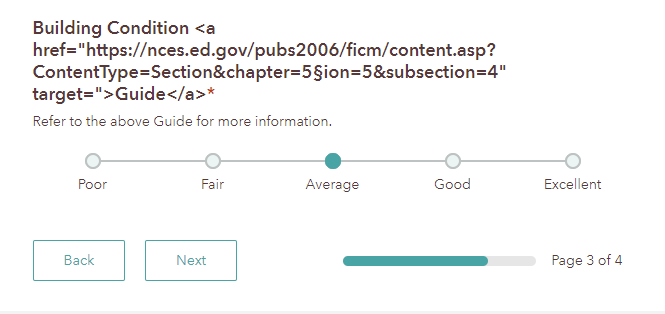
And then in both the preview and live view of the published app - it only shows the raw HTML text and not the link to the Guide? Is anyone else having this issue or does anyone else have a workaround for this?
@ShaneClarke @Anonymous User
Turns out this was a copy and paste error - the word doc quotation marks are different than the quotation marks that would appear when typed directly into the Survey123 web designer - which threw off the markup language. I deleted the copied quotation marks and typed them in manually in the Label field and this fixed the issue.
Oh yes this one gets us too, I kept wondering how people got them in there. Change the setting from the AutoCorrect options.
Aangemelde leden kunnen berichten plaatsen, updates volgen en meer. Nieuw hier? Registreer een gratis account.
Find useful guides, FAQs, and documents to help you navigate and make the most of Esri Community.