I am attempting to automate a process of exporting photos from a Survey123 geodatabase and give the output a custom filename, modified from the general script for exporting photos provided by Esri. Here is what I have so far. I am trying to join the Feature Layer, image_repeat table and image_repeat__ATTACH table before exporting the photos so that I can use fields that are in the feature class attribute table in the output file names.
<SPAN class="keyword token">import</SPAN> arcpy
<SPAN class="keyword token">from</SPAN> arcpy <SPAN class="keyword token">import</SPAN> da
<SPAN class="keyword token">import</SPAN> os
featureTable <SPAN class="operator token">=</SPAN> arcpy<SPAN class="punctuation token">.</SPAN>GetParameterAsText<SPAN class="punctuation token">(</SPAN><SPAN class="number token">0</SPAN><SPAN class="punctuation token">)</SPAN> <SPAN class="comment token"># the Feature layer</SPAN>
repeatTable <SPAN class="operator token">=</SPAN> arcpy<SPAN class="punctuation token">.</SPAN>GetParameterAsText<SPAN class="punctuation token">(</SPAN><SPAN class="number token">1</SPAN><SPAN class="punctuation token">)</SPAN> <SPAN class="comment token"># the image_repeat table</SPAN>
attachTable <SPAN class="operator token">=</SPAN> arcpy<SPAN class="punctuation token">.</SPAN>GetParameterAsText<SPAN class="punctuation token">(</SPAN><SPAN class="number token">2</SPAN><SPAN class="punctuation token">)</SPAN> <SPAN class="comment token"># the image_repeat__ATTACH table</SPAN>
fileLocation <SPAN class="operator token">=</SPAN> arcpy<SPAN class="punctuation token">.</SPAN>GetParameterAsText<SPAN class="punctuation token">(</SPAN><SPAN class="number token">3</SPAN><SPAN class="punctuation token">)</SPAN> <SPAN class="comment token"># Output folder location for the photos</SPAN>
arcpy<SPAN class="punctuation token">.</SPAN>AddJoin_management<SPAN class="punctuation token">(</SPAN>repeatTable<SPAN class="punctuation token">,</SPAN> <SPAN class="string token">"parentglobalid"</SPAN><SPAN class="punctuation token">,</SPAN> featureTable<SPAN class="punctuation token">,</SPAN> <SPAN class="string token">"globalid"</SPAN><SPAN class="punctuation token">)</SPAN>
arcpy<SPAN class="punctuation token">.</SPAN>AddJoin_management<SPAN class="punctuation token">(</SPAN>repeatTable<SPAN class="punctuation token">,</SPAN> <SPAN class="string token">"Nutrient_Bank_Monitoring.globalid"</SPAN><SPAN class="punctuation token">,</SPAN> attachTable<SPAN class="punctuation token">,</SPAN> <SPAN class="string token">"REL_GLOBALID"</SPAN><SPAN class="punctuation token">)</SPAN>
<SPAN class="keyword token">with</SPAN> da<SPAN class="punctuation token">.</SPAN>SearchCursor<SPAN class="punctuation token">(</SPAN>repeatTable<SPAN class="punctuation token">,</SPAN> <SPAN class="punctuation token">[</SPAN><SPAN class="string token">'DATA'</SPAN><SPAN class="punctuation token">,</SPAN> <SPAN class="string token">'ATT_NAME'</SPAN><SPAN class="punctuation token">,</SPAN> <SPAN class="string token">'ATTACHMENTID'</SPAN><SPAN class="punctuation token">,</SPAN> <SPAN class="string token">'site'</SPAN><SPAN class="punctuation token">,</SPAN> <SPAN class="string token">'plot'</SPAN><SPAN class="punctuation token">]</SPAN><SPAN class="punctuation token">)</SPAN> <SPAN class="keyword token">as</SPAN> cursor<SPAN class="punctuation token">:</SPAN>
<SPAN class="keyword token">for</SPAN> item <SPAN class="keyword token">in</SPAN> cursor<SPAN class="punctuation token">:</SPAN>
attachment <SPAN class="operator token">=</SPAN> item<SPAN class="punctuation token">[</SPAN><SPAN class="number token">0</SPAN><SPAN class="punctuation token">]</SPAN> <SPAN class="comment token"># blob data type</SPAN>
site <SPAN class="operator token">=</SPAN> str<SPAN class="punctuation token">(</SPAN>item<SPAN class="punctuation token">[</SPAN><SPAN class="number token">3</SPAN><SPAN class="punctuation token">]</SPAN><SPAN class="punctuation token">)</SPAN>
plotNum <SPAN class="operator token">=</SPAN> str<SPAN class="punctuation token">(</SPAN>item<SPAN class="punctuation token">[</SPAN><SPAN class="number token">4</SPAN><SPAN class="punctuation token">]</SPAN><SPAN class="punctuation token">)</SPAN>
filenum <SPAN class="operator token">=</SPAN> <SPAN class="string token">"ATT"</SPAN> <SPAN class="operator token">+</SPAN> str<SPAN class="punctuation token">(</SPAN>item<SPAN class="punctuation token">[</SPAN><SPAN class="number token">2</SPAN><SPAN class="punctuation token">]</SPAN><SPAN class="punctuation token">)</SPAN> <SPAN class="operator token">+</SPAN> <SPAN class="string token">"_"</SPAN> <SPAN class="comment token"># i.e. ATT531_</SPAN>
filename <SPAN class="operator token">=</SPAN> site <SPAN class="operator token">+</SPAN> <SPAN class="string token">"_Plot"</SPAN> <SPAN class="operator token">+</SPAN> plotNum <SPAN class="operator token">+</SPAN> <SPAN class="string token">"_"</SPAN> <SPAN class="operator token">+</SPAN> filenum <SPAN class="operator token">+</SPAN> str<SPAN class="punctuation token">(</SPAN>item<SPAN class="punctuation token">[</SPAN><SPAN class="number token">1</SPAN><SPAN class="punctuation token">]</SPAN><SPAN class="punctuation token">)</SPAN> <SPAN class="comment token">#i.e. miyagi_creek_Plot6_ATT531_plot_image-20200324-143302.jpg</SPAN>
open<SPAN class="punctuation token">(</SPAN>fileLocation <SPAN class="operator token">+</SPAN> os<SPAN class="punctuation token">.</SPAN>sep <SPAN class="operator token">+</SPAN> filename<SPAN class="punctuation token">,</SPAN> <SPAN class="string token">'wb'</SPAN><SPAN class="punctuation token">)</SPAN><SPAN class="punctuation token">.</SPAN>write<SPAN class="punctuation token">(</SPAN>attachment<SPAN class="punctuation token">.</SPAN>tobytes<SPAN class="punctuation token">(</SPAN><SPAN class="punctuation token">)</SPAN><SPAN class="punctuation token">)</SPAN>
<SPAN class="keyword token">del</SPAN> item
<SPAN class="keyword token">del</SPAN> filenum
<SPAN class="keyword token">del</SPAN> filename
<SPAN class="keyword token">del</SPAN> attachment<SPAN class="line-numbers-rows"><SPAN></SPAN><SPAN></SPAN><SPAN></SPAN><SPAN></SPAN><SPAN></SPAN><SPAN></SPAN><SPAN></SPAN><SPAN></SPAN><SPAN></SPAN><SPAN></SPAN><SPAN></SPAN><SPAN></SPAN><SPAN></SPAN><SPAN></SPAN><SPAN></SPAN><SPAN></SPAN><SPAN></SPAN><SPAN></SPAN><SPAN></SPAN><SPAN></SPAN><SPAN></SPAN><SPAN></SPAN><SPAN></SPAN><SPAN></SPAN></SPAN>
However, I get the following error message - "The value cannot be a table":
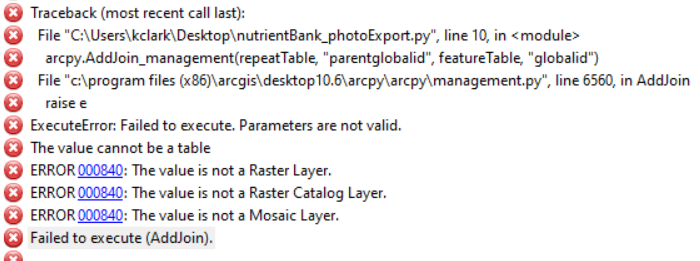
I have no problem doing the joins manually in ArcMap, so I'm unclear why it won't work in the script. Is it possible to do what I'm trying to do?
I am obviously still a python newbie, so many thanks in advance for any help or advice!



