First, a general question about future versions of the runtime: Are there any plans to enhance the raster renderers or add a classify renderer?
More generally, I'm doing some raster analysis and adding them to the map by creating a RasterLayer with the file path:
<SPAN class="keyword token">var</SPAN> rlayer <SPAN class="operator token">=</SPAN> <SPAN class="keyword token">new</SPAN> <SPAN class="token class-name">RasterLayer</SPAN><SPAN class="punctuation token">(</SPAN>path<SPAN class="punctuation token">)</SPAN><SPAN class="punctuation token">;</SPAN>
rlayer<SPAN class="punctuation token">.</SPAN>Id <SPAN class="operator token">=</SPAN> id<SPAN class="punctuation token">;</SPAN>
rlayer<SPAN class="punctuation token">.</SPAN>Renderer <SPAN class="operator token">=</SPAN> RendererFactory<SPAN class="punctuation token">.</SPAN><SPAN class="token function">GenerateRenderer</SPAN><SPAN class="punctuation token">(</SPAN>product<SPAN class="punctuation token">,</SPAN> path<SPAN class="punctuation token">)</SPAN><SPAN class="punctuation token">;</SPAN>
rlayer<SPAN class="punctuation token">.</SPAN>Opacity <SPAN class="operator token">=</SPAN> <SPAN class="number token">0.6</SPAN><SPAN class="punctuation token">;</SPAN>
rlayer<SPAN class="punctuation token">.</SPAN>IsVisible <SPAN class="operator token">=</SPAN> <SPAN class="keyword token">false</SPAN><SPAN class="punctuation token">;</SPAN>
layers<SPAN class="punctuation token">.</SPAN><SPAN class="token function">Add</SPAN><SPAN class="punctuation token">(</SPAN>rlayer<SPAN class="punctuation token">)</SPAN><SPAN class="punctuation token">;</SPAN>
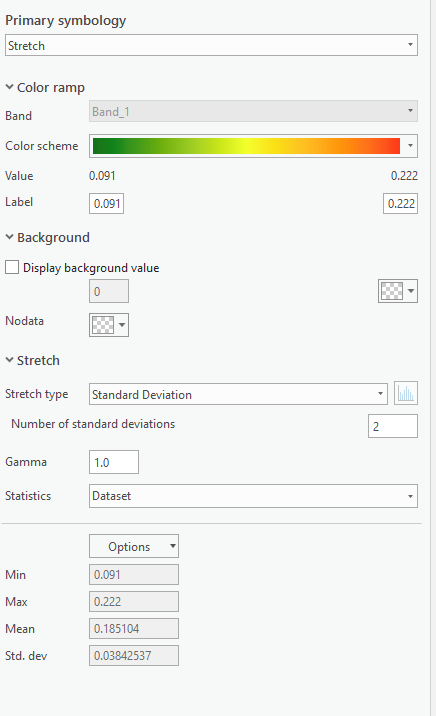
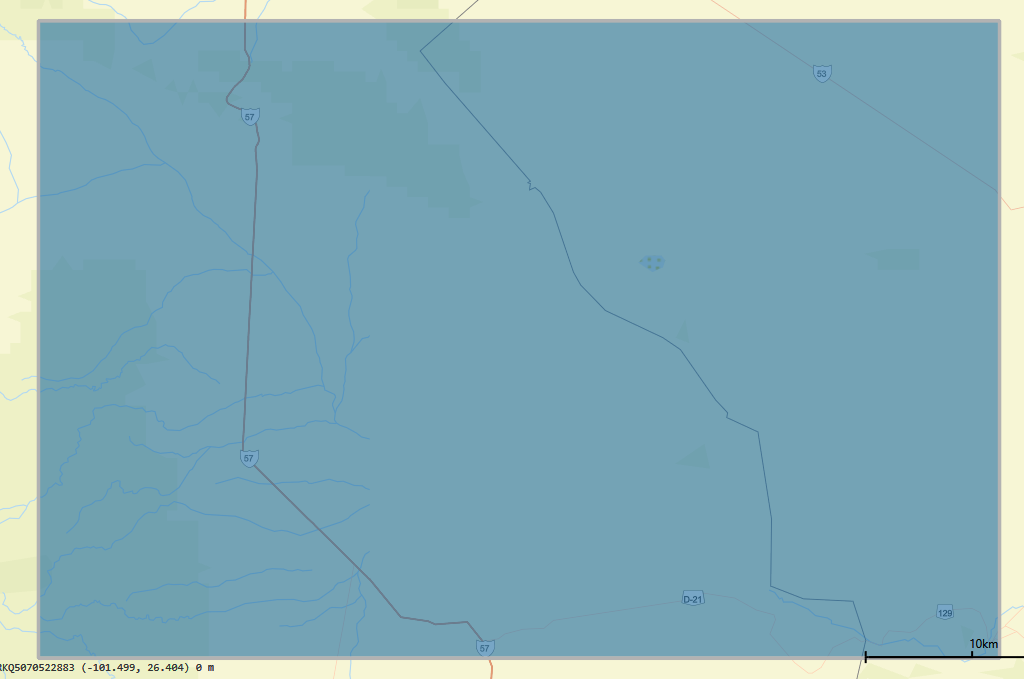
RendererFactory is a class I wrote that chooses the renderer properties based on the type of file. The problem I'm running into is that even when I set the renderer properties to match the symbology in Pro, often times it doesn't render or has a very narrow range of colors. Anecdotally, this seems more likely to happen when the raster values are small (<1), or have a small range, or a small number of unique values. But I haven't really tried to narrow it down.
This is an example of one my rasters in Pro:
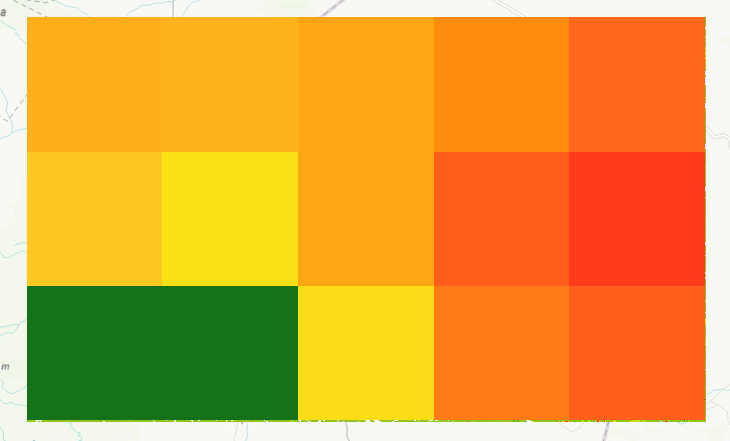
Here is it's corresponding symbology:
The same raster rendered on my map looks like this:
Here are the rendering parameters:
IEnumerable<SPAN class="operator token"><</SPAN><SPAN class="keyword token">double</SPAN><SPAN class="operator token">></SPAN> myGammaValues <SPAN class="operator token">=</SPAN> <SPAN class="keyword token">new</SPAN> <SPAN class="token class-name">List</SPAN><SPAN class="operator token"><</SPAN><SPAN class="keyword token">double</SPAN><SPAN class="operator token">></SPAN><SPAN class="punctuation token">(</SPAN><SPAN class="punctuation token">)</SPAN> <SPAN class="punctuation token">{</SPAN> <SPAN class="number token">1.0</SPAN> <SPAN class="punctuation token">}</SPAN><SPAN class="punctuation token">;</SPAN>
<SPAN class="keyword token">var</SPAN> std <SPAN class="operator token">=</SPAN> <SPAN class="keyword token">new</SPAN> <SPAN class="token class-name">StandardDeviationStretchParameters</SPAN><SPAN class="punctuation token">(</SPAN><SPAN class="number token">2.0</SPAN><SPAN class="punctuation token">)</SPAN><SPAN class="punctuation token">;</SPAN>
<SPAN class="keyword token">var</SPAN> numColors <SPAN class="operator token">=</SPAN> Math<SPAN class="punctuation token">.</SPAN><SPAN class="token function">Ceiling</SPAN><SPAN class="punctuation token">(</SPAN>max <SPAN class="operator token">-</SPAN> min<SPAN class="punctuation token">)</SPAN><SPAN class="punctuation token">;</SPAN>
<SPAN class="keyword token">if</SPAN> <SPAN class="punctuation token">(</SPAN>numColors <SPAN class="operator token"><</SPAN> <SPAN class="number token">16</SPAN><SPAN class="punctuation token">)</SPAN>
numColors <SPAN class="operator token">=</SPAN> <SPAN class="number token">16</SPAN><SPAN class="punctuation token">;</SPAN>
ColorRamp myColorRamp <SPAN class="operator token">=</SPAN> ColorRamp<SPAN class="punctuation token">.</SPAN><SPAN class="token function">Create</SPAN><SPAN class="punctuation token">(</SPAN>PresetColorRampType<SPAN class="punctuation token">.</SPAN>Elevation<SPAN class="punctuation token">,</SPAN> <SPAN class="punctuation token">(</SPAN><SPAN class="keyword token">uint</SPAN><SPAN class="punctuation token">)</SPAN>numColors<SPAN class="punctuation token">)</SPAN><SPAN class="punctuation token">;</SPAN>
<SPAN class="keyword token">var</SPAN> rendrr <SPAN class="operator token">=</SPAN> <SPAN class="keyword token">new</SPAN> <SPAN class="token class-name">StretchRenderer</SPAN><SPAN class="punctuation token">(</SPAN>std<SPAN class="punctuation token">,</SPAN> myGammaValues<SPAN class="punctuation token">,</SPAN> <SPAN class="keyword token">true</SPAN><SPAN class="punctuation token">,</SPAN> myColorRamp<SPAN class="punctuation token">)</SPAN><SPAN class="punctuation token">;</SPAN>
<SPAN class="keyword token">return</SPAN> rendrr<SPAN class="punctuation token">;</SPAN><SPAN class="line-numbers-rows"><SPAN></SPAN><SPAN></SPAN><SPAN></SPAN><SPAN></SPAN><SPAN></SPAN><SPAN></SPAN><SPAN></SPAN><SPAN></SPAN><SPAN></SPAN><SPAN></SPAN></SPAN>The result is the same if I change color ramp to DemScreen or if I use Min/Max parameters for the stretch renderer.
However, if I set the layer renderer to null, I actually get a better rendering (albeit grayscale):
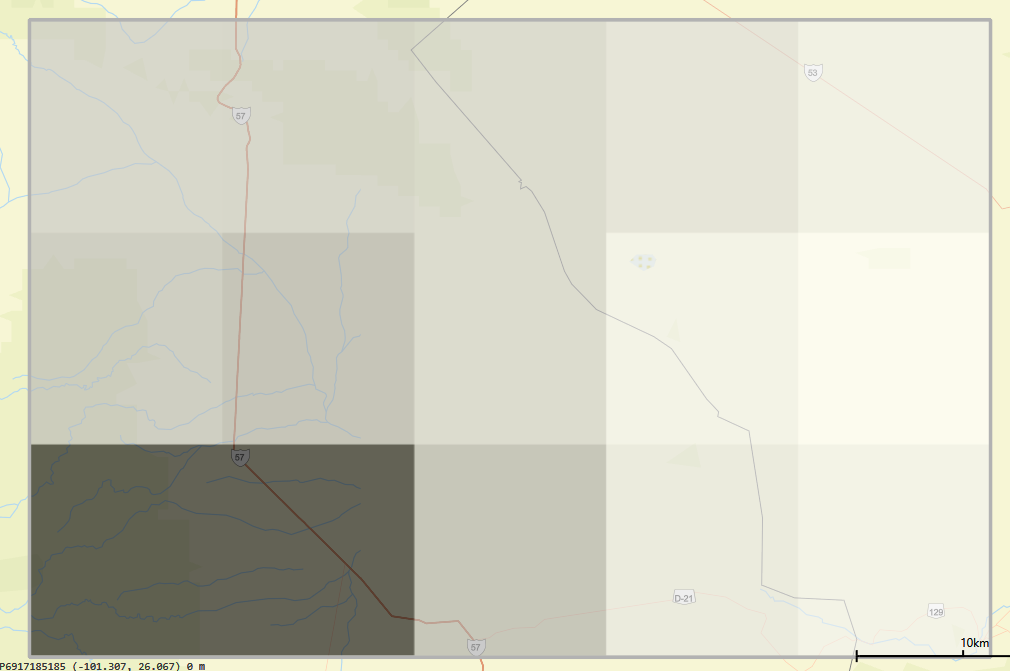
Any advice on how to improve my raster rendering????
P.S. Sample raster attached.
