Hi,
I'm try to mimic the web app (https://statelocaltryit.maps.arcgis.com/apps/webappviewer/index.html?id=5ab754a588724888ac4585b7dc7d2130) that I found from ESRI Recreation Outreach solution page (https://storymaps.arcgis.com/stories/88435bbb90954f2380e2cc42eb5bc837). The solution (park locator) has a totally different look and feel to the solution web page.
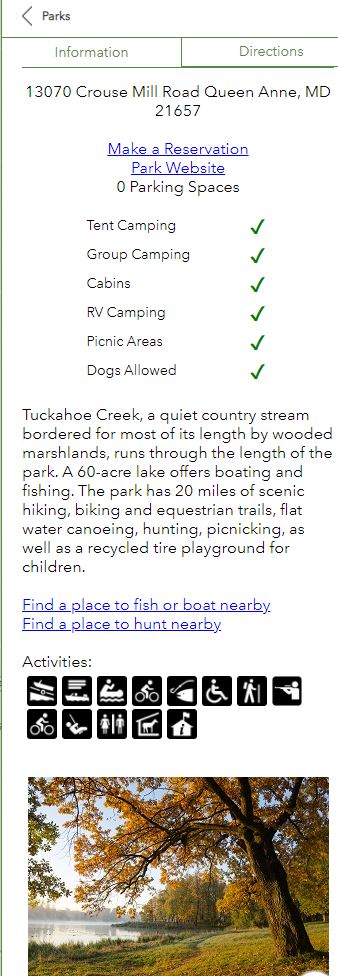
Below image is what I trying to mimic.
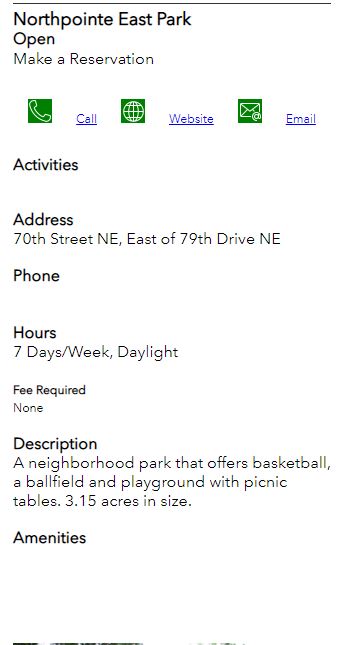
Next image is what I have:
I want to have the Amenities and Activities have similar look and feel. I'm trying to figure out, how it was done. Any help would be appreciated. Maybe if the web map that was use for the app could be shared with me.
Thank you Lauren the info! Yes, all the fields are populated correctly. I copied the expression from the Nearby Instant app and put it in the Near Me widget and it doesn't display the check mark like it does for the Nearby Instant app. I don't know, if it is a bug, but the storymap I referenced has those elements (activities/ amenities) working. I was hoping to be able to see the web map used for Near Me widget. Would it be possible to have it shared to me?
Thanks,
Chien
Hi Chien,
I wanted to offer some clarity on this. The storymap you referenced in your first message contains links to an older version of the Recreation Outreach solution. The version available now, version 2.0, is the version that contains the Arcade referenced above. It uses a single Arcade expression to list out the Activities and Amenities with the checks, and uses the Nearby Instant App, instead of WebApp Builder.
If you're not seeing the check marks in your pop-up, I would suggest making sure the fields listed in line 2 of Arcade expression are populated with 'Yes' or 'No' in the ParkRecreationFacilities layer. The fields are what drive the pop-up to create the check mark. If the fields aren't populated with anything, no checkmarks will appear.
This should still work in the older WebApp Builder version; the Near Me widget and the Nearby Instant app both use the pop-up and it's Arcade expressions to display results. But the Arcade above has been configured to be used with the Nearby Instant app, and so works better there.
I hope that clarifies! Please let me know if you have further questions here, or reach out to me directly! I'd love to hear any other pain points or suggestions for improvement on the Park Locator and Recreation Outreach.
Best,
Lauren
Thank you Johannes for the response! The solution has an arcade expression, but for some reason it doesn't show the check mark in the near me widget in the Web App Builder. In the expression, you see there is an check mark symbol. Which I don't understand how they get it in the expression.
What you need:
Amenities:
Create an Arcade expression for each amenity you want to show:
var target_amenity = "Tent Camping" // change this
var amenities = Split($feature.Amenities, ",")
if(Includes(amenities, target_amenity)) {
  return "https://checkmark_url.jpg"
}
return "https://cross_url.jpg"
In the popup definition, create a table. First column is the amenity, second column is an image, image url = expression for that amenity. In the HTML source, it looks like this:
<h3>Amenities</h3>
<table>
<tablebody>
<tr><td>Tent Camping</td><td><img src="{expression/expr10}"></td></tr>
<tr><td>Group Camping</td><td><img src="{expression/expr11}"></td></tr>
<tr><td>Dogs Allowed</td><td><img src="{expression/expr12}"></td></tr>
<!-- and so on -->
</tablebody>
</table>
Activities:
For each activity you want to show, create an Arcade expression:
var target_activity = "Hiking" // change this
var activities= Split($feature.Activities, ",")
if(Includes(activities, target_activity )) {
  return "inline"
}
return "none"
In the popup definition, switch to HTML source. Use the style variable of the img tags to show or hide the activity icons:
<h3>Activities</h3>
<img src="biking_icon_url" style="display: {expression/expr15};">
<img src="hiking_icon_url" style="display: {expression/expr16};">
<img src="fishing_icon_url" style="display: {expression/expr17};">
<!-- and so on -->
Aangemelde leden kunnen berichten plaatsen, updates volgen en meer. Nieuw hier? Registreer een gratis account.
Find useful guides, FAQs, and documents to help you navigate and make the most of Esri Community.