Browsers Chrome and Edge are not displaying Graphics stored on the network drive within a portal application, and linked to the Web-app Pop-up Media section using a UNC path.
The Roads Department has a Folder on their Server location where they store Photographs of their Grit Bins.
This folder is in \\BHQFS94\environment\Roads&Transp\Photos\ and it accessible only to those members of the Roads Department, and others who have been granted access. I have also tried the process in a Public Unsecured location.
There is an ESRI layer displaying the Grit Bins which includes a link to the images displayed in this folder, however there is an issue with Chrome Accessing the Display Image. As you can see from the screen shot attached below, Internet Explorer correctly displays the Image, however Chrome does not.
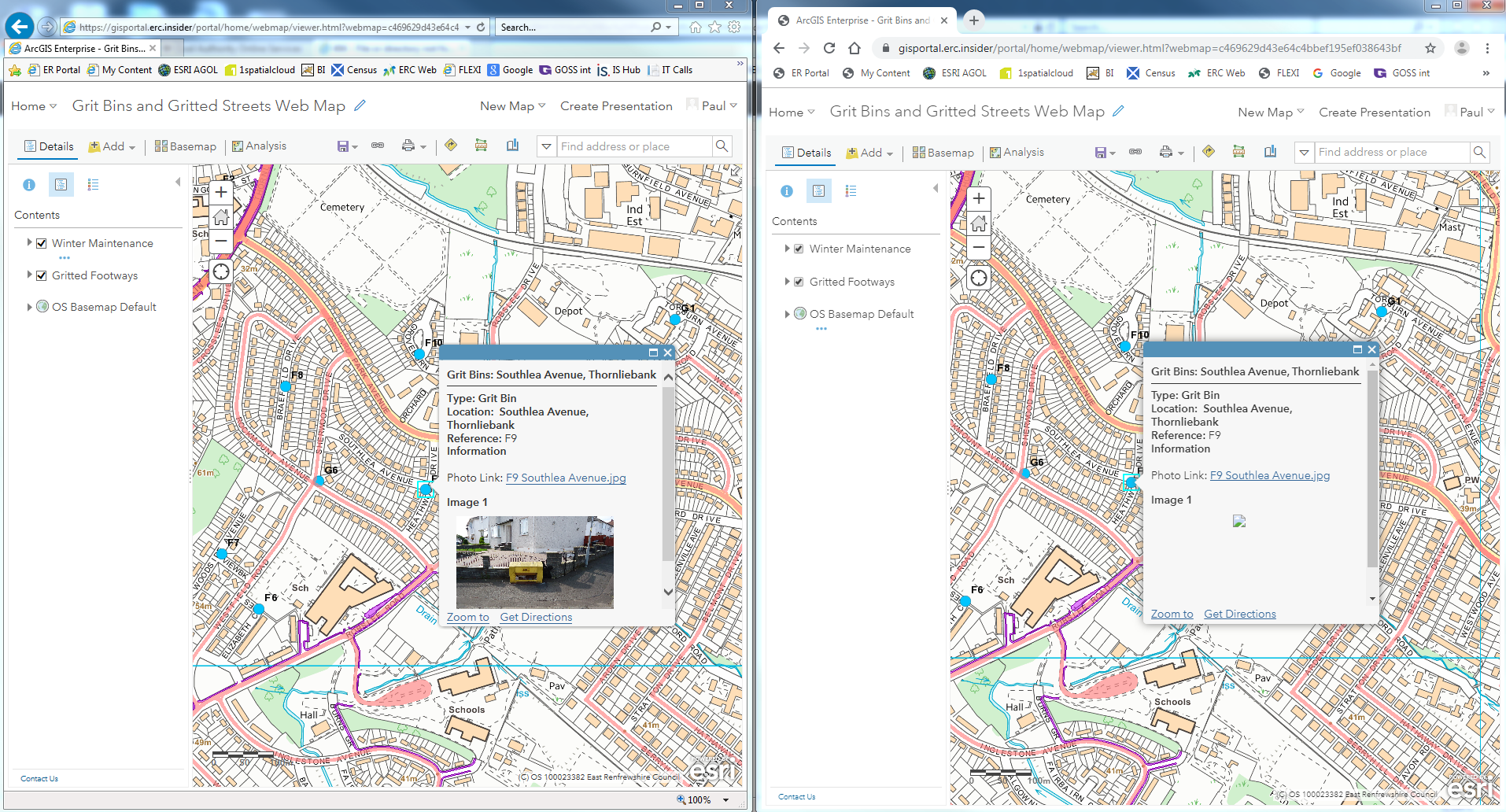
I also tried to attach the UNC Path as a Hyperlink in the Configured Popup Link. But this failed too. I believe that the Hyperlink in Portal Web-app Pop-ups will NOT allow Local Files to be linked, only Web Addresses.
Does anyone know if this a known Chrome / Edge issue, is there a simple setting that needs to be checked, or is it a local IT issue with permissions? Thanks.


