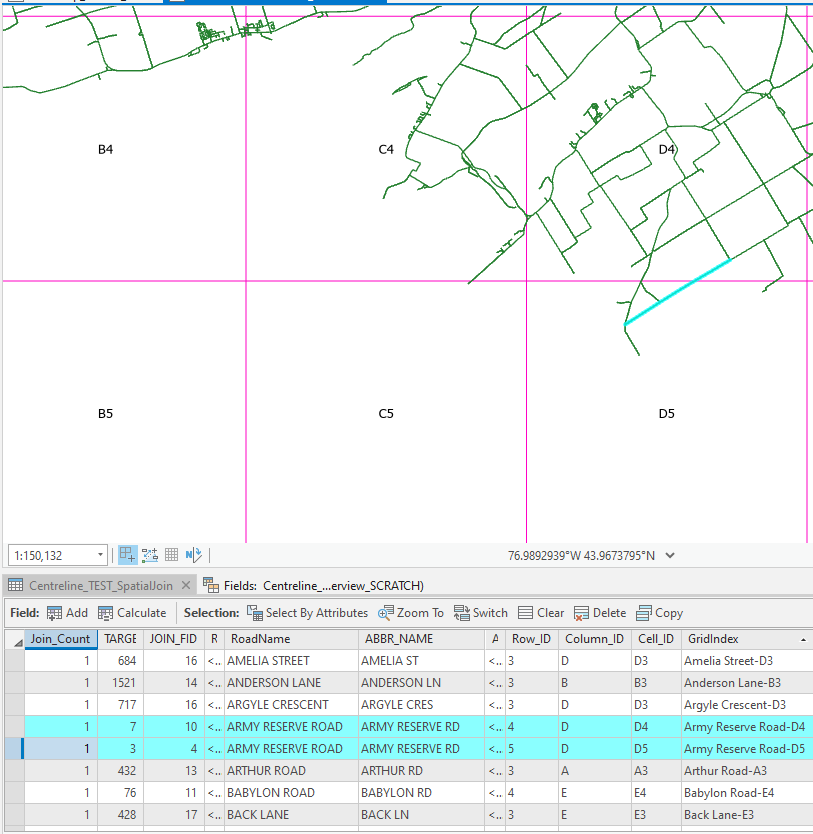
I am trying to create a street name index as described in this post from 2007 Creating street name indexes (esri.com). I would like to know if it is possible to create an arcade script to create the final table rather than manually manipulating the data in excel. For example, I would like my final GridIndex field attribute to populate on one line as Army Reserve Road-D4, D5
I think you would be best concatenating the D4, D5 in the spatial join initially, then doing any field calculations/arcade labelling.
Where the road intersects each grid in the spatial join, you can set the field mapping to 'Join' and set a delimiter (such as a comma).
A good overview of the process (albeit in ArcMap) Spatial Join’s hidden trick or how to transfer attribute values in a One to Many relationship | Esri Australia Technical Blog (wordpress.com)
Spatial Join (Analysis)—ArcGIS Pro | Documentation - look at the filed_mapping parameter.
I used the following Arcade expression to reorder my Cell_ID values:
var arrName = split($feature.Cell_ID, ",");
return Concatenate(sort(arrName),",")
I guess it's a bit complicated. My original road layer contains multiple segments for a single road (4 for Army Reserve Rd). 1 in D4, 1 that crosses D4 & D5, and 2 in D5.
The process in the 2007 article states that the duplicated roads/cellID's be removed using the dissolve tool AFtER the spatial join has been performed. in this case I would have 4 features: Army Reserve:D4, Army Reserve:D4, Army Reserve D5, Army Reserve D5. The dissolve would then remove the duplicates and leave me with Army Reserve:D4 & Army Reserve:D5
Your original suggestion was to concatenate the CellID's during the spatial join process which, in the 2007 article, is performed BEFORE the duplicated roads are removed. I would again then be left with 4 Army Reserve Rd's:
Army Reserve:D4
Army Reserve:D5
Army Reserve:D5,D4
I'm not sure about sorting in the join. You might be best just doing a field calculation:
def my_function(value):
    value_list = value.split(",")
    sorted_list = sorted(value_list)
    string = ''
    for value in sorted_list:
        if string != '':
            string += "," + value
        else:
            string += value
    return string
I thought you had repeated roads because of a one-to-many operation. With the join type being concatenated, you would just need a One-to-one join? or am I missing something about your roads data (I can only read between the lines so far)?
do you know if there is a way to chose the order of the attribute with the join? I would like the Cell_ID to populate in order (D1, D2, D3, D4, D5). some of my cells are populating with the larger number first (D5,D4), as seen below.
I may have to perform some manual manipulation anyways. I will be left with 4 Army Reserve Roads since there are 4 road segments for this road:
Cell_ID: D5
Cell_ID: D5,D4
Cell_ID: D4
Using the dissolve tool as suggested in the 2007 post will only remove 1 instance of Army Reserve Rd-D4. I suspect that I will be left with 3 features: Army Reserve Rd-D5, Army Reserve Rd-D5,D4, & Army Reserve Rd-D4
Aangemelde leden kunnen berichten plaatsen, updates volgen en meer. Nieuw hier? Registreer een gratis account.
Find useful guides, FAQs, and documents to help you navigate and make the most of Esri Community.