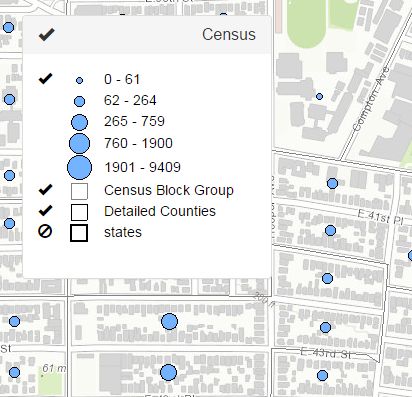
dijit/Tree<\/A>でもいいですし、普通のDOM要素だけでも構いません。お好きな方法を選んでください。<\/P><\/P>
以下はまさにこれを行うコードです。<\/P>
define([\n 'dojo\/_base\declare',\n 'dojo\/_base\Deferred',\n 'dojo\/_base\on',\n 'dojo\/_base\topic',\n 'dojo\/_base\query',\n 'dojo\/_base\dom',\n 'dojo\/_base\dom-attr',\n 'put-selector',\n 'dojo\/_base\dom-class',\n 'dojo\/_base\Evented',\n 'esri/lang',\n '.\/_layerservice',\n 'dojox/lang/functional/curry',\n 'dijit/_WidgetBase',\n 'dijit/_TemplatedMixin',\n 'dojo/text!.\/_templates/layertoc.tpl.html'\n], function(\n declare, Deferred, on, topic,\n query, dom, domAttr, put, domClass,\n Evented, esriLang,\n getLayers, curry,\n _WidgetBase, _TemplatedMixin,\n template\n) {\n var labelName = curry(function(a, b) {\n if (b.label && b.label.length > 1) {\n return b.label;\n } else if (a.layerName && a.layerName.length) {\n return a.layerName;\n } else {\n return 'Layer Item';\n }\n });\n var sub = esriLang.substitute;\n var layertitle = '<span class=\\"pull-right\\">${title}</span>';\n return declare([_WidgetBase, _TemplatedMixin, Evented], {\n templateString: template,\n postCreate: function() {\n var node = dom.byId('map_root');\n put(node, this.domNode);\n var map = this.get('map');\n var layerIds = this.get('layerIds');\n // レイヤーIDをマップして、凡例の一部として指定されたレイヤーを取得する。\n this.tocLayers = map.layerIds.map(function(x) {\n if (layerIds.indexOf(x) > -1) {\n return map.getLayer(x);\n } else {\n return false;\n }\n }).filter(function(a) { return a; });\n // それらのレイヤーをマップしてDOM要素コンテナを作成する。\n .& nbsp.& nbsp.& nbsp.this.tocLayers.map(function(x) { \ n & nbsp.& nbsp.& nbsp.& nbsp.var visible = x.visible ? 'glyphicon-ok' : 'glyphicon-ban-circle'; \ n & nbsp.& nbsp.& nbsp.& nbsp.var panel = put(this.tocInfo, 'div.panel.panel-default'); \ n & nbsp.& nbsp.& nbsp.& nbsp.var pheading = put(panel, 'div.panel-heading'); \ n & nbsp.& nbsp.& nbsp.& nbsp.var ptitle = put(pheading, 'h4.panel-title'); \ n & nbsp.& nbsp.& nbsp.& nbsp.put( \ n & nbsp.& nbsp.& nbsp.& nbsp.& nbsp.ptitle, \ n & nbsp.& nbsp.& nbsp.& nbsp.& nbsp.'span.glyphicon.' + visible + \ n & nbsp.& nbsp.& nbsp.& nbsp.& nbsp.'&layer-item[data-layer-id=' + x.id + ']') ; \ n & nbsp.& nbsp.& nbsp.& nbsp.var node = \ n & nbsp.& nbsp.& nbsp.& nbsp.put(ptitle, \ n & nbsp.& nbsp.& nbsp.& nbsp.'span', \ n & nbsp.& nbsp.& nbsp.& nbsp.{ innerHTML: sub(x, layertitle) } \ n & nbsp.& nbsp.& nbsp.& nb sp.); \ n & nb sp.;& nb sp;. _getDetails(x , node , panel ); \ n & nb sp.;}. bind(this)); \ n & nb sp.;// これはサービス全体のオンオフを処理します \ n & nb sp.;var layerHandle = on(this.tocInfo , '.layer-item:click' , function(e) { \ n & nb sp.;& nb sp;e.preventDefault(); \ n & nb sp.;& nb sp;e.stopPropagation(); \ n & nb sp.;& nb sp;.domClass.toggle(e.target , 'glyphicon-ok glyphicon-ban-circle'); \ n & nb sp.;& nb sp;.var id = domAttr.get(e.target , 'data-layer-id'); \ n & nb sp.;& nb sp;.var lyr = map.getLayer(id); \ n & nb sp.;& nb sp;.lyr.setVisibility(!lyr.visible); \ n & nb sp.;}); \ n & nb sp;// これは個々のレイヤーのオンオフを切り替えます \ n & nb sp;.var itemHandle = on(this.tocInfo , '.sublayer-item:click' , function(e) { \ n & nb sp.;& nb sp;e.preventDefault(); \ n & nb sp.;& nb sp;e.stopPropagation(); \ n & nb sp.;& nb sp;.domClass.toggle(e.target , 'glyphicon-ok glyphicon-ban-circle'); \ n & nb sp.;& nb sp;.var id = domAttr.get(e.target , 'data-layer-id'); \ n & nb sp.;& nb sp;.var subid = parseInt(domAttr.get(e.target , 'data-sublayer-id')); \ n & nb sp.;& nb sp;.var lyr = map.getLayer(id); \ n & nb sp.;& nb sp;.var lyrs = lyr.visibleLayers ; \ n & nb sp.;& nb sp;.var visibleLayers = []; \ n & nb sp;// この部分はクリックされた内容に基づいて表示レイヤーを調整します \ n & nb sp;if (lyrs.indexOf(subid) > -1) { \ n & nb sp;.visibleLayers = lyrs.filter(function(x) { return x !== subid ; }); \ n & nb sp;} else { \ n & nb sp;.visibleLayers = lyrs.concat([subid]); \ n & nb sp;} \ n & nb sp;.lyr.setVisibleLayers(visibleLayers); \ n & nb sp.}); \ n & nb sp;.this.own(layerHandle , itemHandle); \ n }, \ n // URLが提供されているか簡単にチェックします \ n _getDetails: function(layer , node , panel ) { \ n if (!layer.url) { return ; } \ n var pbody = put(panel , 'div.panel-body'); \ n this._getLegend(layer , pbody); \ n }, \ n // ここが主力です \ n _getLegend: function(layer , pbody ) { \ n var url = layer.url + '\/legend'; \ n var id = layer.id ; \ n // これは私が使っているesri/request用ラッパーモジュールです。ソースは // esri/request. ソースはこちら <\/SPAN>