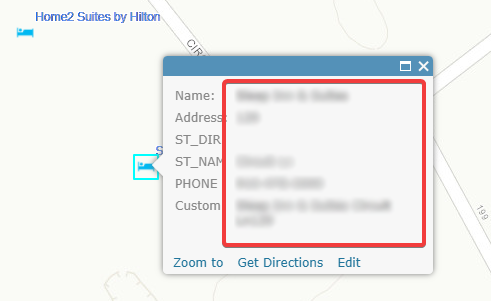
ArcGIS Onlineを使い始めたばかりなので、Arcadeも初めてです。ポップアップウィンドウに表示されるラベルをカスタマイズするために、AGOLの式ビルダーをどう使えばよいのか知りたいと思っています。ごく簡単な例ですが、現在はデータがデフォルトでどのように表示されているかを示しています。次のように表示できるようにしたいです。
施設名施設の住所施設の電話番号
属性名も表示したくありません。
ご意見をいただけると幸いです。よろしくお願いいたします。
Actually, to do this you don't need Arcade. This can be easily done by using the "custom attribute display" to show the data in the pop-up:
In teh Custom Attribute Display you just add the fields with the "+" button and format it as you please:
Thank you! I actually figured out how to show the fields I want using the custom expressions but this is good to know that I can do it this way instead.Do you know how I would not show the field names but just the content of each field?
The example above does just that. The field names (e.g. "{ST_NAME}") will be replaced by the value each feature has in that field.
Arcade is built to create more dynamic pop-ups, labeliing and symbology. A nice discussion can be found here: https://community.esri.com/community/gis/web-gis/arcgisonline/blog/2017/07/18/conditional-field-display-with-arcade-in-pop-ups
I have published several documents on using Arcade, but they are in Spanish. Since they are pretty visual I include an example here to give you an idea of what you can accomplish using Aracade: https://community.esri.com/docs/DOC-10368-crear-ventanas-emergentes-en-arcgis-online-con-imágenes-condicionales-usando-expresiones-de-arcade
Ahh, thank you! Very much appreciated!
サインインしたメンバーは投稿、更新のフォローなどができます。初めてですか?無料アカウントを登録してください。
Find useful guides, FAQs, and documents to help you navigate and make the most of Esri Community.