こんにちは。
ArcOnline Web Mapのポップアップ下部に表示されるオプションを無効にする方法を探しています。
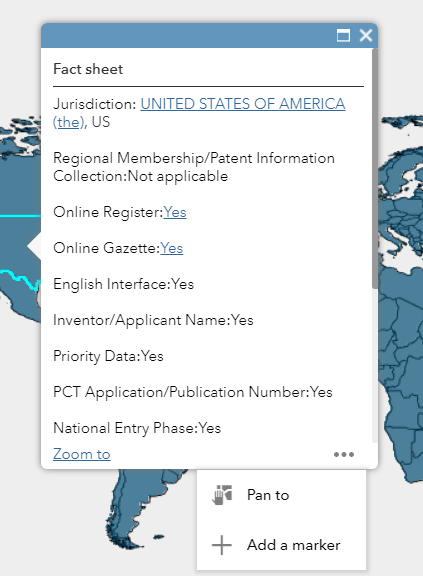
現在、次のオプション(Zoom to、Pan to、マーカーを追加)が表示されています。下のスクリーンショットをご覧ください。
これらのオプションをユーザーに表示しないようにしたいです。
ArcGIS WebApp Builderを使わずにこれが可能か、皆さんからのご意見をお待ちしています。
よろしくお願いします。
Vipin Saroha
Vipin,
Unfortunately there is no way to remove those using AGOL WAB apps. You would have to use WAB Developer and self host the app to remove those.
You can disable the ability to zoom and pan around with some of the configurable apps.
Check out Minimalist and Media Map for details. This can also be controlled with URL parameters: Use URL parameters to modify embedded maps—ArcGIS Online Help | ArcGIS
-Kelly
Hello Robert & all, I am also interested in the above question. I am using WAB developer. Which file am I suppose to modify e.g. config.json... In addition to the above question, is there a way to get rid of being able to highlight features on the map using pop ups. I have points on the map with visible scale ranges, after a certain 'zoom in' the points disappear but the highlights remain and with continuous 'zooming in' one can actually see the street or household which is something I do not want customers to be able to do.
Thanks,
Simon.
Simon,
So you want to remove the zoom to and highlight all all layers and features in your app? That sounds pretty drastic.
サインインしたメンバーは投稿、更新のフォローなどができます。初めてですか?無料アカウントを登録してください。
Find useful guides, FAQs, and documents to help you navigate and make the most of Esri Community.