Hello.
I'm developing sceneView application and i can't see basemaps when i debugging my project on localhost (pressing F5). Because CORS policy blocking my localhost. But i see no error when i published my project.
I tried to add
esriConfig.request.corsDetection = false;
But doesn't worked.
AccessTo image at "https://myproxyserver/resource-proxy/proxy.ashx?http://myserver.com/myservice/3/5/1.jpg" from origin "https://localhost:44300" has been blocked by CORS policy: No "Access-Contol-Allow-Origin" header is present on the requested ressource. Origin "https://localhost:44300" is therefore not allowed access
Thanks inadvance.
Tuba,
You really need to get out of the habit of using localhost. You should use your machine name instead and then make sure you have added your machine name to the proxy.config serverUrls.
thanks for the answer.
ye you're right.
I tried to add below codes into my javascript file
urlUtils.addProxyRule ({ urlPrefix: "https://mymachinename", proxyUrl: "https:proxrserver/proxy.ashx"});
and into proxy.config file
<serverUrl url="https://mymachinename" matchAll="true" />
and i changed to Project URL from VB.NET Project Properties with "https://mymachinename"
doesn't worked. same error.
You have to add the port number to the url or else it is seen as a different server. https://mymachinename:44300 needs to be added to the proxy rule and proxy.config
Hi Robert,
i've defined 44300 port as https from IIS manager. mymachinename is my local IIS name not different server.
JS file
urlUtils.addProxyRule ({ urlPrefix: "https://mymachinename:44300", proxyUrl: "https:proxrserver/proxy.ashx"});
proxy.config file
<serverUrl url="https://mymachinename:44300" matchAll="true" />
still getting same error. I just seeing empty globe in sceneview.
Robert,
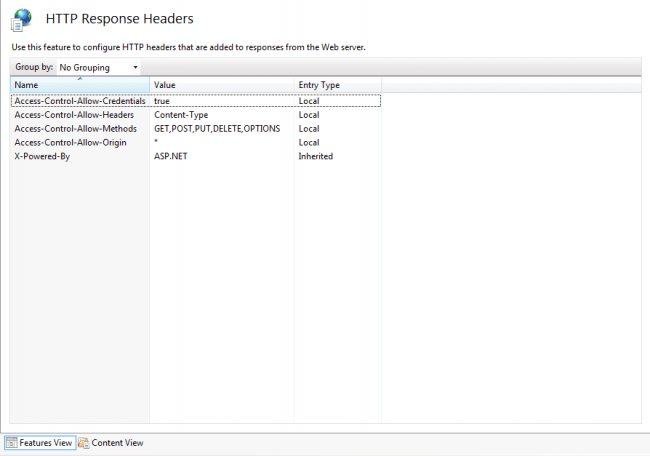
I found the problem. My proxy file is not on my machine. I 've added Some variables to my proxy machine's http response headers.
My fault is that i searching error on my machine since 2 days. Actually error was in proxy machine's proxy web application configuration.
My problem solved and working now. I'm happy.
Thank you again for all help.
Here is the picture where i added variables
サインインしたメンバーは投稿、更新のフォローなどができます。初めてですか?無料アカウントを登録してください。
Find useful guides, FAQs, and documents to help you navigate and make the most of Esri Community.