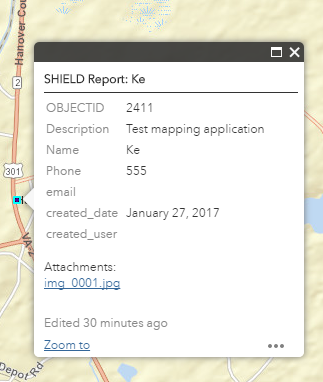
Web AppBuilder のマッピングアプリケーションでポイントを直接クリックすると、元の Web マップで設定したとおりの正しいポップアップが表示されます。
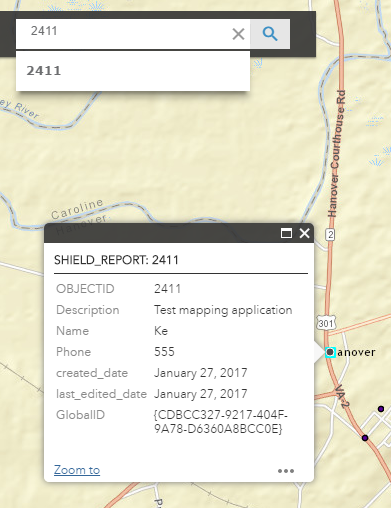
しかし、Web AppBuilder のマッピングアプリケーションでフィーチャ検索を使うと、ポップアップに誤ったフィールドが表示されます。
なぜこのような違いが生じるのか、わかる方はいらっしゃいますか?
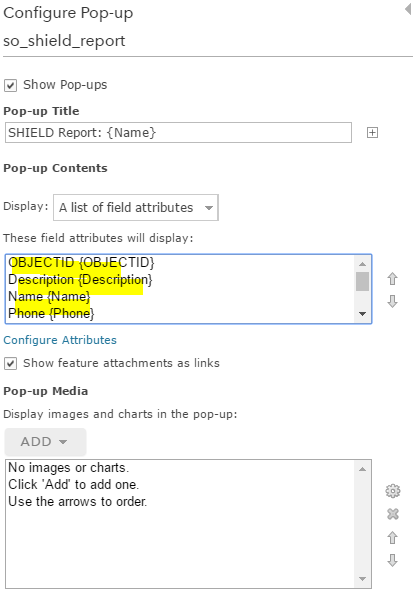
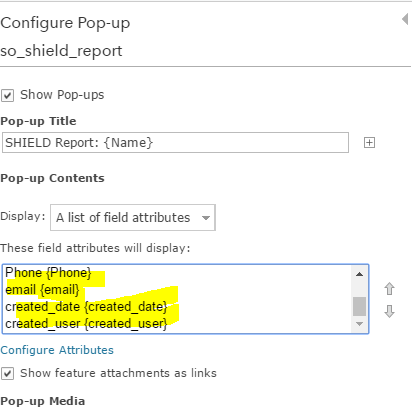
元の Web マップでの設定はこちらです(フィールド属性のボックスを拡大できないため、スクリーンショットを2枚に分けています)。
Recreating from scratch fixed it. At some point during the process I added new fields to the feature service, so that may have messed it up.
It looks like you may have found a bug. In my experimentation, if I configure the popup display first, then configure "Find locations by layer" on the web map Settings tab, this seems to impact my popup configuration and it looks different. If I reverse the order and configure Find Locations first, then configure the popup display, it works fine. So in your case, just reconfigure the popup display and see if that fixes the problem. If not, you may have a different issue. In any case, I'll write up the issue I describe here and we'll get it fixed for our next update.
thanks,
Mike
I should have been more specific. I created a web map, and configured the popup settings. Then I created a web map application using Web AppBuilder. So the feature search I was talking about was in Web AppBuilder. I did not know about the Find Locations by Layer checkbox in the Settings tab of the map. I just tried turning that on, but OBJECTID is not an option.
The purpose of the search feature is so I can insert the OBJECTID into the url (&find=3611) and send people directly to a certain feature in the map.
I might just try recreating everything from scratch and see if that works.
Thanks for your help!
サインインしたメンバーは投稿、更新のフォローなどができます。初めてですか?無料アカウントを登録してください。
Find useful guides, FAQs, and documents to help you navigate and make the most of Esri Community.