I'm trying to add Legend into LayerList widget, using the same method as this example. When I test this with a multi-layer webmap, there are some unwanted "legend" text shown in the LayerList. See the screenshot below.
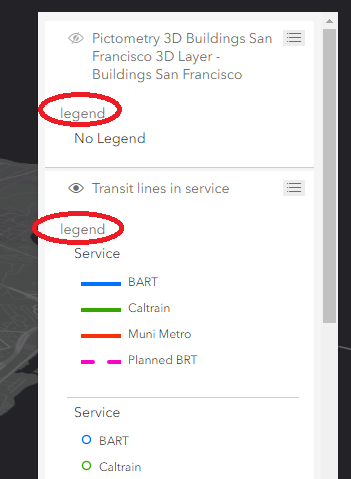
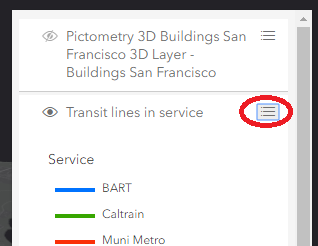
These unwanted "legend" texts only exist in v4.8 API. v4.7 is working perfectly as expected. Also, if I clicked the toggle button to hide and show legend panel, those texts will be gone. This behavior is seen in both latest Chrome and MS Edge browsers.
The source code is very simple:
<SPAN class="comment token">// Add a legend instance to the panel of a</SPAN>
<SPAN class="comment token">// ListItem in a LayerList instance</SPAN>
<SPAN class="keyword token">const</SPAN> layerList <SPAN class="operator token">=</SPAN> <SPAN class="keyword token">new</SPAN> <SPAN class="token class-name">LayerList</SPAN><SPAN class="punctuation token">(</SPAN><SPAN class="punctuation token">{</SPAN>
view<SPAN class="punctuation token">:</SPAN> view<SPAN class="punctuation token">,</SPAN>
listItemCreatedFunction<SPAN class="punctuation token">:</SPAN> <SPAN class="keyword token">function</SPAN> <SPAN class="punctuation token">(</SPAN>event<SPAN class="punctuation token">)</SPAN> <SPAN class="punctuation token">{</SPAN>
<SPAN class="keyword token">const</SPAN> item <SPAN class="operator token">=</SPAN> event<SPAN class="punctuation token">.</SPAN>item<SPAN class="punctuation token">;</SPAN>
item<SPAN class="punctuation token">.</SPAN>panel <SPAN class="operator token">=</SPAN> <SPAN class="punctuation token">{</SPAN>
content<SPAN class="punctuation token">:</SPAN> <SPAN class="string token">"legend"</SPAN><SPAN class="punctuation token">,</SPAN>
open<SPAN class="punctuation token">:</SPAN> <SPAN class="keyword token">true</SPAN>
<SPAN class="punctuation token">}</SPAN><SPAN class="punctuation token">;</SPAN>
<SPAN class="punctuation token">}</SPAN>
<SPAN class="punctuation token">}</SPAN><SPAN class="punctuation token">)</SPAN><SPAN class="punctuation token">;</SPAN><SPAN class="line-numbers-rows"><SPAN></SPAN><SPAN></SPAN><SPAN></SPAN><SPAN></SPAN><SPAN></SPAN><SPAN></SPAN><SPAN></SPAN><SPAN></SPAN><SPAN></SPAN><SPAN></SPAN><SPAN></SPAN><SPAN></SPAN></SPAN>Below is a running example:
https://codepen.io/anon/pen/RJzzep


