皆さん、こんにちは。
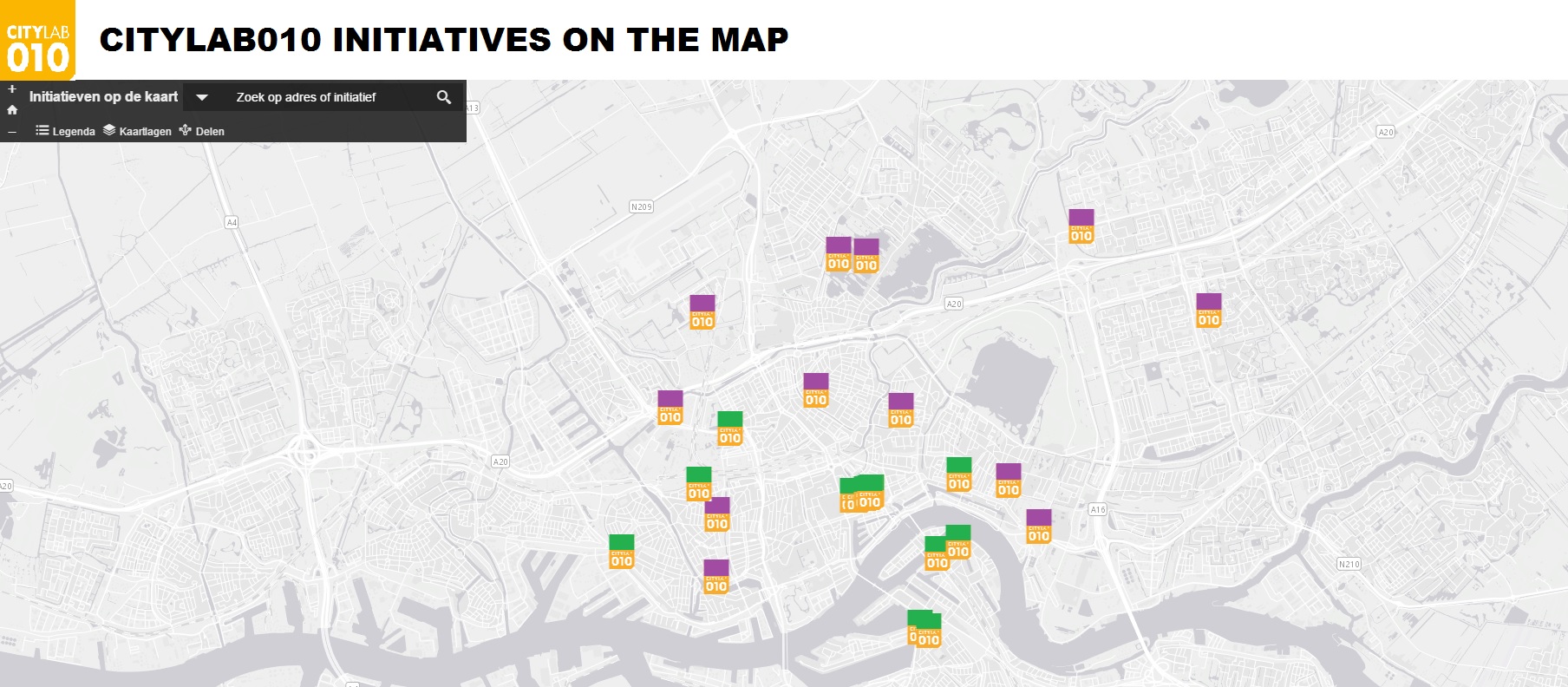
基本的なMapviewerにヘッダー(組織のロゴ画像と説明)を追加したいと考えています。以下にモックアップを載せます。
a)これは可能でしょうか?
b)可能な場合、どのようにすればよいでしょうか?JavaScriptではなくHTMLを変更する必要があると思うのですが、合っていますか?何か手がかりをいただけると大変助かります!
Your best bet is to download the source code for that application from the github repository, host it on your own web server and add a header using html and css. The source code for the application you are using can be found here:
GitHub - Esri/Viewer: Viewer is a configurable application template that enables you to display an ArcGIS web map using …
Another option that might work depending on what you need in the header is to add custom css. I'll say up front that this approach will require you to fiddle around with the css to get it right and is fairly limited in what it can do but if all you need is text and an image in the header then it may work. To use this approach you'll need to modify the path to the image (see line 2) and the text to display (line 6) in the css below and then paste all the css into the Custom css text box that you can find at the bottom of the Theme tab when you configure the basic viewer then save the app and test.
<SPAN class="selector token">#panelTitle</SPAN> <SPAN class="punctuation token">{</SPAN> <SPAN class="property token">background-image</SPAN><SPAN class="punctuation token">:</SPAN> <SPAN class="url token"><SPAN>url(</SPAN><A class="jive-link-external-small" href="https://community.esri.com/external-link.jspa?url=https%3A%2F%2Fwww.google.com%2Flogos%2Fdoodles%2F2017%2Foskar-fischingers-117th-birthday-5635181101711360.2-s.png" target="_blank">https://www.google.com/logos/doodles/2017/oskar-fischingers-117th-birthday-5635181101711360.2-s.png</A><SPAN>)</SPAN></SPAN> <SPAN class="important token">!important</SPAN><SPAN class="punctuation token">;</SPAN> <SPAN class="property token">background-repeat</SPAN><SPAN class="punctuation token">:</SPAN> no-repeat <SPAN class="important token">!important</SPAN><SPAN class="punctuation token">;</SPAN> <SPAN class="punctuation token">}</SPAN> <SPAN class="selector token">div#panelTitle:before</SPAN> <SPAN class="punctuation token">{</SPAN> <SPAN class="property token">content</SPAN><SPAN class="punctuation token">:</SPAN> <SPAN class="string token">"CityLab010 Initiatives on the map"</SPAN><SPAN class="punctuation token">;</SPAN> <SPAN class="property token">overflow</SPAN><SPAN class="punctuation token">:</SPAN> hidden<SPAN class="punctuation token">;</SPAN> <SPAN class="property token">font-size</SPAN><SPAN class="punctuation token">:</SPAN> 20px<SPAN class="punctuation token">;</SPAN> <SPAN class="property token">padding-left</SPAN><SPAN class="punctuation token">:</SPAN> 130px<SPAN class="punctuation token">;</SPAN> <SPAN class="punctuation token">}</SPAN> <SPAN class="selector token">#panelTop</SPAN> <SPAN class="punctuation token">{</SPAN> <SPAN class="property token">height</SPAN><SPAN class="punctuation token">:</SPAN> 125px<SPAN class="punctuation token">;</SPAN> <SPAN class="property token">width</SPAN><SPAN class="punctuation token">:</SPAN> 100%<SPAN class="punctuation token">;</SPAN> <SPAN class="punctuation token">}</SPAN> <SPAN class="selector token">#panelContent</SPAN> <SPAN class="punctuation token">{</SPAN> <SPAN class="property token">top</SPAN><SPAN class="punctuation token">:</SPAN> 125px<SPAN class="punctuation token">;</SPAN> <SPAN class="punctuation token">}</SPAN> <SPAN class="selector token">.esriSimpleSliderTL</SPAN> <SPAN class="punctuation token">{</SPAN> <SPAN class="property token">top</SPAN><SPAN class="punctuation token">:</SPAN> 45px<SPAN class="punctuation token">;</SPAN> <SPAN class="property token">z-index</SPAN><SPAN class="punctuation token">:</SPAN> 99 <SPAN class="important token">!important</SPAN><SPAN class="punctuation token">;</SPAN> <SPAN class="property token">background</SPAN><SPAN class="punctuation token">:</SPAN> transparent <SPAN class="important token">!important</SPAN><SPAN class="punctuation token">;</SPAN> <SPAN class="punctuation token">}</SPAN> <SPAN class="selector token">#panelTop</SPAN> <SPAN class="punctuation token">{</SPAN> <SPAN class="property token">left</SPAN><SPAN class="punctuation token">:</SPAN> 0<SPAN class="punctuation token">;</SPAN> <SPAN class="property token">white-space</SPAN><SPAN class="punctuation token">:</SPAN> nowrap<SPAN class="punctuation token">;</SPAN> <SPAN class="punctuation token">}</SPAN> <SPAN class="selector token">#panelTools</SPAN> <SPAN class="punctuation token">{</SPAN> <SPAN class="property token">position</SPAN><SPAN class="punctuation token">:</SPAN> absolute<SPAN class="punctuation token">;</SPAN> <SPAN class="property token">bottom</SPAN><SPAN class="punctuation token">:</SPAN> 4px<SPAN class="punctuation token">;</SPAN> <SPAN class="property token">left</SPAN><SPAN class="punctuation token">:</SPAN> 30px<SPAN class="punctuation token">;</SPAN> <SPAN class="property token">background</SPAN><SPAN class="punctuation token">:</SPAN> transparent <SPAN class="important token">!important</SPAN><SPAN class="punctuation token">;</SPAN> <SPAN class="punctuation token">}</SPAN> <SPAN class="selector token">#panelSearch</SPAN> <SPAN class="punctuation token">{</SPAN> <SPAN class="property token">position</SPAN><SPAN class="punctuation token">:</SPAN> absolute<SPAN class="punctuation token">;</SPAN> <SPAN class="property token">right</SPAN><SPAN class="punctuation token">:</SPAN> 5px<SPAN class="punctuation token">;</SPAN> <SPAN class="property token">top</SPAN><SPAN class="punctuation token">:</SPAN> 45px<SPAN class="punctuation token">;</SPAN> <SPAN class="punctuation token">}</SPAN> <SPAN class="selector token">#title</SPAN> <SPAN class="punctuation token">{</SPAN> <SPAN class="property token">float</SPAN><SPAN class="punctuation token">:</SPAN> left<SPAN class="punctuation token">;</SPAN> <SPAN class="punctuation token">}</SPAN> <SPAN class="selector token">#title.nosubtitle</SPAN> <SPAN class="punctuation token">{</SPAN> <SPAN class="property token">height</SPAN><SPAN class="punctuation token">:</SPAN> 120px<SPAN class="punctuation token">;</SPAN> <SPAN class="punctuation token">}</SPAN> <SPAN class="selector token">#panelText</SPAN> <SPAN class="punctuation token">{</SPAN> <SPAN class="property token">position</SPAN><SPAN class="punctuation token">:</SPAN> absolute<SPAN class="punctuation token">;</SPAN> <SPAN class="property token">left</SPAN><SPAN class="punctuation token">:</SPAN> 30px<SPAN class="punctuation token">;</SPAN> <SPAN class="property token">top</SPAN><SPAN class="punctuation token">:</SPAN> 40px<SPAN class="punctuation token">;</SPAN> <SPAN class="punctuation token">}</SPAN> <SPAN class="selector token">#panelTitle</SPAN> <SPAN class="punctuation token">{</SPAN> <SPAN class="property token">background</SPAN><SPAN class="punctuation token">:</SPAN> #fff<SPAN class="punctuation token">;</SPAN> <SPAN class="property token">width</SPAN><SPAN class="punctuation token">:</SPAN> 100% <SPAN class="important token">!important</SPAN><SPAN class="punctuation token">;</SPAN> <SPAN class="property token">color</SPAN><SPAN class="punctuation token">:</SPAN> #333<SPAN class="punctuation token">;</SPAN> <SPAN class="punctuation token">}</SPAN><SPAN class="line-numbers-rows"><SPAN></SPAN><SPAN></SPAN><SPAN></SPAN><SPAN></SPAN><SPAN></SPAN><SPAN></SPAN><SPAN></SPAN><SPAN></SPAN><SPAN></SPAN><SPAN></SPAN><SPAN></SPAN><SPAN></SPAN><SPAN></SPAN><SPAN></SPAN><SPAN></SPAN><SPAN></SPAN><SPAN></SPAN><SPAN></SPAN><SPAN></SPAN><SPAN></SPAN><SPAN></SPAN><SPAN></SPAN><SPAN></SPAN><SPAN></SPAN><SPAN></SPAN><SPAN></SPAN><SPAN></SPAN><SPAN></SPAN><SPAN></SPAN><SPAN></SPAN><SPAN></SPAN><SPAN></SPAN><SPAN></SPAN><SPAN></SPAN><SPAN></SPAN><SPAN></SPAN><SPAN></SPAN><SPAN></SPAN><SPAN></SPAN><SPAN></SPAN><SPAN></SPAN><SPAN></SPAN><SPAN></SPAN><SPAN></SPAN><SPAN></SPAN><SPAN></SPAN><SPAN></SPAN><SPAN></SPAN><SPAN></SPAN><SPAN></SPAN><SPAN></SPAN><SPAN></SPAN><SPAN></SPAN></SPAN>
Here's a link to a test app where I applied the custom css above to insert a header with text and an image.
http://www.arcgis.com/apps/View/index.html?appid=2bcdc686ee50413c97db9619373bd7c7
Note: I haven't tested this across browsers so you may run into some browser specific issues.
Hi Kelly, many thanks!!!
Additional query: is one of the limitations of option 2 that the banner size is very limited? Say if I want to double it in size in the dummy you've used?
(I've fiddled with the px's of #Panel10 (row11) )
PS re: option1, my company does not allow hosting external sources, so need to find another solution first)
Sure you can make the header bigger you'll just need to modify the numbers. Here's an example:
And here's the css I used - I added a few comments on where you can make modifications to change the size and location of various elements.
<SPAN class="comment token">/*background-size 165 is the width of the image and 100% says to take up the full height*/</SPAN> <SPAN class="selector token">#panelTitle</SPAN><SPAN class="punctuation token">{</SPAN> <SPAN class="property token">background-image</SPAN><SPAN class="punctuation token">:</SPAN> <SPAN class="url token"><SPAN>url(</SPAN><A class="jive-link-external-small" href="https://community.esri.com/external-link.jspa?url=https%3A%2F%2Fwww.google.com%2Flogos%2Fdoodles%2F2017%2Foskar-fischingers-117th-birthday-5635181101711360.2-s.png" target="_blank">https://www.google.com/logos/doodles/2017/oskar-fischingers-117th-birthday-5635181101711360.2-s.png</A><SPAN>)</SPAN></SPAN> <SPAN class="important token">!important</SPAN><SPAN class="punctuation token">;</SPAN> <SPAN class="property token">background-repeat</SPAN><SPAN class="punctuation token">:</SPAN> no-repeat <SPAN class="important token">!important</SPAN><SPAN class="punctuation token">;</SPAN> <SPAN class="property token">background-size</SPAN><SPAN class="punctuation token">:</SPAN> 165px 100% <SPAN class="important token">!important</SPAN><SPAN class="punctuation token">;</SPAN> <SPAN class="punctuation token">}</SPAN> <SPAN class="comment token">/*This is the text to display on the header. If you make the image wider you'll want to increase the value for padding-left*/</SPAN> <SPAN class="selector token">div#panelTitle:before</SPAN> <SPAN class="punctuation token">{</SPAN> <SPAN class="property token">content</SPAN><SPAN class="punctuation token">:</SPAN> <SPAN class="string token">"CityLab010 Initiatives on the map"</SPAN><SPAN class="punctuation token">;</SPAN> <SPAN class="property token">overflow</SPAN><SPAN class="punctuation token">:</SPAN>hidden<SPAN class="punctuation token">;</SPAN> <SPAN class="property token">font-size</SPAN><SPAN class="punctuation token">:</SPAN> 20px<SPAN class="punctuation token">;</SPAN> <SPAN class="property token">padding-left</SPAN><SPAN class="punctuation token">:</SPAN> 170px<SPAN class="punctuation token">;</SPAN> <SPAN class="punctuation token">}</SPAN> <SPAN class="comment token">/*Here 165 is the total height of the complete header area include the tools, title and search*/</SPAN> <SPAN class="selector token">#panelTop</SPAN><SPAN class="punctuation token">{</SPAN> <SPAN class="property token">height</SPAN><SPAN class="punctuation token">:</SPAN>165px<SPAN class="punctuation token">;</SPAN> <SPAN class="property token">width</SPAN><SPAN class="punctuation token">:</SPAN>100%<SPAN class="punctuation token">;</SPAN> <SPAN class="punctuation token">}</SPAN> <SPAN class="comment token">/*When you open a tool the panel for the tool's info appears below the toolbar. If you make the panelTop height larger make sure you set the top value to match*/</SPAN> <SPAN class="selector token">#panelContent</SPAN><SPAN class="punctuation token">{</SPAN> <SPAN class="property token">top</SPAN><SPAN class="punctuation token">:</SPAN>165px<SPAN class="punctuation token">;</SPAN> <SPAN class="punctuation token">}</SPAN> <SPAN class="comment token">/*The top value sets the position in the header of the zoom controls.*/</SPAN> <SPAN class="selector token">.esriSimpleSliderTL</SPAN><SPAN class="punctuation token">{</SPAN> <SPAN class="property token">top</SPAN><SPAN class="punctuation token">:</SPAN>85px<SPAN class="punctuation token">;</SPAN> <SPAN class="property token">z-index</SPAN><SPAN class="punctuation token">:</SPAN>99 <SPAN class="important token">!important</SPAN><SPAN class="punctuation token">;</SPAN> <SPAN class="property token">background</SPAN><SPAN class="punctuation token">:</SPAN>transparent <SPAN class="important token">!important</SPAN><SPAN class="punctuation token">;</SPAN> <SPAN class="punctuation token">}</SPAN> <SPAN class="selector token">#panelTop</SPAN><SPAN class="punctuation token">{</SPAN> <SPAN class="property token">left</SPAN><SPAN class="punctuation token">:</SPAN>0<SPAN class="punctuation token">;</SPAN> <SPAN class="property token">white-space</SPAN><SPAN class="punctuation token">:</SPAN>nowrap<SPAN class="punctuation token">;</SPAN> <SPAN class="punctuation token">}</SPAN> <SPAN class="comment token">/*Set the toolbar to be 4 pixels up from the bottom of the header area*/</SPAN> <SPAN class="selector token">#panelTools</SPAN><SPAN class="punctuation token">{</SPAN> <SPAN class="property token">position</SPAN><SPAN class="punctuation token">:</SPAN>absolute<SPAN class="punctuation token">;</SPAN> <SPAN class="property token">bottom</SPAN><SPAN class="punctuation token">:</SPAN>4px<SPAN class="punctuation token">;</SPAN> <SPAN class="property token">left</SPAN><SPAN class="punctuation token">:</SPAN>30px<SPAN class="punctuation token">;</SPAN> <SPAN class="property token">background</SPAN><SPAN class="punctuation token">:</SPAN>transparent <SPAN class="important token">!important</SPAN><SPAN class="punctuation token">;</SPAN> <SPAN class="punctuation token">}</SPAN> <SPAN class="comment token">/*Set the search to be 5 pixels up from the bottom of the header area*/</SPAN> <SPAN class="selector token">#panelSearch</SPAN><SPAN class="punctuation token">{</SPAN> <SPAN class="property token">position</SPAN><SPAN class="punctuation token">:</SPAN>absolute<SPAN class="punctuation token">;</SPAN> <SPAN class="property token">right</SPAN><SPAN class="punctuation token">:</SPAN>5px<SPAN class="punctuation token">;</SPAN> <SPAN class="property token">bottom</SPAN><SPAN class="punctuation token">:</SPAN>5px<SPAN class="punctuation token">;</SPAN> <SPAN class="punctuation token">}</SPAN> <SPAN class="selector token">#title</SPAN><SPAN class="punctuation token">{</SPAN> <SPAN class="property token">float</SPAN><SPAN class="punctuation token">:</SPAN>left<SPAN class="punctuation token">;</SPAN> <SPAN class="punctuation token">}</SPAN> <SPAN class="comment token">/* Set the title (Atafu coral inslets in example) to be 25 pixels from the bottom of the header*/</SPAN> <SPAN class="selector token">#panelText</SPAN><SPAN class="punctuation token">{</SPAN> <SPAN class="property token">position</SPAN><SPAN class="punctuation token">:</SPAN>absolute<SPAN class="punctuation token">;</SPAN> <SPAN class="property token">left</SPAN><SPAN class="punctuation token">:</SPAN>30px<SPAN class="punctuation token">;</SPAN> <SPAN class="property token">bottom</SPAN><SPAN class="punctuation token">:</SPAN>25px<SPAN class="punctuation token">;</SPAN> <SPAN class="punctuation token">}</SPAN> <SPAN class="selector token">#panelTitle</SPAN><SPAN class="punctuation token">{</SPAN> <SPAN class="property token">background</SPAN><SPAN class="punctuation token">:</SPAN>#fff<SPAN class="punctuation token">;</SPAN> <SPAN class="property token">width</SPAN><SPAN class="punctuation token">:</SPAN>100% <SPAN class="important token">!important</SPAN><SPAN class="punctuation token">;</SPAN> <SPAN class="property token">color</SPAN><SPAN class="punctuation token">:</SPAN>#333<SPAN class="punctuation token">;</SPAN> <SPAN class="property token">height</SPAN><SPAN class="punctuation token">:</SPAN>85px<SPAN class="punctuation token">;</SPAN> <SPAN class="property token">line-height</SPAN><SPAN class="punctuation token">:</SPAN>85px<SPAN class="punctuation token">;</SPAN> <SPAN class="punctuation token">}</SPAN> <SPAN class="line-numbers-rows"><SPAN></SPAN><SPAN></SPAN><SPAN></SPAN><SPAN></SPAN><SPAN></SPAN><SPAN></SPAN><SPAN></SPAN><SPAN></SPAN><SPAN></SPAN><SPAN></SPAN><SPAN></SPAN><SPAN></SPAN><SPAN></SPAN><SPAN></SPAN><SPAN></SPAN><SPAN></SPAN><SPAN></SPAN><SPAN></SPAN><SPAN></SPAN><SPAN></SPAN><SPAN></SPAN><SPAN></SPAN><SPAN></SPAN><SPAN></SPAN><SPAN></SPAN><SPAN></SPAN><SPAN></SPAN><SPAN></SPAN><SPAN></SPAN><SPAN></SPAN><SPAN></SPAN><SPAN></SPAN><SPAN></SPAN><SPAN></SPAN><SPAN></SPAN><SPAN></SPAN><SPAN></SPAN><SPAN></SPAN><SPAN></SPAN><SPAN></SPAN><SPAN></SPAN><SPAN></SPAN><SPAN></SPAN><SPAN></SPAN><SPAN></SPAN><SPAN></SPAN><SPAN></SPAN><SPAN></SPAN><SPAN></SPAN><SPAN></SPAN><SPAN></SPAN><SPAN></SPAN><SPAN></SPAN><SPAN></SPAN><SPAN></SPAN><SPAN></SPAN><SPAN></SPAN><SPAN></SPAN><SPAN></SPAN><SPAN></SPAN><SPAN></SPAN><SPAN></SPAN><SPAN></SPAN><SPAN></SPAN></SPAN>
Many many Thanks Kelly!!! This works for me! Thank you so much for taking time with that explainer for dummies like me
Hi Kelly,
A follow-up question on your previous guidance: I've been fiddeling with the image (decided on a different design), which meant having an image as the entire banner.
It seems that this is better done in the source code than in Custom CSS?
For example in HTML I could get the image to this size and quality:
Here I adjusted the following:
#panelTitle { background: #fff; width: 100% !important; color: #333; height: 200px; line-height: 200px;
Plus:
#panelTitle { background-image: url(http://rotterdam.maps.arcgis.com/sharing/rest/content/items/35c4d63247264ff7974a904d35c9ca92/data) !important;background-repeat: no-repeat !important; background-size: 1050px 100% !important;
However when adding these values to your CSS sheet, the image becomes vague/warped.
Is this one of the limitations of working with Custom CSS, i.e. should rather work this out in the source code? (as you mentioned at the start of your first answer?)
サインインしたメンバーは投稿、更新のフォローなどができます。初めてですか?無料アカウントを登録してください。
Find useful guides, FAQs, and documents to help you navigate and make the most of Esri Community.