Dear All,
i'm using the code present in the ArcGIS Runtime SDK for iOS (Quartz Beta) to connect to the portal:
var portal:AGSPortal!
...
self.portal = AGSPortal(URL: NSURL(string: "http://www.arcgis.com")!, loginRequired: false)
self.portal.credential = AGSCredential(user: "username", password: "password")
self.portal.loadWithCompletion() {[weak self] (error) in
if error == nil {
// check the portal item loaded and print the modified date
if self?.portal.loadStatus == AGSLoadStatus.Loaded {
let user = self?.portal.user
print(user?.fullName)
}
}
}
if i inserts wrong credential, the system shows ever a default popup to insert the credential (see attachment):
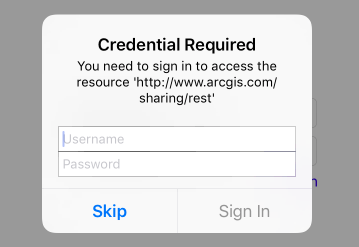
Is possible to manage the login error with a custom code?
In the previous SDK was present a portal delegate "didFailToLoadWithError" to manage the error.
In the code present in the example about Quartz SDK, seems that the code "if error..." is not execute because the systems shows the popup attached.
Is possible to hide the default popup how the previous SDK and manage all errors by code?
Thanks in advance!
Tony


