In a separate post a while back, I was hoping to solicit some guidance on how to use the geoprocessing widget. After some distractions, I'm now returning to this effort.
I have built a few functioning Python tool(boxe)s with ArcGIS Pro now. I understand how to interact with the map layout in Pro to programmatically create PDF of my map and modify the map for conversion to PDF. I am not completely sure how that related to what ESRI calls a "staged layout template." But that has to be similar to what I'm doing. First, I want to replace my aprx reference to a project file with one to a web map.
Memorable ESRI Quote #1
For advanced printing scenarios, you ... can use the ConvertWebMapToMapDocument (for ArcMap) or ConvertWebMapToArcGISProject (for ArcGIS Pro) functions in the Python arcpy module.
So I am trying to leverage
arcpy<SPAN class="punctuation token">.</SPAN>mp<SPAN class="punctuation token">.</SPAN>ConvertWebMapToArcGISProject<SPAN class="punctuation token">(</SPAN><SPAN class="operator token"><</SPAN>webmap_as_json<SPAN class="operator token">></SPAN><SPAN class="punctuation token">,</SPAN> <SPAN class="operator token"><</SPAN>some_wonderful_pdf<SPAN class="operator token">></SPAN><SPAN class="punctuation token">)</SPAN><SPAN class="line-numbers-rows"><SPAN></SPAN></SPAN>
There is no simple way of generating some sample JSON describing your web map that you could use to test your script. So after publishing a script as a geoprocessing service that takes <webmap_as_json> as an argument, how do I pass the json ?
I can hook Web AppBuilder's Geoprocessing widget into my geoprocessing services but it's needing that JSON to feed on.
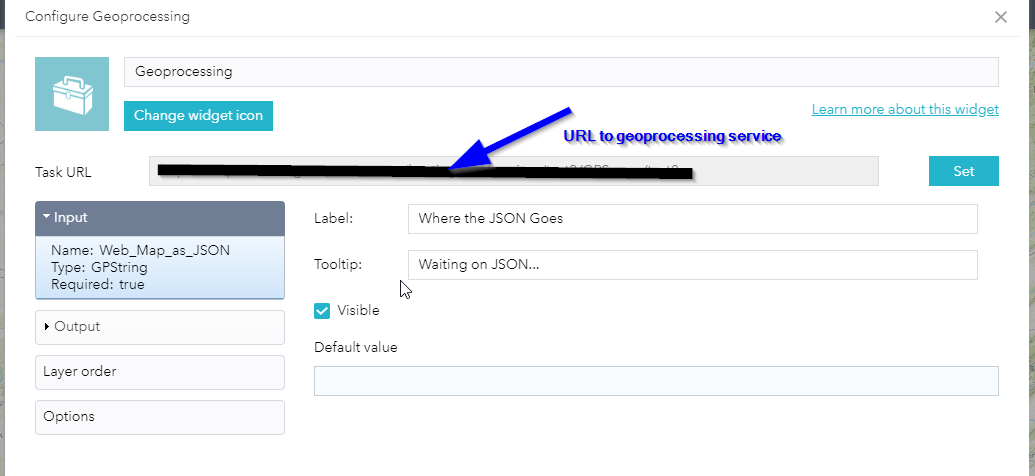
So I'm inclined to think I'm headed down the wrong path.
Questions:
- Which widget, if any, can call geoprocessing services and pass along the JSON?
- Is a "staged layout template" just a PAGX file sitting in a folder registered with my hosting server?
