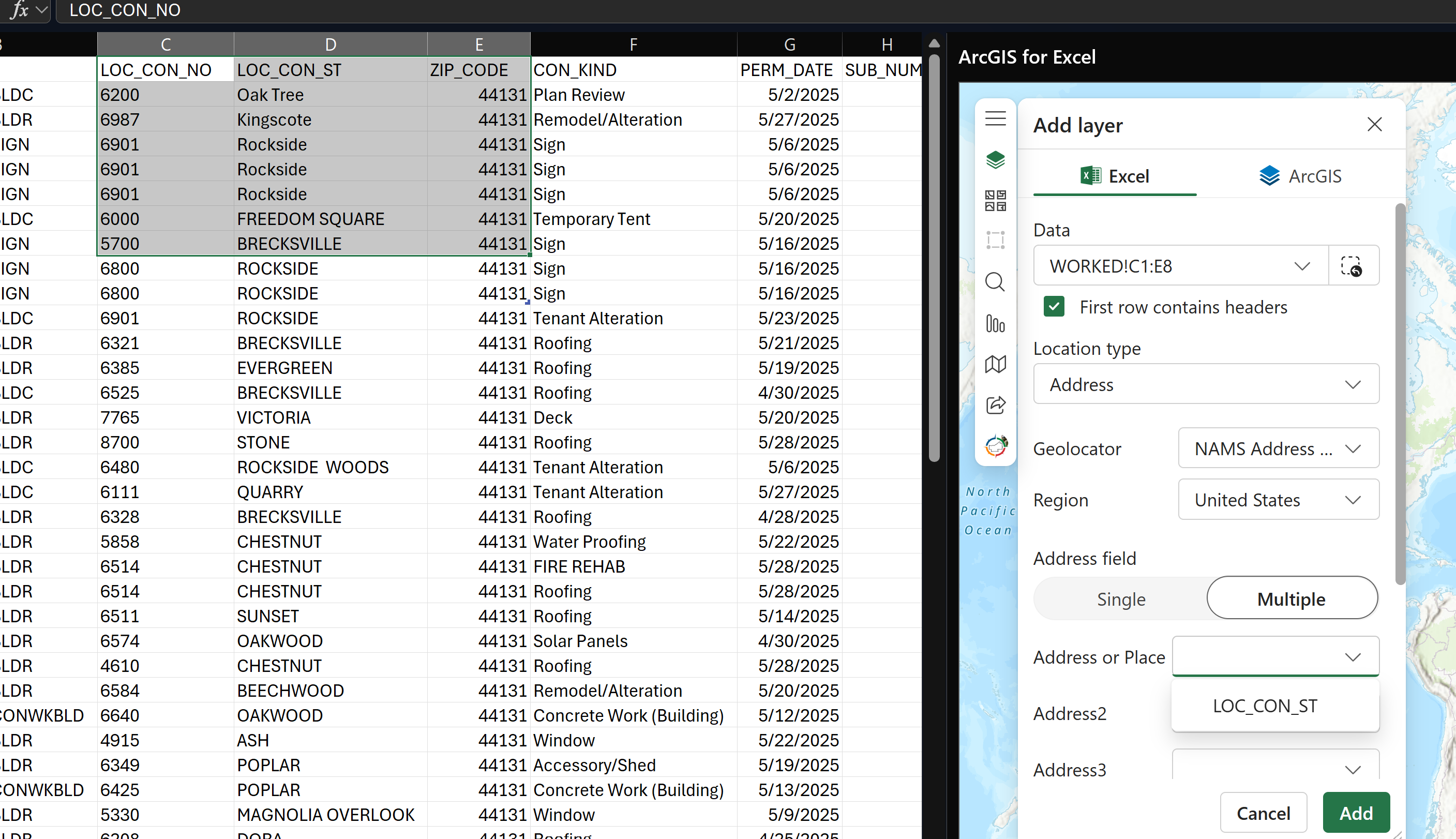
Address locationタイプを使用してExcelデータを追加しようとすると、使用するフィールドを選択するドロップダウンにはテキストフィールドのみが表示されます。数値フィールドをテキストに変更しても違いはありません。ジオロケーションに必要なフィールドを認識させるにはどうすればよいですか?
Yeah, the workaround I gave the end user was to calculate a new column with the number and street together.
However, I just tested adding a non-numeric character (an empty space after the number) to one row in the number column and that was enough for the dropdowns to show the column.
It's interesting that the ZIP dropdown shows all field types, but the other fields only show strings.
I think some additional formatting is needed, see below when I tried it:
I used the address column for street number, street for street name and so on. Is that an option for you (to format or prep the data a bit more)?
-SC
Thanks for the reply @ShannonCardoza! Yes, the dropdown for ZIP (and ZIP+4) include every field, even the number fields. I also changed the field types of all cells to Text but that doesn't help.
I want to put the house number in the 'Address or Place' field then the street name in the 'Address2' field, but it appears only the ZIP fields accept numbers.
Good afternoon @dgiersz_cuyahoga,
Thank you for your post. From the screenshot, I cannot tell but if you scroll down to another field, for example Zip code can you see additional options in the dropdown field? Here is a recording of me trying to recreate your workflow and I didnt see an issue to select the appropriate fields for geolocating.
Did you change any of the formatting in Excel?
You may also find our documentation, Work with data types helpful. I look forward to your reply!
Thanks,
SC
サインインしたメンバーは投稿、更新のフォローなどができます。初めてですか?無料アカウントを登録してください。
Find useful guides, FAQs, and documents to help you navigate and make the most of Esri Community.