I'd like to see if this is a known issue with ExB or just an internal issue with my organization:
I've created a simple ExB: it has a table widget and a couple of filter widgets. The purpose of the ExB app is to allow users to filter the data in the table and download it onto their device. All the settings - the hosted feature layer that is connected to the table and the setting inside the ExB app itself - are set up to allow data export. And it does. But...
When I use the 'Export to CSV' option, the browser's pop-up blocker is engaged and blocks the file from being downloaded. I need to go into the pop-up blocker window to "release" the file and let it download. manually.
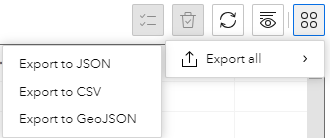
When I tested the 'Export to CSV' option ExB app several months ago, the pop-up blocker was not engaged and the file was downloaded successfully. So it worked in past.
A few thins that happened since my first test and the current one (not sure if its related, but worth mentioning):
- The crowd strike outage happened.
- Our organization upgraded to ArcGIS Enterprise 11.1
Now, the pop-up blocker happens to multiple users, multiple ExB apps, desktop and mobile devices and in different browsers (Chrome and MS Edge were tested).
I should mentioned that I work for a state agency.
Is this a known issue with ExB itself? or my organization browser's pop-up blocker policy? (as far as I know, that hasn't changed).



