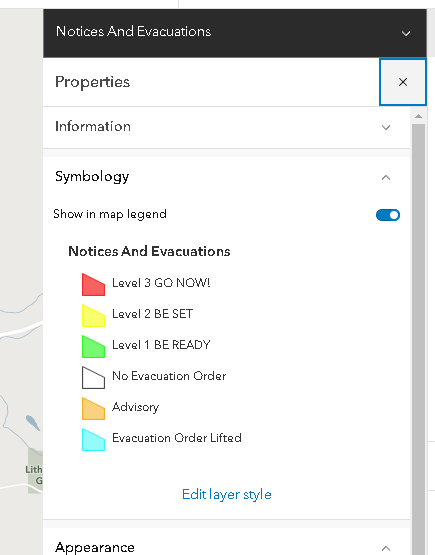
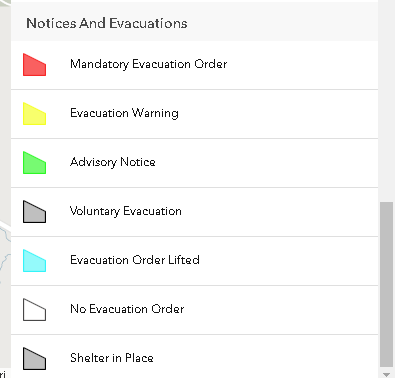
AGOL マップ ビューアーで編集しようとしているときに、レイヤーのシンボルが変わらない理由を調べています。このレイヤーは、Emergency Management Operations Solution で作成されたものです。組織向けに「通知と避難」レイヤーをカスタマイズする必要がありました。シンボルを一致させ、カスタマイズした選択肢を表示したいです。レイヤーのシンボルは次のとおりです。
編集時のシンボルは次のとおりです。
Hi @RickeyFight,
To update the choices in the Editor, you'll need to manage the feature templates. Support for managing feature templates within Map Viewer is on our future road map.In the mean time, you can use either Map Viewer Classic or the Field Maps Designer app.
To manage feature templates in the Field Maps Designer app, follow these steps:
Hope that helps!
@EmilyGeo Thank you for the help! I have not used Field Maps Designer.I am running into an issue on step 4. I do not see an 'Add Template' button.
I was able to change the template by using map viewer classic.
@EmilyGeo I their a webpage where we can track the current status of this new feature? Like Rickey, I have no option in Field Maps Designer to edit the existing template, or to create a new one.
Hi @BRENNEJM,
You should be able to manage templates for all layers that you own or administer. At this time, Templates can be managed in either Field maps or Map Viewer Classic.
To create a new template in Field Maps Designer, select an existing template and click the 'Duplicate' button, then update the attributes accordingly.
サインインすると、投稿したり、更新をフォローしたりできます。初めての方ですか?無料アカウントを登録しましょう。
Find useful guides, FAQs, and documents to help you navigate and make the most of Esri Community.