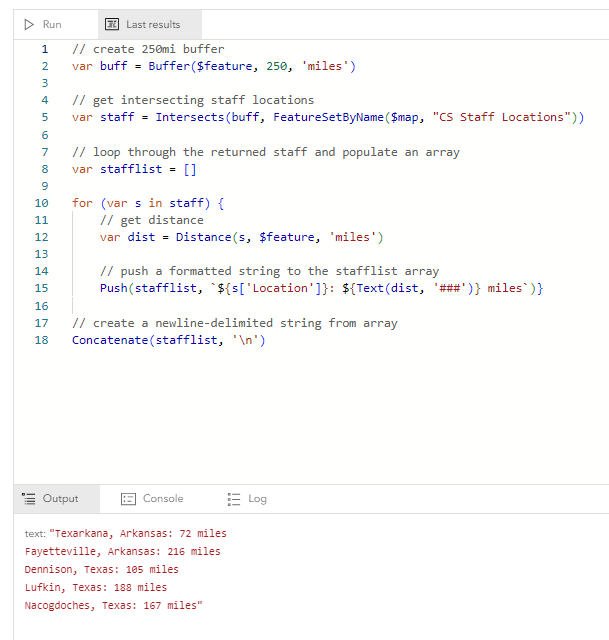
こんにちは。指定した地物に最も近い3つのポイント(スタッフの所在地)をポップアップに表示しようとしています。距離の近い順に並べたいです。地物のバッファ内にあるすべてのポイントを表示する式は作成できたのですが、結果の文字列を崩さずに並べ替えて件数を絞る方法がわかりません。
Sorry I miss read your question. I would probably create an empty featureset and populate it in your loop, then you can sort it and get the top 3.
var New_FS = {fields:[
        {'name':'StaffLocation','type': 'esriFieldTypeString'},
        {'name':'SLDistance','type': 'esriFieldTypeDouble'}],
        'geometryType': '',
        'features':[]
        }

for (var s in staff){
    var dist = Distance(s,$feature,'miles')
    var new_f = {'attributes': {'StaffLocation': s['Location'] ,
                                'SLDistance': dist}
                 }
    Push(New_FS.features, new_f)}
You would then have to loop through this new fs to construct the string for the popup
Sorry, forgot to mention you need to convert the populated dictionary/featureset to read like one.
Try
var sorted = Top(OrderBy(FeatureSet(Text(New_FS)), 'SLDistance ASC'),3)
Cheers
Peter
I don't know about truncating the first three, but OrderBy should allow you to at least list them in descending order. I think you would do:
var dist = Top(OrderBy(Distance(s, $feature, 'miles'), 'miles DESC'),3)
But, I'm not an Arcade expert. 😅 Maybe that goes around Push(Top(Orderby(stafflist....) instead of the Distance function.
Solved: Re: How to Use Arcade GroupBy with Top and OrderBy... - Esri Community
Still erroring saying invalid parameter 😕
Maybe because 'miles' isn't a field already? idk
Thanks for the reply though!
I would use a top and order by on the intersects
https://developers.arcgis.com/arcade/function-reference/featureset_functions/#top
That didn't work either. My problem is that the feature set I'm wanting to sort only has a name field, and I can't get OrderBy to recognize conditional data from an arcade expression.
Thanks for the suggestion!
This feels closer to what I'm trying to do, but now I can't get the sort to work. Am I doing something wrong?
Thank you
// create 250mi buffer on selection
var buff = Buffer($feature, 250, 'miles')

// get intersecting staff locations
var staff = Intersects(buff, FeatureSetByName($map, "CS Staff Locations"))

// create empty featureset to hold results
var New_FS = {fields:[
        {'name':'StaffLocation','type': 'esriFieldTypeString'},
        {'name':'SLDistance','type': 'esriFieldTypeDouble'}],
        'geometryType': '',
        'features':[]
        }

for (var s in staff){
    var dist = Distance(s,$feature,'miles')
    var new_f = {'attributes': {'StaffLocation': s['Location'] ,
                                'SLDistance': dist}
                 }
    Push(New_FS.features, new_f)}

var sorted= Top(OrderBy(New_FS, 'SLDistance ASC'),3)

return sorted
サインインすると、投稿したり、更新をフォローしたりできます。初めての方ですか?無料アカウントを登録しましょう。
Find useful guides, FAQs, and documents to help you navigate and make the most of Esri Community.