Hello,
This issue seems trivial, so hopefully I'm just overlooking something simple. I had a standalone CoreHost WPF application that would open at the intended height/width of 650/1100. I am attempting to recreate a similar template layout within a ProWindow, using much of the exact syntax from the other app. The XAML view within Visual Studio looks correct and matches what I had within the CoreHost app, but when I launch the add-in within Pro, the ProWindow no longer matches. Anybody have any idea what's causing this?
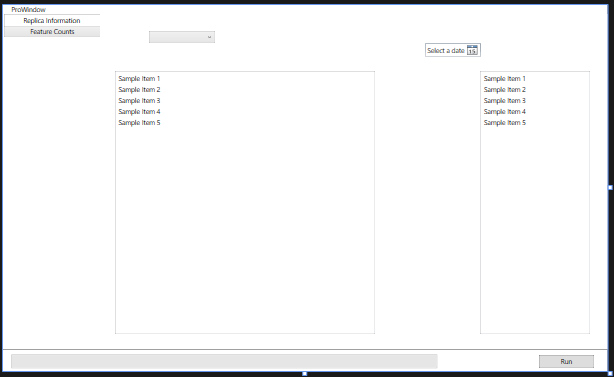
How the app looks within Visual Studio 2022 (with Pro 3.1.1 installed, running latest 3.1.0.41833 Pro SDK version):
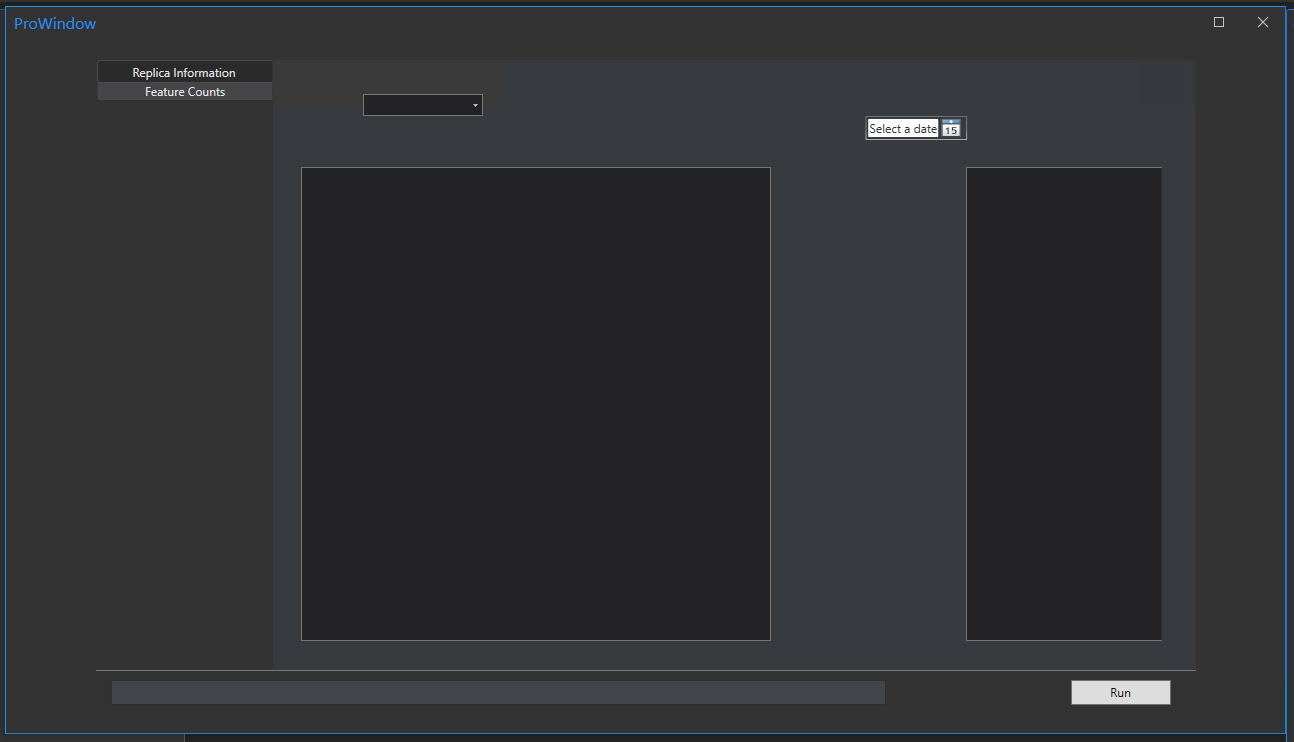
How it looks when launched within ArcGIS Pro:
Here's my XAML code:
<controls:ProWindow x:Class="Pro_AddIn_Testing_2023.ProWindow"
        xmlns="http://schemas.microsoft.com/winfx/2006/xaml/presentation"
        xmlns:controls="clr-namespace:ArcGIS.Desktop.Framework.Controls;assembly=ArcGIS.Desktop.Framework"
        xmlns:x="http://schemas.microsoft.com/winfx/2006/xaml"
        xmlns:d="http://schemas.microsoft.com/expression/blend/2008"
        xmlns:mc="http://schemas.openxmlformats.org/markup-compatibility/2006"
        xmlns:extensions="clr-namespace:ArcGIS.Desktop.Extensions;assembly=ArcGIS.Desktop.Extensions"
        mc:Ignorable="d"
        Title="ProWindow" Height="Auto" Width="Auto"
        WindowStartupLocation="CenterOwner"
    >
    <controls:ProWindow.Resources>
        <ResourceDictionary>
            <ResourceDictionary.MergedDictionaries>
                <extensions:DesignOnlyResourceDictionary Source="pack://application:,,,/ArcGIS.Desktop.Framework;component\Themes\Default.xaml"/>
            </ResourceDictionary.MergedDictionaries>
        </ResourceDictionary>
    </controls:ProWindow.Resources>
    <Grid Height="650" Width="1100">
        <StackPanel>
            <TabControl x:Name="tabControl" Height="610" TabStripPlacement="Left" BorderThickness="0,0,0,0">
                <TabItem x:Name="tabReplicaInformation" Header="Replica Information" Width="175">
                    <Grid>
                        <ComboBox x:Name="comboBox" HorizontalAlignment="Left" Margin="86,30,0,0" VerticalAlignment="Top" Width="120" IsReadOnly="True" SelectedIndex="0"/>
                        <DatePicker x:Name="datePicker" HorizontalAlignment="Left" Margin="589,52,0,0" VerticalAlignment="Top" />
                        <ListBox x:Name="listBox1" d:ItemsSource="{d:SampleData ItemCount=5}" Margin="24,103,421,25"/>
                        <ListBox x:Name="listBox2" d:ItemsSource="{d:SampleData ItemCount=5}" Width="200" Margin="689,103,30,25"/>
                    </Grid>
                </TabItem>
                <TabItem x:Name="tabFeatureCounts" Header="Feature Counts">
                    <Grid/>
                </TabItem>
            </TabControl>
            <Separator Margin="0,0,0,0"/>
        </StackPanel>
        <ProgressBar x:Name="progressBar" Height="25" Width="775" HorizontalAlignment="Left" Margin="15,5,0,5" VerticalAlignment="Bottom" />
        <Button x:Name="buttonRun" Content="Run" Width="100" Height="25" VerticalAlignment="Bottom" HorizontalAlignment="Right" Margin="0,5,25,5" Click="buttonRun_Click"/>
    </Grid>
</controls:ProWindow>
Thanks for any insight!




