画像とテキストを横並びにしようとしていますが、うまくいきません。Arcade コンテンツブロックと関連する HTML を使うと、次のように表示されます:
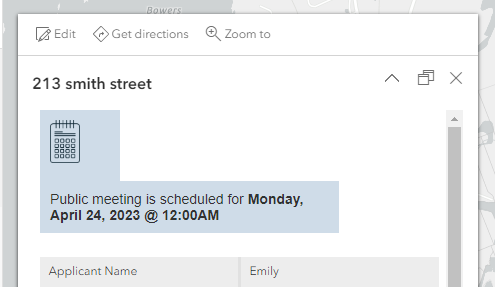
var public_date = Text($feature.meeting_date,'dddd, MMMM D, Y @ hh:mmA')

return {
    type: 'text',
    text: `
        <div style="float:left;padding:10px;background-color:#cfdce8;width:20%;"><img style="float:left;width:30px;" src="{image_url}"></div>
        <div style="font-family:arial;float:right;align-top;padding:10px;width:75%;background-color:#cfdce8;">公開ミーティングは<strong>${public_date}</strong>に予定されています</div>
        `
Text(Source Formatting)コンテンツブロックも試しましたが、画像とテキストを横並びにできませんでした。
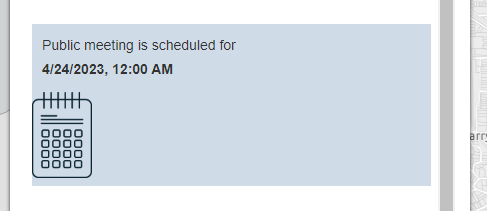
<div style="background-color:#cfdce8;">
    <div style="float:left;padding:10px;width:65%;">
        <span style="font-family:arial;">公開ミーティングは<strong>
        {meeting_date}</strong>に予定されています</span>
    </div>
    <div style="float:right;width:15%;">
        <img style="float:right;" src="https://wpsgn.maps.arcgis.com/sharing/rest/content/items/7571b914c3fc40929328a5be04331759/data">
    </div>
</div>
何かアドバイスをいただけると助かります。