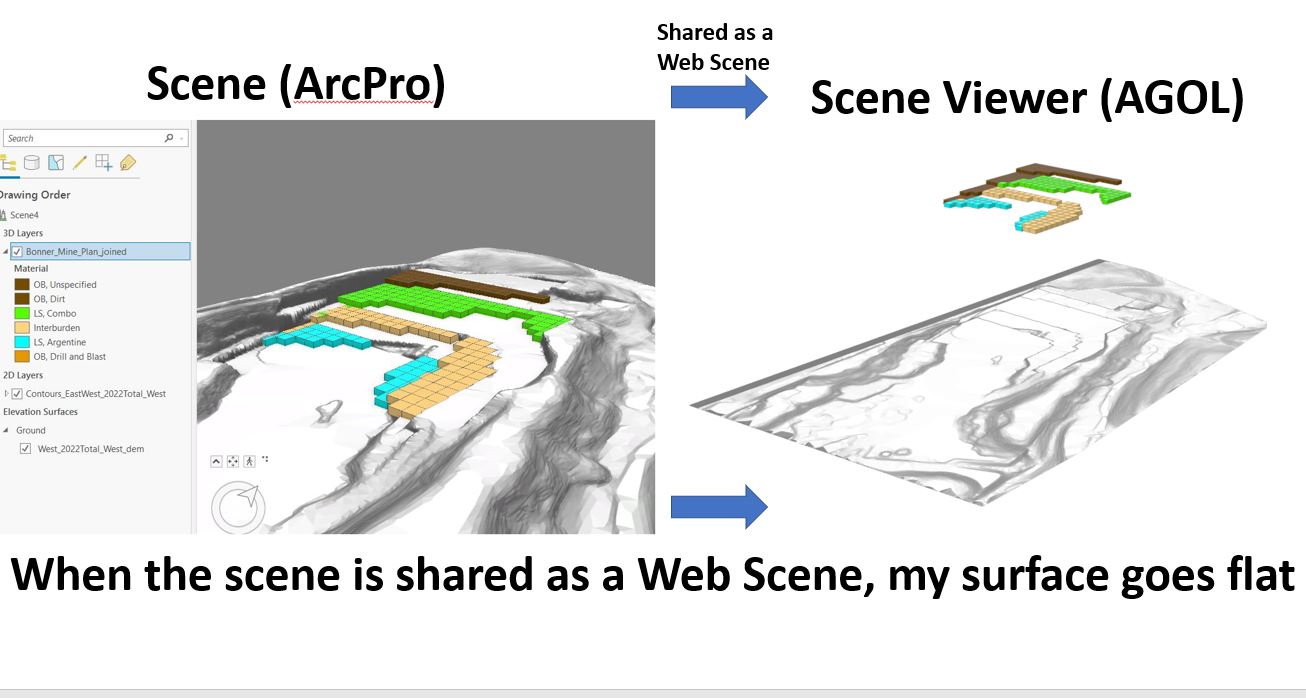
When I share a Scene created in ArcPro as a Web Scene, my ground goes flat. My ground displays correctly in ArcPro and there aren't any warnings when I share. I've tried several things and I can't get this 'custom' ground to display properly in the shared Web Scene. The default 'WorldElevation3D/Terrain3D' does just fine, its elevations display correct when shared. But this new ground won't. What could my problem be?
24110: Custom elevation surfaces are not supported in a web scene. Custom surfaces will be dropped from the web scene.—ArcGIS Pro | Documentation
perhaps this is the issue
@MillionMap, I see.. What do you think I might be doing wrong? I have an enterprise server where I'm publishing the map, and I'm the administrator.
My problem was admin privileges at the time. I wasn't allowed to host a tile package on AGOL. Once that was changed, the steps at the following links allowed me to publish my custom surface. You've probably seen these links before but it was the steps I took.
Steps to create a map tile package: https://pro.arcgis.com/en/pro-app/latest/help/sharing/overview/tile-package.htm#GUID-853C5B89-8C83-4C0B-A7F1-03300218E6C2]
Steps to publish a tile package: https://doc.arcgis.com/en/arcgis-online/manage-data/publish-elevation-layers.htm
@MillionMap , how did you solve this? I'm facing exactly the same problem. As @Andrew--Johnson said, your elevation seems to be ground elevation, and not custom elevation.
From your screenshot it appears you only have the Ground elevation surface not a custom elevation surface so in this case it should work. Are you able to share a map package of this data so I can take a look?
thanks,
Andrew
That would be it then. Thanks.
サインインしたメンバーは投稿、更新のフォローなどができます。初めてですか?無料アカウントを登録してください。
Find useful guides, FAQs, and documents to help you navigate and make the most of Esri Community.