皆さん、こんにちは。<\/P>
ETLプロセスを使い始めようとしています。最近見たいくつかのビデオに感銘を受け、もっと学ぶ時間を取りたいと思いました。EsriのETLに関する2つのトレーニングを見つけましたが、どちらもArcGIS Desktopの以前のバージョン向けであることにすぐ気づきました。Proで学びたかったので、Proで進めました。最初のコースはそれほど悪くなかったです。いくつかの違いを見つけましたが、問題なく進められました。しかし2番目はそうではありませんでした: Extract, Transform, and Load Processesを使用したデータ変換の制御 | Esriトレーニングウェブコース<\/P>
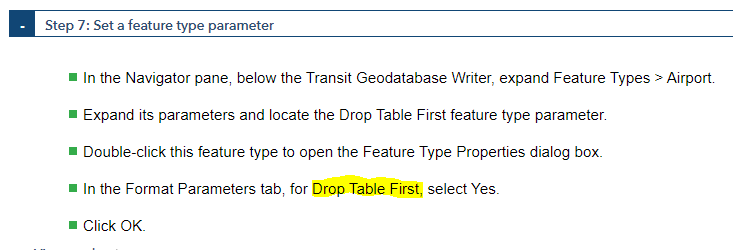
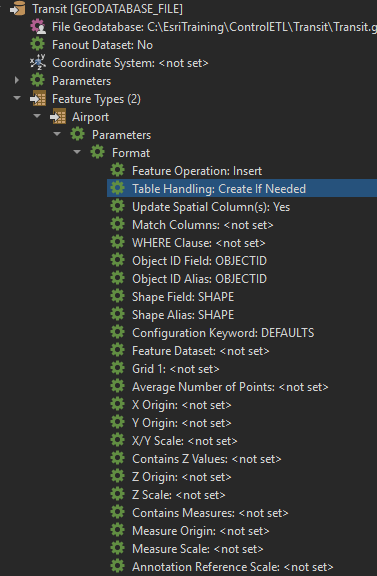
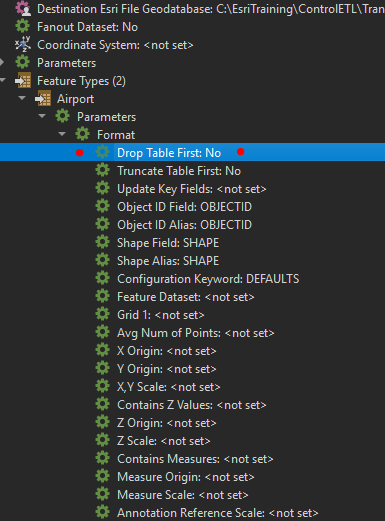
(私はArcGIS Pro 2.6.3と FME 2020.0.1.0 (20200407 - Build 20218 - WIN64)<\/SPAN>を使用しています)<\/P>最初に直面した問題はWriterの追加です。Format<\/U>セクションで、特定のフォーマットを使うよう指示されました:<\/P>format<\/span><\/span><\/P>利用可能なGeodatabaseフォーマットは以下の通りです:<\/P><\/span><\/P>正しい選択は最後のものだと思います。確信はありませんが、かなり確かです。<\/P>問題の次の部分はこのトレーニングの別のセクションにあります: <\/P><\/span><\/P>Drop Table Firstパラメーターを探しましたが、ProのFMEで作成したGeodatabase Writerには見当たりません:<\/P><\/span><\/P>Esriの事前作成されたETLツール(トレーニングセクション終了時点で私の作業結果と同じになるはず)を開いてパラメーターを見ると、以下のようになっています:<\/P><\/span><\/P>つまり、Esriトレーニングの演習後完成例はおそらくDesktop 10.5で作成されたもので、私はProを使っています。<\/P>これは単にバージョン間の違いを見ているだけで、設定は目の前にあって私が両者間の解釈方法を知らないだけなのか、それとも完全に迷子になっているのでしょうか?<\/P>
Hello Adam
Thanks for persevering with our dated training materials, we have transitioned to leveraging Safe Software's courses at present. For the first part of your question, we renamed the long form of the ArcObjects-based file geodatabase writer to drop the word 'ArcObjects', we thought it didn't add anything. The short form of the format - GEODATABASE_FILE - is unchanged. For the second part of your question it is the Table Handling parameter that has the options you are looking for:
Thanks for visiting the Data Interoperability forum, there are some blogs to help you with your journey!
Yes that's right. I almost always use that setting in case my target feature class already exists, it functions like 'drop if exists then create'.
Thanks for your response, @BruceHarold !
The second part - Would "Drop and Create" be my choice for the legacy "Drop Table First"?
Thanks,--Adam
サインインしたメンバーは投稿、更新のフォローなどができます。初めてですか?無料アカウントを登録してください。
Find useful guides, FAQs, and documents to help you navigate and make the most of Esri Community.