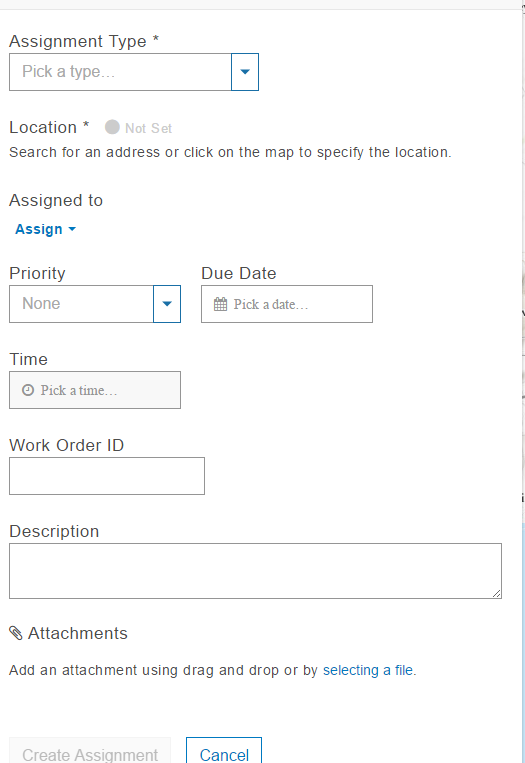
Hello everyone,
I have the following questions for the workforce:
And if there is a tech support that i can contact please let me know.
Thank you in advance
Hello Ali,
Hello Ali, thanks for your feedback on Workforce.
1. No, at this time it is not possible to change the app design.
2. No, it's not possible to change the fields that are displayed in the web or mobile app. Can you provide some information on why you'd like to change the fields and what you'd like to add or remove?
3. Yes, it will be possible to remove Navigator from the available apps; for the 1.0 release we have an App Integration experience that allows you to configure which ArcGIS app (Navigator, Collector or Survey123) to use with your project. Which other apps are you considering adding?
4. Yes, there's a few ways you can do this. You can use ArcGIS Pro to edit the Assignments feature service in the same way you'd edit any other feature service. You need to make sure that you follow the guidelines for how to create assignments; The Workforce Schema. You can use a script to import assignments into the feature service; we've created several that you can use as a starting point: workforce-scripts
Similar questions to were posted to the Workforce Beta forum but included a few additional questions; please let me know if you'd like to continue the discussion there.
thanks,
Craig
Thank you very much Craig for your helpful reply.
for number 2, for example i want to remove the priority field or add any other field needed. it would be much better if these fields were flexible.
also i have 2 extra questions:
Thanks again for your kind help!
Ali,
Can you provide some more information on why removing the Priority field is a use case? If left empty; it will not appear to field workers. Can you provide some use cases or more information on what additional fields you would like to add?
My replies to your 2 other questions
Dear Craig,
There is no particular reason for adding/removing fields, im just thinking about future projects where some people would like to have only specific fields to describe their assignments and not all of them.
Thank you very much for your useful answers.
Btw, I attended the dev summit in palm springs few months ago, and your presentation on workforce was my favorite, it was very interesting.
Since that moment i started working on workforce and started trying different cases.
I will try some additional stuff and i'll get back to you if needed.
Thanks again
Thanks for clarifying on the request to add/remove fields. What we're hearing from users is that; while they first want to add or remove fields from the Assignment feature service and have that reflected in the web and mobile apps; once they realize that they can launch Collector from Workforce; that handles the majority of scenarios where they want to customize or change the Assignments feature service.
There definitely are valid use cases for adding fields to the Assignments feature service and have them appear; that's in our backlog for a future release. If you have examples like this, please pass them along so I can add them to our backlog.
Thanks for the comments, glad you enjoyed the session on Workforce and looking forward to hearing your feedback after it's release.
Hello again,
I have some additional questions if its okay:
Thank you very much.
Regards,
Ali
thanks, Craig
sure!
for example, lets say i have 4 assignments
Assignment 1: uses webmap1 in collector
Assignment 2: uses webmap2 in collector
Assignment 3: uses survey1 in survey123
Assignment 4: uses survey2 in survey123
i give a worker assignment1, i want this mobile to directly open webmap1 in collector without giving him the option to go to another webmap.
if i give him assignment4, he should directly go to survey2 in survey123.
it might be risky that the worker open another webmap or survey by mistake.
This will help us avoid any misunderstanding or confusion between dispatcher and worker.
Thanks Ali, thanks for following up. A couple follow-on questions:
I agree that you want to the Worker to be using the right web map or survey for their work; but it's not a use case we've come across where a single Workforce Project uses Collector and Survey123.
Examples of your project and the scenarios you're trying to solve would really help to dig into this.
I would like to have someone fill out a geoform (public) for a new meter install request. Which will use the same assignment feature class as a workforce project. For example, adding 3 fields in the details section for workforce to include Permit #, Tap Size requested, Rate Class(commercial, irrigation, industrial, etc). The worker would then be able to see the assignment with appropriate information from the requester and open Collector to update the Meter data during install.
Craig,
You've heard of at least one use case where a single Workforce Project uses both Collector and Survey123. At least we are trying to...
Our use case is probably very common (at least we think it is). Our Inspection group is recording asbuilt facility attributes along with various information related to construction progress. Initially we are focused on the more common field observations that will be form based data entry in Survey123, but after that we are going to expand our capabilities to enter facility attributes along with spatial edits in Collector.
We also think that these links should based on the assignment type (NOT THE PROJECT). Seriously, there has got to be more than 2 of us that brought up this kind of scenario. I sent you a PM to expand upon our use case, but here's a short version for those reading this post... If a worker gets a Concrete Inspection Assignment in Workforce, we would like the worker to open a Concrete Inspection survey in Survey123. If they get a Certificate of Occupancy Approval assignment in Workforce, they should open the Certificate of Occupancy survey in Survey123. Yada, yada, yada...
Thanks,
Glen
Glen,
The workflow example you and ALi have both provided makes a lot of sense and I am just about to embark on a similar task where our Officers play various roles but will utilize the same Workforce Project for tracking though may have different types of assignments that need specific forms based on the assignment type.
For example, an Officer receives a call for service (assignment) to remove debris out of the Interstate and upon arrival has a specific Survey123 form that collects data about the road debris type (semi-truck tire), location (geopoint), possibly where it came from (say the tractor tailor and driver are still at the scene company name, drivers license, etc...), and possibly damage or injuries arising from this road debris, pictures of the debris and/or damage, and final Officer notes perhaps.
The the same Officer is dispatched to a motorist assist who has a mechanical malfunction or run out of fuel using a Survey123 form to collect important details including amount of gas that was provided for financial accountability, driver info, vehicle info, etc...
As Ali described this would tie an Assignment type to the method of data collection in these two examples it would be one of potentially many available Survey123 forms HOWEVER; as I think through this process I realized that the Officer is free to choose the correct Survey123 from those available to him/her and that could work equally as well unless I want to specifically prescribe which Suvery123 form will open based on the Assignment type then we're back to begin to define a specific workflow to ensure there's no chance of an Officer using the wrong Survey to collect the data in the field.
Often times this seems like a simple thing, why wouldn't the Officer know which Survey to use but to be honest they usually have a lot more on their mind than selecting the proper Survey123 form each and every assignment and when new assignment types are added and can be tied to a specific Suvery123 form, there's no training required to make sure they use the correct form for the correct assingment and if the Survey123 (Collect, GeoForms, etc..) are developed in an intuitive manner there may be little training required there as well.
I understand the necessity to try and keep things simple and expand/enhance by also passing some of the responsibility to the users but when we can take stesp and decisions out of a process we find that adoption and usage increase dramatically.
We'd also like to be able to use our own Status lists too rather then Online, Break Offline, Offline (Android) or Working, On Break, Not Working (iOS) to provide our Dispatchers better filtering and quick visibility into what each Officer on screen is currently doing... three Status Options are not sufficient enough for us... workable but we're looking into expanded options.
Sincere Regards,
Chris Rogers
Traffic Enforcement Planner
OKDPS
Chris, thanks for providing the use case; it's similar to what we discussed during our meeting at the UC and I've made sure to capture it in our issue to track this enhancement.
Is it possible to change the format of the due time from for example to something that shows the full due date and time? We are transitioning our City Inspector over to workforce and when our dispatchers schedule inspections, they need the ability to see the due dates and times. Any ideas?
Any assistance would be greatly appreciated!
-Cody
Hi @cmerwin
This is not possible in Workforce today. It is something we could support when Workforce moves into Field Maps; as we're looking to open up more control for the Project Owner with how the Assignment information is displayed.
Les membres connectés peuvent publier, suivre les mises à jour, et plus encore. Nouveau ici ? Inscrivez-vous gratuitement.
Find useful guides, FAQs, and documents to help you navigate and make the most of Esri Community.