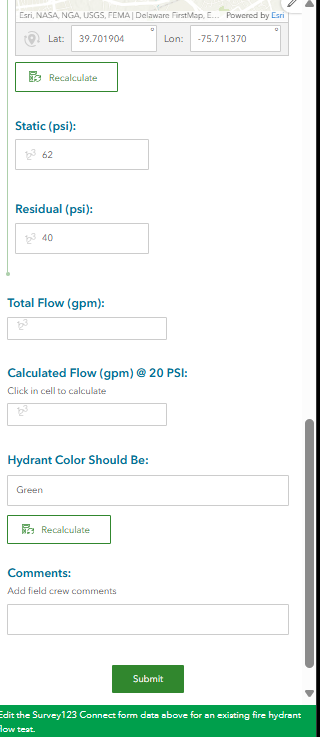
Hello. We have created a fire hydrant flow testing form in Survey123 Connect, for one Read hydrant and up to six Flow hydrants. In production, we have embedded the 123 form twice in a Dashboard (Enterprise 10.9.1). For a new flow test, we input the various flow testing values (pitot, discharge coefficient, static psi, etc.) for the Flow and Read hydrants and have the XLSForm calculate the 'total flow' and 'calculated flow at 20psi,' showing the results in the form as expected.
We also have a dashboard list element listing the flow tests. If we need to edit the values of an existing flow test, we select the test from the list element, scroll to the second embedded survey form where the URL is set to edit mode (mode=edit&globalId={globalid}). The former data are retrieved and populate the form; however, the total flow and calculate flow values are blank. I don't see a Recalculate button in the form in the vicinity of the flow calculations, and I wonder if this is the reason. Clicking in the Calculated Flow cell does not work either. I see a couple of other recalculate buttons, but I have no clue where they came from. I hope someone can point me to a solution. Thanks in advance.