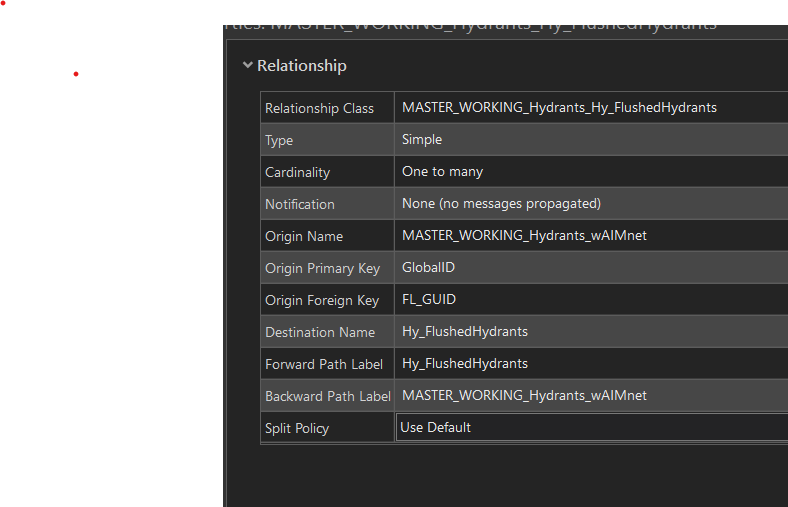
I have a hydrant inspection feature layer with 5 related tables hosted on ArcGIS Online. One of the tables is giving the error in the title. All relationship classes are setup as shown in the picture but this is the only one giving an error. Any ideas what this would be?
Okay, I at least figured out my issue. I had to go back and recreate the table in ArcPro and re-share the web map. When I previously made my map, I had created a GUID field for the related table to use as the destination ID key. I used a different field this time, and it worked without a problem. I guess the takeaway is beware of using GUID's as ID keys when making relationship classes?
Hi,
I'm having a similar issue. All of my fields are set to editable. I don't know how to tell if the editor tracking table is corrupted. Specifically, I can't get Field Maps to create an entry in a related table on a mobile device. It says the whole "1 attribute failed" thing. The weird part is that I can create entries in a browser on my laptop. I can then edit entries in mobile. I don't have a great notion as to why it seems to work fine in the browser, then can't create entries on a mobile device. My next option is to remove all of the layers and reupload the web map from Pro.
My issue was a corrupted editor tracking table. I had to rebuild the entire layer.
This worked for me, must be sure that the option "Allow attribute editing" is enabled on the field. I had recreate my fields, and it worked.
I am experiencing the same issue. Hosted feature service point layer with 1:M relationship class with a table layer in the same hosted service. The table in the ArcGIS Online item's Data tab indicates that there are records (which would be my tests) but the table is blank shown below.
@RobynSnookCCB Did you ever figure this out? I'm having a very similar issue, except sometimes it does submit and sometimes it fails, even with the simplest 1-field form.
Hi @RobynSnookCCB,
I encountered the same error when trying to collect field data using Field Maps.
What I did is checked the feature layer fields in the form and noticed that from one of the field under Logic, below the Editable check box is a message "Editing is disabled in the field settings". I checked the details of that field and changed the Editable section to Yes. I then return to the Field Map designer form and after refreshing, the message is gone and click the Editable check box under the Logic section . When I tried to collect field data again, there is no more error.
Ok, thank you for trying. If you are interested in doing some more troubleshooting on the original feature service, I would recommend reaching out to Esri Technical Support. Your other option, as you already stated is to update your maps with the new feature service that you created that isn't showing the error.
No it did not work
@RobynSnookCCB in the original feature service, try removing the Arcade from the form (if you haven't already) and save the form to the map. Then Field Maps mobile app, on the browse screen (the screen with the list of all your maps) pull the screen down to refresh, find your map and if it's listed as the current map, use the overflow menu (...) to select Reload Map, if it's not the current map, you can just open the map. See if you are still having issues submitting data.
No field gets highlighted, there was some arcade as a calculation and title in the form and pop-up, even after removing it, it still won't submit. I have arcade with the other tables to which are working fine. Thanks though.
I republished as another feature service and it works fine but I'm hoping to fix the original so I don't have to re-do a lot of work.
Hi @RobynSnookCCB . When you try to submit the form for that specific table, are there any fields highlighted showing which field is causing the error? Or do you happen to be using an Arcade expression on any of those fields? If so, it's possible there is something wrong with the expression were it can't run properly.
Les membres connectés peuvent publier, suivre les mises à jour, et plus encore. Nouveau ici ? Inscrivez-vous gratuitement.
Find useful guides, FAQs, and documents to help you navigate and make the most of Esri Community.