I have written this script to autonumber trees our arborists are surveying:
// if this feature already has a Tree Number, return that
if(!IsEmpty($feature.TreeNumber)) {
  return $feature.TreeNumber
} else {

  // get the feature with the greatest Tree Number for the current project in the featureset
  var projectNumber = $feature.ProjectNum
  var Tree_features = Filter($featureset, "(TreeNumber IS NOT NULL) AND (ProjectNum = @projectNumber)")
  var max_Tree_feature = First(OrderBy(Tree_features, "TreeNumber DESC"))

  // for an empty featureset, this will be null, so return a 1
  if(max_Tree_feature == null) { return 1 }

  // calculate the max tree number for this project and return the next tree number for the current feature
  var max_TreeNumber = max_Tree_feature.TreeNumber
  var next_TreeNumber = max_TreeNumber + 1
  return next_TreeNumber
}
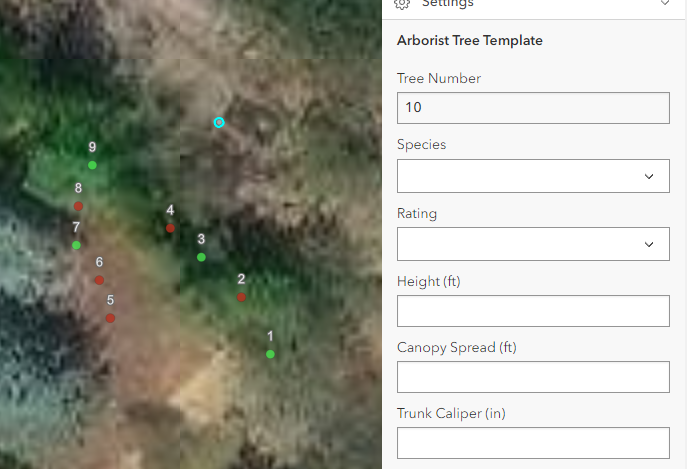
The script works great in the map viewer. If I add a new feature in the particular project I'm working in, it autonumbers the new feature 10 because there are already nine other features. However, if I open the same map in Field Maps and add a new feature, it autonumbers every new feature 1 regardless of the other tree numbers already in the project.
Map Viewer:
Field Maps mobile app:
The quick fix is to hard code the project number. We already have to update the Arcade expression that calculates the Project Number field each time we set up a Field Maps map with this layer for a new project, so we could also pop into this script and enter the project number here too. But I don't want to do that because it's an extra step for us to remember to do and because typing in (or pasting in) the project number twice is just an opportunity to introduce error. Plus I just want to know why this works in the Map Viewer but not in the Field Maps mobile app.
Thanks in advance for any help you can provide!



