Summary
SQL was introduced as a Beta feature in the AppFramework as part of AppStudio 2.0. What this means is we are looking forward to your feedback, use cases and what you want us to improve on. Future changes may affect your app and may require additional changes to support it.
In AppStudio 2.0 you can:
- read/write SQLite, ODBC, PostgreSQL and MySQL databases
- read DBF files (via SQLite virtual tables)
- read CSV files (via SQLite virtual tables)
To get a taste of the SQL support, we will be covering the following.
- Minimal app - open a SQLite database
- Running queries
- Error handling
- Looping through results
- Prepared and parameterized queries
- Autoincrement field
- SqlQueryModel and SqlTableModel
- Including SQL Schema as an app resource
- SQL Viewer app
1. Minimal app - open a SQLite database
This minimal working sample opens a SQLite database in your home directory called ArcGIS/Data/Sql/sample.sqlite. The code works on all platforms. On Android, Linux, Windows and Mac platform, the database created and can be accessed by other apps. On iOS the database will be sandboxed to your application, i.e. only your application may access it.
<SPAN class="keyword token">import</SPAN> QtQuick <SPAN class="number token">2.8</SPAN>
<SPAN class="keyword token">import</SPAN> ArcGIS<SPAN class="punctuation token">.</SPAN>AppFramework <SPAN class="number token">1.0</SPAN>
<SPAN class="keyword token">import</SPAN> ArcGIS<SPAN class="punctuation token">.</SPAN>AppFramework<SPAN class="punctuation token">.</SPAN>Sql <SPAN class="number token">1.0</SPAN>
Item <SPAN class="punctuation token">{</SPAN>
width<SPAN class="punctuation token">:</SPAN> <SPAN class="number token">640</SPAN>
height<SPAN class="punctuation token">:</SPAN> <SPAN class="number token">480</SPAN>
FileFolder <SPAN class="punctuation token">{</SPAN>
id<SPAN class="punctuation token">:</SPAN> fileFolder
path<SPAN class="punctuation token">:</SPAN> <SPAN class="string token">"~/ArcGIS/Data/Sql"</SPAN>
<SPAN class="punctuation token">}</SPAN>
SqlDatabase <SPAN class="punctuation token">{</SPAN>
id<SPAN class="punctuation token">:</SPAN> db
databaseName<SPAN class="punctuation token">:</SPAN> fileFolder<SPAN class="punctuation token">.</SPAN><SPAN class="token function">filePath</SPAN><SPAN class="punctuation token">(</SPAN><SPAN class="string token">"sample.sqlite"</SPAN><SPAN class="punctuation token">)</SPAN>
<SPAN class="punctuation token">}</SPAN>
Component<SPAN class="punctuation token">.</SPAN>onCompleted<SPAN class="punctuation token">:</SPAN> <SPAN class="punctuation token">{</SPAN>
fileFolder<SPAN class="punctuation token">.</SPAN><SPAN class="token function">makeFolder</SPAN><SPAN class="punctuation token">(</SPAN><SPAN class="punctuation token">)</SPAN><SPAN class="punctuation token">;</SPAN>
db<SPAN class="punctuation token">.</SPAN><SPAN class="token function">open</SPAN><SPAN class="punctuation token">(</SPAN><SPAN class="punctuation token">)</SPAN><SPAN class="punctuation token">;</SPAN>
<SPAN class="punctuation token">}</SPAN>
<SPAN class="punctuation token">}</SPAN><SPAN class="line-numbers-rows"><SPAN></SPAN><SPAN></SPAN><SPAN></SPAN><SPAN></SPAN><SPAN></SPAN><SPAN></SPAN><SPAN></SPAN><SPAN></SPAN><SPAN></SPAN><SPAN></SPAN><SPAN></SPAN><SPAN></SPAN><SPAN></SPAN><SPAN></SPAN><SPAN></SPAN><SPAN></SPAN><SPAN></SPAN><SPAN></SPAN><SPAN></SPAN><SPAN></SPAN><SPAN></SPAN><SPAN></SPAN><SPAN></SPAN></SPAN>
2. Running queries
To run a SQL query, we use the SqlDatabase's query method. This function is overloaded, i.e. there are multiple, very useful ways of calling query. The most simplest is passing in a single string parameter and that query will be prepared and executed all in one go.
<SPAN class="keyword token">var</SPAN> query <SPAN class="operator token">=</SPAN> db<SPAN class="punctuation token">.</SPAN><SPAN class="token function">query</SPAN><SPAN class="punctuation token">(</SPAN><SPAN class="string token">"SELECT COUNT(*) as Count FROM sqlite_master"</SPAN><SPAN class="punctuation token">)</SPAN><SPAN class="punctuation token">;</SPAN>
<SPAN class="keyword token">if</SPAN> <SPAN class="punctuation token">(</SPAN>query<SPAN class="punctuation token">.</SPAN><SPAN class="token function">first</SPAN><SPAN class="punctuation token">(</SPAN><SPAN class="punctuation token">)</SPAN><SPAN class="punctuation token">)</SPAN> <SPAN class="punctuation token">{</SPAN>
console<SPAN class="punctuation token">.</SPAN><SPAN class="token function">log</SPAN><SPAN class="punctuation token">(</SPAN>query<SPAN class="punctuation token">.</SPAN>values<SPAN class="punctuation token">.</SPAN>Count<SPAN class="punctuation token">)</SPAN><SPAN class="punctuation token">;</SPAN>
query<SPAN class="punctuation token">.</SPAN><SPAN class="token function">finish</SPAN><SPAN class="punctuation token">(</SPAN><SPAN class="punctuation token">)</SPAN><SPAN class="punctuation token">;</SPAN>
<SPAN class="punctuation token">}</SPAN><SPAN class="line-numbers-rows"><SPAN></SPAN><SPAN></SPAN><SPAN></SPAN><SPAN></SPAN><SPAN></SPAN></SPAN>3. Error handling
If the query failed, the error parameter would be not null. You can test for it, and, if it exists, it will be set to a JSON error object.
<SPAN class="keyword token">var</SPAN> query <SPAN class="operator token">=</SPAN> db<SPAN class="punctuation token">.</SPAN><SPAN class="token function">query</SPAN><SPAN class="punctuation token">(</SPAN><SPAN class="string token">"CRAP"</SPAN><SPAN class="punctuation token">)</SPAN><SPAN class="punctuation token">;</SPAN>
<SPAN class="keyword token">if</SPAN> <SPAN class="punctuation token">(</SPAN>query<SPAN class="punctuation token">.</SPAN>error<SPAN class="punctuation token">)</SPAN> <SPAN class="punctuation token">{</SPAN>
console<SPAN class="punctuation token">.</SPAN><SPAN class="token function">log</SPAN><SPAN class="punctuation token">(</SPAN>JSON<SPAN class="punctuation token">.</SPAN><SPAN class="token function">stringify</SPAN><SPAN class="punctuation token">(</SPAN>query<SPAN class="punctuation token">.</SPAN>error<SPAN class="punctuation token">,</SPAN> undefined<SPAN class="punctuation token">,</SPAN> <SPAN class="number token">2</SPAN><SPAN class="punctuation token">)</SPAN><SPAN class="punctuation token">)</SPAN><SPAN class="punctuation token">;</SPAN>
<SPAN class="punctuation token">}</SPAN> <SPAN class="keyword token">else</SPAN> <SPAN class="punctuation token">{</SPAN>
<SPAN class="comment token">// success</SPAN>
<SPAN class="punctuation token">}</SPAN><SPAN class="line-numbers-rows"><SPAN></SPAN><SPAN></SPAN><SPAN></SPAN><SPAN></SPAN><SPAN></SPAN><SPAN></SPAN></SPAN>Output:
<SPAN class="punctuation token">{</SPAN>
<SPAN class="string token">"isValid"</SPAN><SPAN class="punctuation token">:</SPAN> <SPAN class="keyword token">true</SPAN><SPAN class="punctuation token">,</SPAN>
<SPAN class="string token">"type"</SPAN><SPAN class="punctuation token">:</SPAN> <SPAN class="number token">2</SPAN><SPAN class="punctuation token">,</SPAN>
<SPAN class="string token">"databaseText"</SPAN><SPAN class="punctuation token">:</SPAN> <SPAN class="string token">"near \"CRAP\": syntax error"</SPAN><SPAN class="punctuation token">,</SPAN>
<SPAN class="string token">"driverText"</SPAN><SPAN class="punctuation token">:</SPAN> <SPAN class="string token">"Unable to execute statement"</SPAN><SPAN class="punctuation token">,</SPAN>
<SPAN class="string token">"text"</SPAN><SPAN class="punctuation token">:</SPAN> <SPAN class="string token">"near \"CRAP\": syntax error Unable to execute statement"</SPAN><SPAN class="punctuation token">,</SPAN>
<SPAN class="string token">"nativeErrorCode"</SPAN><SPAN class="punctuation token">:</SPAN> <SPAN class="string token">"1"</SPAN>
<SPAN class="punctuation token">}</SPAN><SPAN class="line-numbers-rows"><SPAN></SPAN><SPAN></SPAN><SPAN></SPAN><SPAN></SPAN><SPAN></SPAN><SPAN></SPAN><SPAN></SPAN><SPAN></SPAN></SPAN>4. Looping through results
If your query is a select statement, it will return data via the values JSON object property. The values property will contain values corresponding to one row of results. To get all the results we need to access them in a loop. Note that when we iterate through results, it's always important to call finish(). If you forget, the query could lock the database in an unfinished transaction which may prevent future operations such as DROP TABLE.
<SPAN class="keyword token">var</SPAN> query <SPAN class="operator token">=</SPAN> db<SPAN class="punctuation token">.</SPAN><SPAN class="token function">query</SPAN><SPAN class="punctuation token">(</SPAN><SPAN class="string token">"SELECT * FROM Roads"</SPAN><SPAN class="punctuation token">)</SPAN><SPAN class="punctuation token">;</SPAN>
<SPAN class="keyword token">var</SPAN> ok <SPAN class="operator token">=</SPAN> query<SPAN class="punctuation token">.</SPAN><SPAN class="token function">first</SPAN><SPAN class="punctuation token">(</SPAN><SPAN class="punctuation token">)</SPAN><SPAN class="punctuation token">;</SPAN>
<SPAN class="keyword token">while</SPAN> <SPAN class="punctuation token">(</SPAN>ok<SPAN class="punctuation token">)</SPAN> <SPAN class="punctuation token">{</SPAN>
console<SPAN class="punctuation token">.</SPAN><SPAN class="token function">log</SPAN><SPAN class="punctuation token">(</SPAN>JSON<SPAN class="punctuation token">.</SPAN><SPAN class="token function">stringify</SPAN><SPAN class="punctuation token">(</SPAN>query<SPAN class="punctuation token">.</SPAN>values<SPAN class="punctuation token">)</SPAN><SPAN class="punctuation token">)</SPAN><SPAN class="punctuation token">;</SPAN>
ok <SPAN class="operator token">=</SPAN> query<SPAN class="punctuation token">.</SPAN><SPAN class="token function">next</SPAN><SPAN class="punctuation token">(</SPAN><SPAN class="punctuation token">)</SPAN><SPAN class="punctuation token">;</SPAN>
<SPAN class="punctuation token">}</SPAN>
query<SPAN class="punctuation token">.</SPAN><SPAN class="token function">finish</SPAN><SPAN class="punctuation token">(</SPAN><SPAN class="punctuation token">)</SPAN><SPAN class="punctuation token">;</SPAN><SPAN class="line-numbers-rows"><SPAN></SPAN><SPAN></SPAN><SPAN></SPAN><SPAN></SPAN><SPAN></SPAN><SPAN></SPAN><SPAN></SPAN></SPAN>Output:
qml<SPAN class="punctuation token">:</SPAN> <SPAN class="punctuation token">{</SPAN><SPAN class="string token">"RoadID"</SPAN><SPAN class="punctuation token">:</SPAN><SPAN class="number token">1</SPAN><SPAN class="punctuation token">,</SPAN><SPAN class="string token">"RoadName"</SPAN><SPAN class="punctuation token">:</SPAN><SPAN class="string token">"Coventry"</SPAN><SPAN class="punctuation token">,</SPAN><SPAN class="string token">"RoadType"</SPAN><SPAN class="punctuation token">:</SPAN><SPAN class="string token">"St"</SPAN><SPAN class="punctuation token">}</SPAN>
qml<SPAN class="punctuation token">:</SPAN> <SPAN class="punctuation token">{</SPAN><SPAN class="string token">"RoadID"</SPAN><SPAN class="punctuation token">:</SPAN><SPAN class="number token">2</SPAN><SPAN class="punctuation token">,</SPAN><SPAN class="string token">"RoadName"</SPAN><SPAN class="punctuation token">:</SPAN><SPAN class="string token">"Sturt"</SPAN><SPAN class="punctuation token">,</SPAN><SPAN class="string token">"RoadType"</SPAN><SPAN class="punctuation token">:</SPAN><SPAN class="string token">"St"</SPAN><SPAN class="punctuation token">}</SPAN>
qml<SPAN class="punctuation token">:</SPAN> <SPAN class="punctuation token">{</SPAN><SPAN class="string token">"RoadID"</SPAN><SPAN class="punctuation token">:</SPAN><SPAN class="number token">3</SPAN><SPAN class="punctuation token">,</SPAN><SPAN class="string token">"RoadName"</SPAN><SPAN class="punctuation token">:</SPAN><SPAN class="string token">"Kings"</SPAN><SPAN class="punctuation token">,</SPAN><SPAN class="string token">"RoadType"</SPAN><SPAN class="punctuation token">:</SPAN><SPAN class="string token">"Way"</SPAN><SPAN class="punctuation token">}</SPAN><SPAN class="line-numbers-rows"><SPAN></SPAN><SPAN></SPAN><SPAN></SPAN></SPAN>5. Prepared and parameterized queries
A number of commands have been overloaded to support parameterized syntax. Using parametized queries diligently can stop accidental bugs or malicious attacks via SQL injection. You can bind to a parameter via name (e.g. ":name") or via position (e.g. "?"). In practice, I always recommend binding parameters by name, because it's stricter and safer. Parameterized queries go well with prepared queries. This is when you offer one SQL statement for repeated execution. The following shows how you can use this approach to populate a table.
<SPAN class="keyword token">var</SPAN> insert <SPAN class="operator token">=</SPAN> db<SPAN class="punctuation token">.</SPAN><SPAN class="token function">query</SPAN><SPAN class="punctuation token">(</SPAN><SPAN class="punctuation token">)</SPAN><SPAN class="punctuation token">;</SPAN>
insert<SPAN class="punctuation token">.</SPAN><SPAN class="token function">prepare</SPAN><SPAN class="punctuation token">(</SPAN><SPAN class="string token">"INSERT INTO Roads (RoadName, RoadType) VALUES (:name, :type)"</SPAN><SPAN class="punctuation token">)</SPAN><SPAN class="punctuation token">;</SPAN>
insert<SPAN class="punctuation token">.</SPAN><SPAN class="token function">executePrepared</SPAN><SPAN class="punctuation token">(</SPAN> <SPAN class="punctuation token">{</SPAN> <SPAN class="string token">"name"</SPAN><SPAN class="punctuation token">:</SPAN> <SPAN class="string token">"Bank"</SPAN><SPAN class="punctuation token">,</SPAN> <SPAN class="string token">"type"</SPAN><SPAN class="punctuation token">:</SPAN> <SPAN class="string token">"St"</SPAN> <SPAN class="punctuation token">}</SPAN> <SPAN class="punctuation token">)</SPAN><SPAN class="punctuation token">;</SPAN>
insert<SPAN class="punctuation token">.</SPAN><SPAN class="token function">executePrepared</SPAN><SPAN class="punctuation token">(</SPAN> <SPAN class="punctuation token">{</SPAN> <SPAN class="string token">"name"</SPAN><SPAN class="punctuation token">:</SPAN> <SPAN class="string token">"Dorcas"</SPAN><SPAN class="punctuation token">,</SPAN> <SPAN class="string token">"type"</SPAN><SPAN class="punctuation token">:</SPAN> <SPAN class="string token">"St"</SPAN> <SPAN class="punctuation token">}</SPAN> <SPAN class="punctuation token">)</SPAN><SPAN class="punctuation token">;</SPAN><SPAN class="line-numbers-rows"><SPAN></SPAN><SPAN></SPAN><SPAN></SPAN><SPAN></SPAN></SPAN>6. Autoincrement field
If your table has an autoincrement field you may want to query its value so that you can use it. This is useful if that field is used in a relationship. i.e. you want to populate a related table using the value of the autoincrement field. The value of the last autoincrement operation is in the insertId property.
<SPAN class="keyword token">var</SPAN> query <SPAN class="operator token">=</SPAN> db<SPAN class="punctuation token">.</SPAN><SPAN class="token function">query</SPAN><SPAN class="punctuation token">(</SPAN><SPAN class="string token">"INSERT INTO Roads (RoadName, RoadType) VALUES ('Park', 'St')"</SPAN><SPAN class="punctuation token">)</SPAN><SPAN class="punctuation token">;</SPAN>
<SPAN class="keyword token">var</SPAN> roadID <SPAN class="operator token">=</SPAN> query<SPAN class="punctuation token">.</SPAN>insertId<SPAN class="punctuation token">;</SPAN>
<SPAN class="keyword token">var</SPAN> query2 <SPAN class="operator token">=</SPAN> db<SPAN class="punctuation token">.</SPAN><SPAN class="token function">query</SPAN><SPAN class="punctuation token">(</SPAN>
<SPAN class="string token">"INSERT INTO Inspections (RoadID, Quality) VALUES (:id, :quality)"</SPAN><SPAN class="punctuation token">,</SPAN>
<SPAN class="punctuation token">{</SPAN> <SPAN class="string token">"id"</SPAN><SPAN class="punctuation token">:</SPAN> roadID<SPAN class="punctuation token">,</SPAN> <SPAN class="string token">"quality"</SPAN><SPAN class="punctuation token">:</SPAN> <SPAN class="string token">"good"</SPAN> <SPAN class="punctuation token">}</SPAN> <SPAN class="punctuation token">)</SPAN><SPAN class="punctuation token">;</SPAN><SPAN class="line-numbers-rows"><SPAN></SPAN><SPAN></SPAN><SPAN></SPAN><SPAN></SPAN><SPAN></SPAN></SPAN>7. SqlQueryModel and SqlTableModel
SqlQueryModel and SqlTableModel are a read-only data model for SQL result sets. The following demonstrates how you can populate a TableView using a SqlQueryModel.
<SPAN class="keyword token">import</SPAN> QtQuick <SPAN class="number token">2.8</SPAN>
<SPAN class="keyword token">import</SPAN> ArcGIS<SPAN class="punctuation token">.</SPAN>AppFramework <SPAN class="number token">1.0</SPAN>
<SPAN class="keyword token">import</SPAN> ArcGIS<SPAN class="punctuation token">.</SPAN>AppFramework<SPAN class="punctuation token">.</SPAN>Sql <SPAN class="number token">1.0</SPAN>
Item <SPAN class="punctuation token">{</SPAN>
width<SPAN class="punctuation token">:</SPAN> <SPAN class="number token">640</SPAN>
height<SPAN class="punctuation token">:</SPAN> <SPAN class="number token">480</SPAN>
TableView <SPAN class="punctuation token">{</SPAN>
id<SPAN class="punctuation token">:</SPAN> tableView
anchors<SPAN class="punctuation token">.</SPAN>fill<SPAN class="punctuation token">:</SPAN> parent
TableViewColumn <SPAN class="punctuation token">{</SPAN>
role<SPAN class="punctuation token">:</SPAN> <SPAN class="string token">"RoadID"</SPAN>
title<SPAN class="punctuation token">:</SPAN> <SPAN class="string token">"Road ID"</SPAN>
<SPAN class="punctuation token">}</SPAN>
TableViewColumn <SPAN class="punctuation token">{</SPAN>
role<SPAN class="punctuation token">:</SPAN> <SPAN class="string token">"RoadName"</SPAN>
title<SPAN class="punctuation token">:</SPAN> <SPAN class="string token">"Road Name"</SPAN>
<SPAN class="punctuation token">}</SPAN>
TableViewColumn <SPAN class="punctuation token">{</SPAN>
role<SPAN class="punctuation token">:</SPAN> <SPAN class="string token">"RoadType"</SPAN>
title<SPAN class="punctuation token">:</SPAN> <SPAN class="string token">"Road Type"</SPAN>
<SPAN class="punctuation token">}</SPAN>
<SPAN class="punctuation token">}</SPAN>
FileFolder <SPAN class="punctuation token">{</SPAN>
id<SPAN class="punctuation token">:</SPAN> fileFolder
path<SPAN class="punctuation token">:</SPAN> <SPAN class="string token">"~/ArcGIS/Data/Sql"</SPAN>
<SPAN class="punctuation token">}</SPAN>
SqlDatabase <SPAN class="punctuation token">{</SPAN>
id<SPAN class="punctuation token">:</SPAN> db
databaseName<SPAN class="punctuation token">:</SPAN> fileFolder<SPAN class="punctuation token">.</SPAN><SPAN class="token function">filePath</SPAN><SPAN class="punctuation token">(</SPAN><SPAN class="string token">"sample.sqlite"</SPAN><SPAN class="punctuation token">)</SPAN>
<SPAN class="punctuation token">}</SPAN>
Component<SPAN class="punctuation token">.</SPAN>onCompleted<SPAN class="punctuation token">:</SPAN> <SPAN class="punctuation token">{</SPAN>
fileFolder<SPAN class="punctuation token">.</SPAN><SPAN class="token function">makeFolder</SPAN><SPAN class="punctuation token">(</SPAN><SPAN class="punctuation token">)</SPAN><SPAN class="punctuation token">;</SPAN>
db<SPAN class="punctuation token">.</SPAN><SPAN class="token function">open</SPAN><SPAN class="punctuation token">(</SPAN><SPAN class="punctuation token">)</SPAN><SPAN class="punctuation token">;</SPAN>
<SPAN class="keyword token">var</SPAN> queryModel <SPAN class="operator token">=</SPAN> db<SPAN class="punctuation token">.</SPAN><SPAN class="token function">queryModel</SPAN><SPAN class="punctuation token">(</SPAN><SPAN class="string token">"SELECT * FROM Roads"</SPAN><SPAN class="punctuation token">)</SPAN><SPAN class="punctuation token">;</SPAN>
tableView<SPAN class="punctuation token">.</SPAN>model <SPAN class="operator token">=</SPAN> queryModel<SPAN class="punctuation token">;</SPAN>
<SPAN class="punctuation token">}</SPAN>
<SPAN class="punctuation token">}</SPAN><SPAN class="line-numbers-rows"><SPAN></SPAN><SPAN></SPAN><SPAN></SPAN><SPAN></SPAN><SPAN></SPAN><SPAN></SPAN><SPAN></SPAN><SPAN></SPAN><SPAN></SPAN><SPAN></SPAN><SPAN></SPAN><SPAN></SPAN><SPAN></SPAN><SPAN></SPAN><SPAN></SPAN><SPAN></SPAN><SPAN></SPAN><SPAN></SPAN><SPAN></SPAN><SPAN></SPAN><SPAN></SPAN><SPAN></SPAN><SPAN></SPAN><SPAN></SPAN><SPAN></SPAN><SPAN></SPAN><SPAN></SPAN><SPAN></SPAN><SPAN></SPAN><SPAN></SPAN><SPAN></SPAN><SPAN></SPAN><SPAN></SPAN><SPAN></SPAN><SPAN></SPAN><SPAN></SPAN><SPAN></SPAN><SPAN></SPAN><SPAN></SPAN><SPAN></SPAN><SPAN></SPAN><SPAN></SPAN></SPAN>Output:
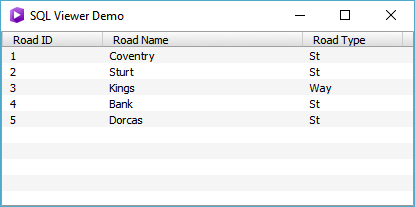
8. Including SQL Schema as an app resource
To reduce the amount of JavaScript code, you may choose to initialize a SQLite database using a SQL Schema written in SQL. For example the following initdb.sql resets the SQLite database with a new Roads database every time the app is run:
<SPAN class="keyword token">DROP</SPAN> <SPAN class="keyword token">TABLE</SPAN> <SPAN class="keyword token">IF</SPAN> <SPAN class="keyword token">EXISTS</SPAN> Roads<SPAN class="punctuation token">;</SPAN>
<SPAN class="keyword token">CREATE</SPAN> <SPAN class="keyword token">TABLE</SPAN> Roads
<SPAN class="punctuation token">(</SPAN>
RoadID <SPAN class="keyword token">INTEGER</SPAN> <SPAN class="keyword token">PRIMARY</SPAN> <SPAN class="keyword token">KEY</SPAN> AUTOINCREMENT <SPAN class="operator token">NOT</SPAN> <SPAN class="token boolean">NULL</SPAN><SPAN class="punctuation token">,</SPAN>
RoadName <SPAN class="keyword token">TEXT</SPAN><SPAN class="punctuation token">,</SPAN>
RoadType <SPAN class="keyword token">TEXT</SPAN><SPAN class="punctuation token">,</SPAN>
<SPAN class="keyword token">CHECK</SPAN> <SPAN class="punctuation token">(</SPAN>RoadType <SPAN class="operator token">IN</SPAN> <SPAN class="punctuation token">(</SPAN><SPAN class="string token">'St'</SPAN><SPAN class="punctuation token">,</SPAN> <SPAN class="string token">'Rd'</SPAN><SPAN class="punctuation token">,</SPAN> <SPAN class="string token">'Way'</SPAN><SPAN class="punctuation token">)</SPAN><SPAN class="punctuation token">)</SPAN>
<SPAN class="punctuation token">)</SPAN><SPAN class="punctuation token">;</SPAN>
<SPAN class="keyword token">INSERT</SPAN> <SPAN class="keyword token">INTO</SPAN> Roads <SPAN class="punctuation token">(</SPAN>RoadName<SPAN class="punctuation token">,</SPAN> RoadType<SPAN class="punctuation token">)</SPAN> <SPAN class="keyword token">VALUES</SPAN> <SPAN class="punctuation token">(</SPAN><SPAN class="string token">'Coventry'</SPAN><SPAN class="punctuation token">,</SPAN> <SPAN class="string token">'St'</SPAN><SPAN class="punctuation token">)</SPAN><SPAN class="punctuation token">;</SPAN>
<SPAN class="keyword token">INSERT</SPAN> <SPAN class="keyword token">INTO</SPAN> Roads <SPAN class="punctuation token">(</SPAN>RoadName<SPAN class="punctuation token">,</SPAN> RoadType<SPAN class="punctuation token">)</SPAN> <SPAN class="keyword token">VALUES</SPAN> <SPAN class="punctuation token">(</SPAN><SPAN class="string token">'Sturt'</SPAN><SPAN class="punctuation token">,</SPAN> <SPAN class="string token">'St'</SPAN><SPAN class="punctuation token">)</SPAN><SPAN class="punctuation token">;</SPAN>
<SPAN class="keyword token">INSERT</SPAN> <SPAN class="keyword token">INTO</SPAN> Roads <SPAN class="punctuation token">(</SPAN>RoadName<SPAN class="punctuation token">,</SPAN> RoadType<SPAN class="punctuation token">)</SPAN> <SPAN class="keyword token">VALUES</SPAN> <SPAN class="punctuation token">(</SPAN><SPAN class="string token">'Kings'</SPAN><SPAN class="punctuation token">,</SPAN> <SPAN class="string token">'Way'</SPAN><SPAN class="punctuation token">)</SPAN><SPAN class="punctuation token">;</SPAN>
<SPAN class="keyword token">CREATE</SPAN> <SPAN class="keyword token">INDEX</SPAN> IX_Roads_001 <SPAN class="keyword token">ON</SPAN> Roads <SPAN class="punctuation token">(</SPAN>RoadName<SPAN class="punctuation token">)</SPAN><SPAN class="punctuation token">;</SPAN>
<SPAN class="keyword token">CREATE</SPAN> <SPAN class="keyword token">INDEX</SPAN> IX_Roads_002 <SPAN class="keyword token">ON</SPAN> Roads <SPAN class="punctuation token">(</SPAN>RoadType<SPAN class="punctuation token">)</SPAN><SPAN class="punctuation token">;</SPAN><SPAN class="line-numbers-rows"><SPAN></SPAN><SPAN></SPAN><SPAN></SPAN><SPAN></SPAN><SPAN></SPAN><SPAN></SPAN><SPAN></SPAN><SPAN></SPAN><SPAN></SPAN><SPAN></SPAN><SPAN></SPAN><SPAN></SPAN><SPAN></SPAN></SPAN>
Qt Creator will recognize SQL files if you add the *.sql filter to the qmlproject file as shown here:
Files <SPAN class="punctuation token">{</SPAN>
directory<SPAN class="punctuation token">:</SPAN> <SPAN class="string token">"."</SPAN>
recursive<SPAN class="punctuation token">:</SPAN> <SPAN class="keyword token">true</SPAN>
filter<SPAN class="punctuation token">:</SPAN> <SPAN class="string token">"*.json;*.html;*.txt;*.sql"</SPAN>
<SPAN class="punctuation token">}</SPAN><SPAN class="line-numbers-rows"><SPAN></SPAN><SPAN></SPAN><SPAN></SPAN><SPAN></SPAN><SPAN></SPAN></SPAN>Place the initdb.sql file into a scripts subdirectory and use the following code to load it:
FileFolder <SPAN class="punctuation token">{</SPAN>
id<SPAN class="punctuation token">:</SPAN> scriptsFolder
url<SPAN class="punctuation token">:</SPAN> <SPAN class="string token">"scripts"</SPAN>
<SPAN class="punctuation token">}</SPAN>
Component<SPAN class="punctuation token">.</SPAN>onCompleted<SPAN class="punctuation token">:</SPAN> <SPAN class="punctuation token">{</SPAN>
dataFolder<SPAN class="punctuation token">.</SPAN><SPAN class="token function">makeFolder</SPAN><SPAN class="punctuation token">(</SPAN><SPAN class="punctuation token">)</SPAN><SPAN class="punctuation token">;</SPAN>
db<SPAN class="punctuation token">.</SPAN><SPAN class="token function">open</SPAN><SPAN class="punctuation token">(</SPAN><SPAN class="punctuation token">)</SPAN><SPAN class="punctuation token">;</SPAN>
<SPAN class="keyword token">var</SPAN> lines <SPAN class="operator token">=</SPAN> scriptsFolder<SPAN class="punctuation token">.</SPAN><SPAN class="token function">readTextFile</SPAN><SPAN class="punctuation token">(</SPAN><SPAN class="string token">"initdb.sql"</SPAN><SPAN class="punctuation token">)</SPAN><SPAN class="punctuation token">.</SPAN><SPAN class="token function">split</SPAN><SPAN class="punctuation token">(</SPAN><SPAN class="string token">";"</SPAN><SPAN class="punctuation token">)</SPAN><SPAN class="punctuation token">;</SPAN>
<SPAN class="keyword token">for</SPAN> <SPAN class="punctuation token">(</SPAN><SPAN class="keyword token">var</SPAN> i <SPAN class="operator token">=</SPAN> <SPAN class="number token">0</SPAN><SPAN class="punctuation token">;</SPAN> i <SPAN class="operator token"><</SPAN> lines<SPAN class="punctuation token">.</SPAN>length<SPAN class="punctuation token">;</SPAN> i<SPAN class="operator token">++</SPAN><SPAN class="punctuation token">)</SPAN> <SPAN class="punctuation token">{</SPAN>
<SPAN class="keyword token">var</SPAN> sql <SPAN class="operator token">=</SPAN> lines<SPAN class="punctuation token">[</SPAN>i<SPAN class="punctuation token">]</SPAN><SPAN class="punctuation token">;</SPAN>
<SPAN class="keyword token">var</SPAN> query <SPAN class="operator token">=</SPAN> db<SPAN class="punctuation token">.</SPAN><SPAN class="token function">query</SPAN><SPAN class="punctuation token">(</SPAN>sql<SPAN class="punctuation token">)</SPAN><SPAN class="punctuation token">;</SPAN>
<SPAN class="keyword token">if</SPAN> <SPAN class="punctuation token">(</SPAN>query<SPAN class="punctuation token">.</SPAN>error<SPAN class="punctuation token">)</SPAN> <SPAN class="punctuation token">{</SPAN>
console<SPAN class="punctuation token">.</SPAN><SPAN class="token function">log</SPAN><SPAN class="punctuation token">(</SPAN>JSON<SPAN class="punctuation token">.</SPAN><SPAN class="token function">stringify</SPAN><SPAN class="punctuation token">(</SPAN>query<SPAN class="punctuation token">.</SPAN>error<SPAN class="punctuation token">,</SPAN> undefined<SPAN class="punctuation token">,</SPAN> <SPAN class="number token">2</SPAN><SPAN class="punctuation token">)</SPAN><SPAN class="punctuation token">)</SPAN><SPAN class="punctuation token">;</SPAN>
<SPAN class="keyword token">continue</SPAN><SPAN class="punctuation token">;</SPAN>
<SPAN class="punctuation token">}</SPAN>
<SPAN class="punctuation token">}</SPAN>
<SPAN class="punctuation token">}</SPAN>
<SPAN class="line-numbers-rows"><SPAN></SPAN><SPAN></SPAN><SPAN></SPAN><SPAN></SPAN><SPAN></SPAN><SPAN></SPAN><SPAN></SPAN><SPAN></SPAN><SPAN></SPAN><SPAN></SPAN><SPAN></SPAN><SPAN></SPAN><SPAN></SPAN><SPAN></SPAN><SPAN></SPAN><SPAN></SPAN><SPAN></SPAN><SPAN></SPAN><SPAN></SPAN></SPAN>Note that this example recognizes we can extract SQL commands by recognize each command is terminated by a semicolon. For more sophisticated SQL Schema involving triggers we will need to adapt the loading code appropriately.
9. SQL Viewer
The "SQL Viewer" app is available for you to try which demonstrates all of the above points. You can find a "SQL Viewer" app in AppStudio:
- Launch AppStudio
- Select New App
- Click Search Icon
- Type: SQL Viewer
The "SQL Viewer" source code is also available at arcgis-appstudio-samples/SQL Viewer at v2.0 · Esri/arcgis-appstudio-samples · GitHub
10. Other AppStudio SQL Blogs
Introduction to SQL Beta in AppStudio 2.0
Using CSV files in your application
