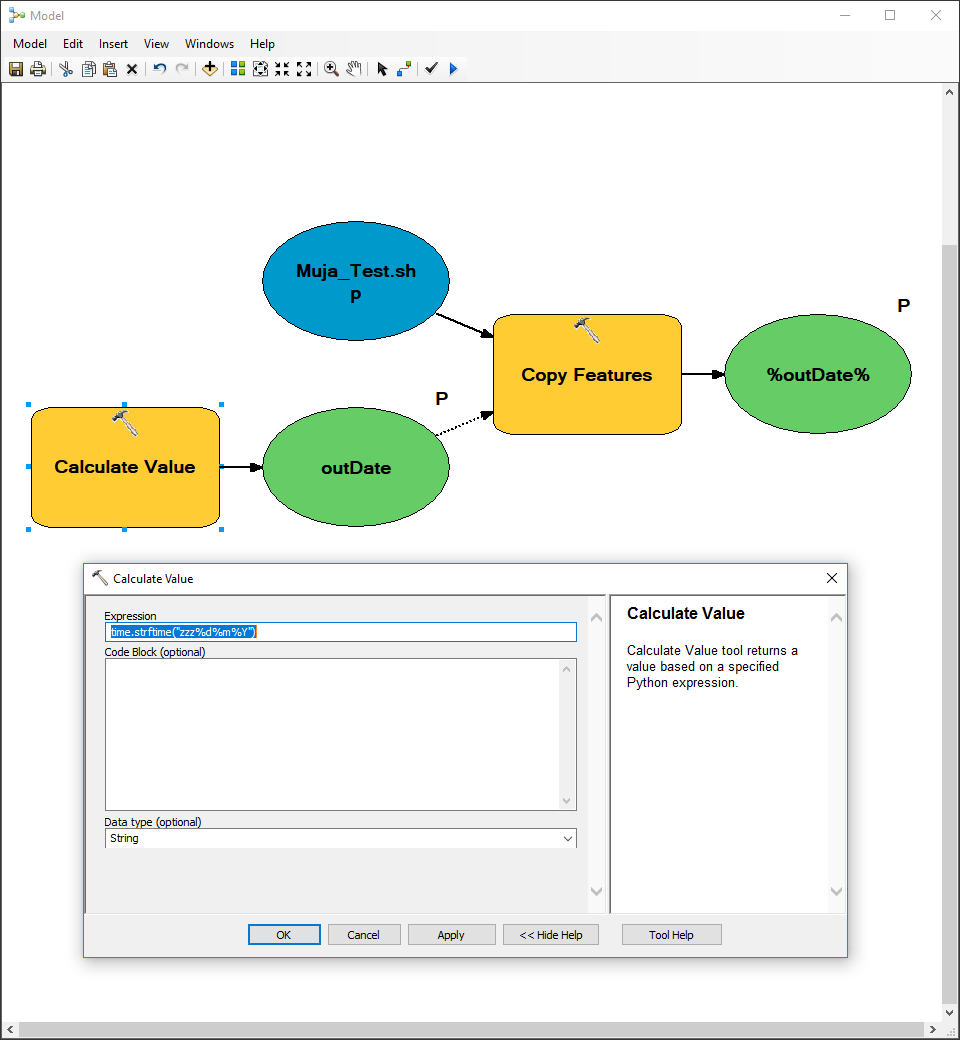
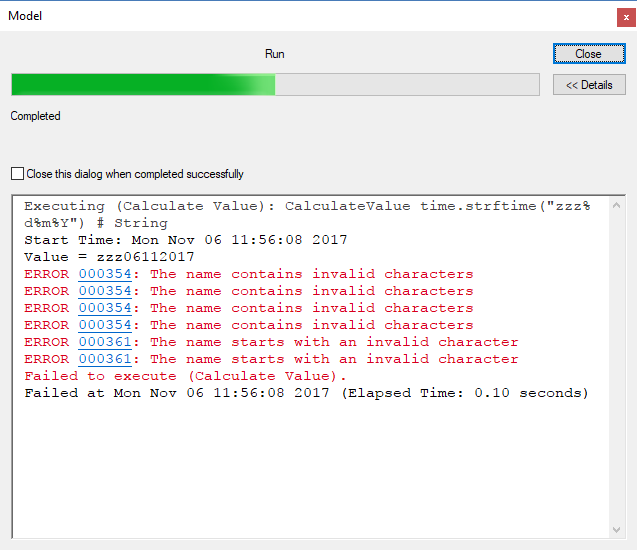
I seem to be having issues getting a String variable to work. I am attempting to get a Date (formatted as YYYYMMDD) in a String Variable which then gets used as a part of an export filename. I was getting a "1" output instead of the Date originally (and other errors) but now I am managing to get the date but also keep getting errors about incorrect naming. Can anyone tell me what is wrong? The original demo tool I used to figure this out so far (provided here) has the same issue!
Curtis is suggestion that you use the expression that he posted above in your field calculator expression rather than hardcoding the % symbols.
I use python 3.5 so I am not sure what he is expecting as output, but here is what I get
time<SPAN class="punctuation token">.</SPAN>strftime<SPAN class="punctuation token">(</SPAN>u<SPAN class="string token">"zzz{0}d{0}m{0}Y"</SPAN><SPAN class="punctuation token">.</SPAN>format<SPAN class="punctuation token">(</SPAN>chr<SPAN class="punctuation token">(</SPAN><SPAN class="number token">37</SPAN><SPAN class="punctuation token">)</SPAN><SPAN class="punctuation token">)</SPAN><SPAN class="punctuation token">)</SPAN> <SPAN class="string token">'zzz12112017'</SPAN> <SPAN class="comment token"># which appears to be day, month and year of today</SPAN><SPAN class="line-numbers-rows"><SPAN></SPAN><SPAN></SPAN><SPAN></SPAN></SPAN>
I cannot reproduce your issue @ 10.5.1. But: percent signs are significant to ModelBuilder as they delimit ModelBuilder variables. If you have a variable "d" or "m" in your model I could see that breaking things, or maybe you are using a different version of ArcGIS where the parser isn't as smart.
You may be able to avoid this issue by hiding percent signs in your time code string like this using the Python chr() function and string formatting:
time<SPAN class="punctuation token">.</SPAN>strftime<SPAN class="punctuation token">(</SPAN><SPAN class="string token">"zzz{0}d{0}m{0}Y"</SPAN><SPAN class="punctuation token">.</SPAN>format<SPAN class="punctuation token">(</SPAN>chr<SPAN class="punctuation token">(</SPAN><SPAN class="number token">37</SPAN><SPAN class="punctuation token">)</SPAN><SPAN class="punctuation token">)</SPAN><SPAN class="punctuation token">)</SPAN><SPAN class="line-numbers-rows"><SPAN></SPAN></SPAN>
Update: This is a Calculate Value expression you can use instead of what you're using, which hides the "%" from Model Builder. The strftime function will see this: "zzz%d%m%Y" (the expression chr(37) is equal to "%", which I then substituted in to the expression using the .format() method.
Here's a copy of the tool I've been testing this in. Not quite sure how to use the script you provided (pretty much a Python novice). We too are using 10.5.1 and there is only the one variable in the tool.
Great! I see where I went wrong. I just copied and pasted the expression Curits provided which was missing a bracket and I didn't notice. Worked perfectly the second time using your's Dan. Thank you both for your help!
Hi mr. Patterson,
your expression helped me but in the end i got table.xls with output name like this:
what else can i do to get output name like the "green bubble" output_value is showing?
thank you.
HelloI am having problem to add date to my fileI am getting this error in ArcPro
I am having problem to set copy features output. I tried with code here too
Les membres connectés peuvent publier, suivre les mises à jour, et plus encore. Nouveau ici ? Inscrivez-vous gratuitement.
Find useful guides, FAQs, and documents to help you navigate and make the most of Esri Community.