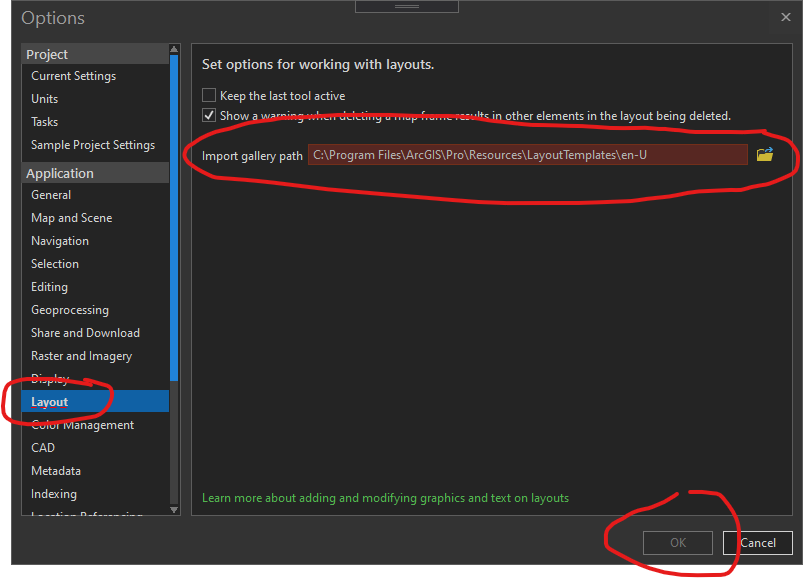
I followed the sample here ProGuide Custom settings · Esri/arcgis-pro-sdk Wiki · GitHub and have added my own add-in settings to the backstage. I've binded several properties to the UI and it works great. I have a textbox where the user can browse to a folder where our company's data exists. If the user inputs an invalid folder I wanted to change the backcolor of the textbox and set the OK button to disabled until the input is fixed. A similar thing is done with the Layout options.
Ive looked in the community samples and looked at the Pro SDK and cant find anything. Where would I add my validation logic to mimic the existing Layout options?
I have attached bundle of ProjectSettingsView mvvm code of BackStage_PropertyPage sample from Esri ArcGIS Pro samples. It works
Hi Abel,
This is the WPF stuff. Look here:
https://docs.microsoft.com/en-us/dotnet/framework/wpf/data/how-to-implement-binding-validation
Yes Im aware of the validation binding. Thank You. What I am asking is how we tap into the Pro Settings OK button to disable it when something is not valid.
You can disable OK button by setting Page IsValid property, like this:
base.IsValid = false;
Ok I am able to bind my validation rules to the textbox. It works great! Thanks!.
But now am struggling how to get that result back to the ViewModel so I can update the IsValid of the page.
My XAML looks like this
<TextBox x:Name="txtLayerDir" TextWrapping="Wrap" VerticalAlignment="Top" Margin="10,86,36,0"> <TextBox.Text> <Binding Path="MyAppDataDir" UpdateSourceTrigger="PropertyChanged"> <Binding.ValidationRules> <ui:DataPathRule/> </Binding.ValidationRules> </Binding> </TextBox.Text> </TextBox>
In the ViewModel I can initialize to False and I can see that works:
Protected Overrides Function InitializeAsync() As Task
'setup the initial validity of the Page MyBase.IsValid = False
Return Task.FromResult(0) End Function
But how do I process updates? Just cant seem to figure that one out.
Les membres connectés peuvent publier, suivre les mises à jour, et plus encore. Nouveau ici ? Inscrivez-vous gratuitement.
Find useful guides, FAQs, and documents to help you navigate and make the most of Esri Community.