Hi ,
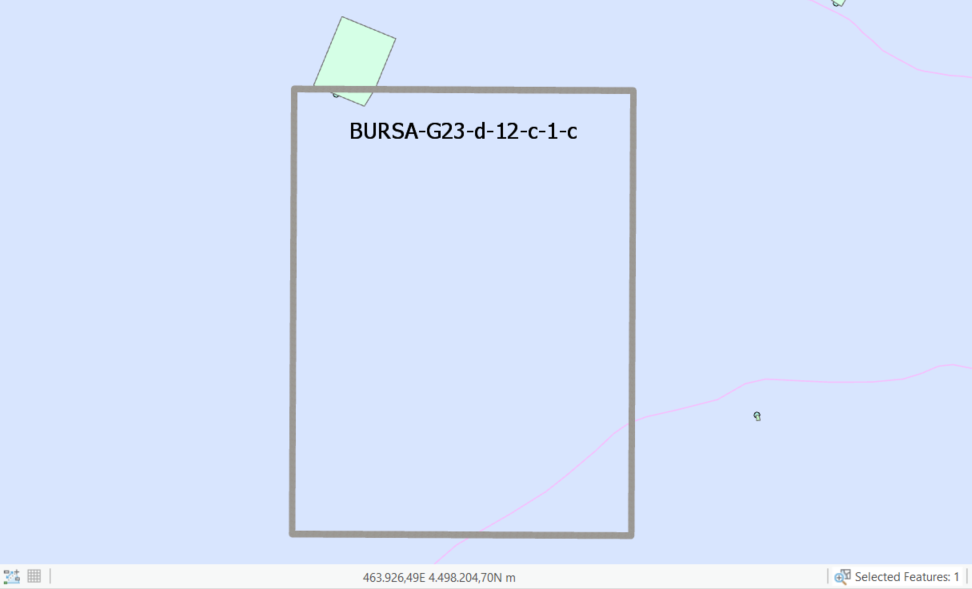
We are develope commands for arcgis pro sdk 2.2 version.We have text and polygon geometry inputs. How can we add these (text and polgon) graphically on map without annotation or feature class ? Can do it as Annotation also I can do polygon overlay (using MapView.Active.AddOverlay function) but but I want to create a graph with both polygon and te text like below in picture?How can I solve this problem?
Thaks for Helping
Here is a code snippet to create an overlay with text. This code is from a sample Map Tool:
<SPAN class="keyword token">internal</SPAN> <SPAN class="keyword token">class</SPAN> <SPAN class="token class-name">AddOverlayWithText</SPAN> <SPAN class="punctuation token">:</SPAN> MapTool <SPAN class="punctuation token">{</SPAN> <SPAN class="keyword token">private</SPAN> IDisposable _graphic <SPAN class="operator token">=</SPAN> <SPAN class="keyword token">null</SPAN><SPAN class="punctuation token">;</SPAN> <SPAN class="keyword token">private</SPAN> CIMPolygonSymbol _polygonSymbol <SPAN class="operator token">=</SPAN> <SPAN class="keyword token">null</SPAN><SPAN class="punctuation token">;</SPAN> <SPAN class="keyword token">public</SPAN> <SPAN class="token function">AddOverlayWithText</SPAN><SPAN class="punctuation token">(</SPAN><SPAN class="punctuation token">)</SPAN> <SPAN class="punctuation token">{</SPAN> IsSketchTool <SPAN class="operator token">=</SPAN> <SPAN class="keyword token">true</SPAN><SPAN class="punctuation token">;</SPAN> SketchType <SPAN class="operator token">=</SPAN> SketchGeometryType<SPAN class="punctuation token">.</SPAN>Polygon<SPAN class="punctuation token">;</SPAN> SketchOutputMode <SPAN class="operator token">=</SPAN> SketchOutputMode<SPAN class="punctuation token">.</SPAN>Map<SPAN class="punctuation token">;</SPAN> <SPAN class="punctuation token">}</SPAN> <SPAN class="keyword token">protected</SPAN> <SPAN class="keyword token">override</SPAN> <SPAN class="keyword token">async</SPAN> Task<SPAN class="operator token"><</SPAN><SPAN class="keyword token">bool</SPAN><SPAN class="operator token">></SPAN> <SPAN class="token function">OnSketchCompleteAsync</SPAN><SPAN class="punctuation token">(</SPAN>Geometry geometry<SPAN class="punctuation token">)</SPAN> <SPAN class="punctuation token">{</SPAN> <SPAN class="comment token">//Add an overlay graphic to the map view</SPAN> _polygonSymbol <SPAN class="operator token">=</SPAN> SymbolFactory<SPAN class="punctuation token">.</SPAN>Instance<SPAN class="punctuation token">.</SPAN><SPAN class="token function">ConstructPolygonSymbol</SPAN><SPAN class="punctuation token">(</SPAN>ColorFactory<SPAN class="punctuation token">.</SPAN>Instance<SPAN class="punctuation token">.</SPAN>BlackRGB<SPAN class="punctuation token">,</SPAN> SimpleFillStyle<SPAN class="punctuation token">.</SPAN>Null<SPAN class="punctuation token">,</SPAN> SymbolFactory<SPAN class="punctuation token">.</SPAN>Instance<SPAN class="punctuation token">.</SPAN><SPAN class="token function">ConstructStroke</SPAN><SPAN class="punctuation token">(</SPAN>ColorFactory<SPAN class="punctuation token">.</SPAN>Instance<SPAN class="punctuation token">.</SPAN>BlackRGB<SPAN class="punctuation token">,</SPAN> <SPAN class="number token">2.0</SPAN><SPAN class="punctuation token">,</SPAN> SimpleLineStyle<SPAN class="punctuation token">.</SPAN>Solid<SPAN class="punctuation token">)</SPAN><SPAN class="punctuation token">)</SPAN><SPAN class="punctuation token">;</SPAN> _graphic <SPAN class="operator token">=</SPAN> <SPAN class="keyword token">await</SPAN> <SPAN class="keyword token">this</SPAN><SPAN class="punctuation token">.</SPAN><SPAN class="token function">AddOverlayAsync</SPAN><SPAN class="punctuation token">(</SPAN>geometry<SPAN class="punctuation token">,</SPAN> _polygonSymbol<SPAN class="punctuation token">.</SPAN><SPAN class="token function">MakeSymbolReference</SPAN><SPAN class="punctuation token">(</SPAN><SPAN class="punctuation token">)</SPAN><SPAN class="punctuation token">)</SPAN><SPAN class="punctuation token">;</SPAN> <SPAN class="comment token">//define the text symbol</SPAN> <SPAN class="keyword token">var</SPAN> textSymbol <SPAN class="operator token">=</SPAN> <SPAN class="keyword token">new</SPAN> <SPAN class="token class-name">CIMTextSymbol</SPAN><SPAN class="punctuation token">(</SPAN><SPAN class="punctuation token">)</SPAN><SPAN class="punctuation token">;</SPAN> <SPAN class="comment token">//define the text graphic</SPAN> <SPAN class="keyword token">var</SPAN> textGraphic <SPAN class="operator token">=</SPAN> <SPAN class="keyword token">new</SPAN> <SPAN class="token class-name">CIMTextGraphic</SPAN><SPAN class="punctuation token">(</SPAN><SPAN class="punctuation token">)</SPAN><SPAN class="punctuation token">;</SPAN> <SPAN class="keyword token">await</SPAN> QueuedTask<SPAN class="punctuation token">.</SPAN><SPAN class="token function">Run</SPAN><SPAN class="punctuation token">(</SPAN><SPAN class="punctuation token">(</SPAN><SPAN class="punctuation token">)</SPAN> <SPAN class="operator token">=</SPAN><SPAN class="operator token">></SPAN> <SPAN class="punctuation token">{</SPAN> <SPAN class="comment token">//Create a simple text symbol</SPAN> textSymbol <SPAN class="operator token">=</SPAN> SymbolFactory<SPAN class="punctuation token">.</SPAN>Instance<SPAN class="punctuation token">.</SPAN><SPAN class="token function">ConstructTextSymbol</SPAN><SPAN class="punctuation token">(</SPAN>ColorFactory<SPAN class="punctuation token">.</SPAN>Instance<SPAN class="punctuation token">.</SPAN>BlackRGB<SPAN class="punctuation token">,</SPAN> <SPAN class="number token">8.5</SPAN><SPAN class="punctuation token">,</SPAN> <SPAN class="string token">"Corbel"</SPAN><SPAN class="punctuation token">,</SPAN> <SPAN class="string token">"Regular"</SPAN><SPAN class="punctuation token">)</SPAN><SPAN class="punctuation token">;</SPAN> <SPAN class="comment token">//Sets the geometry of the text graphic</SPAN> textGraphic<SPAN class="punctuation token">.</SPAN>Shape <SPAN class="operator token">=</SPAN> geometry<SPAN class="punctuation token">;</SPAN> <SPAN class="comment token">//Sets the text string to use in the text graphic</SPAN> textGraphic<SPAN class="punctuation token">.</SPAN>Text <SPAN class="operator token">=</SPAN> <SPAN class="string token">"This is my polygon"</SPAN><SPAN class="punctuation token">;</SPAN> <SPAN class="comment token">//Sets symbol to use to draw the text graphic</SPAN> textGraphic<SPAN class="punctuation token">.</SPAN>Symbol <SPAN class="operator token">=</SPAN> textSymbol<SPAN class="punctuation token">.</SPAN><SPAN class="token function">MakeSymbolReference</SPAN><SPAN class="punctuation token">(</SPAN><SPAN class="punctuation token">)</SPAN><SPAN class="punctuation token">;</SPAN> <SPAN class="comment token">//Draw the overlay text graphic</SPAN> _graphic <SPAN class="operator token">=</SPAN> <SPAN class="keyword token">this</SPAN><SPAN class="punctuation token">.</SPAN>ActiveMapView<SPAN class="punctuation token">.</SPAN><SPAN class="token function">AddOverlay</SPAN><SPAN class="punctuation token">(</SPAN>textGraphic<SPAN class="punctuation token">)</SPAN><SPAN class="punctuation token">;</SPAN> <SPAN class="punctuation token">}</SPAN><SPAN class="punctuation token">)</SPAN><SPAN class="punctuation token">;</SPAN> <SPAN class="keyword token">return</SPAN> <SPAN class="keyword token">true</SPAN><SPAN class="punctuation token">;</SPAN> <SPAN class="punctuation token">}</SPAN> <SPAN class="punctuation token">}</SPAN><SPAN class="line-numbers-rows"><SPAN></SPAN><SPAN></SPAN><SPAN></SPAN><SPAN></SPAN><SPAN></SPAN><SPAN></SPAN><SPAN></SPAN><SPAN></SPAN><SPAN></SPAN><SPAN></SPAN><SPAN></SPAN><SPAN></SPAN><SPAN></SPAN><SPAN></SPAN><SPAN></SPAN><SPAN></SPAN><SPAN></SPAN><SPAN></SPAN><SPAN></SPAN><SPAN></SPAN><SPAN></SPAN><SPAN></SPAN><SPAN></SPAN><SPAN></SPAN><SPAN></SPAN><SPAN></SPAN><SPAN></SPAN><SPAN></SPAN><SPAN></SPAN><SPAN></SPAN><SPAN></SPAN><SPAN></SPAN><SPAN></SPAN><SPAN></SPAN><SPAN></SPAN><SPAN></SPAN><SPAN></SPAN><SPAN></SPAN><SPAN></SPAN></SPAN>
This code creates an overlay like this:
Thanks for halping Uma,
I had a final question about graphic overlay. Are there any graphic Layer (Graphic Container) for adding overlay in Arcgis pro SDK? Can we find graphic overlay after save and close/open pro document (.aprx file) ? Can we use it like graphic Element in ArcObject (Finds element from GraphicContainer and use it) or are there any solution to save overlay as graphic?
Thaks for helping.
Hi Taner
No, the graphics are not persisted.
Thanks
Uma
Hi Umma,
I can display mentioned above graphics on layout but I can not share (export pdf, jpg.etc) ?How can we solve this problem because our customers also want to see these graphics (export pdf., jpg. etc. files).
Here are above pictures.
Layout picture:
Export pdf file picture:
Thanks for helping.
@UmaHarano Do you have to create a drawn polygon for this to work? Is there anyway to just add it automatically without the sketch part?
Hi,
ArcGIS Pro now supports GraphicsLayers. So graphics such as this can be drawn using GraphicsLayer and GraphicElements. GraphicElements can be created with or without sketch tools.
Here are some wiki pages that help shed light on this:
ProConcepts: Graphics Layers
ProSnippets: GraphicsLayers
Sample
Les membres connectés peuvent publier, suivre les mises à jour, et plus encore. Nouveau ici ? Inscrivez-vous gratuitement.
Find useful guides, FAQs, and documents to help you navigate and make the most of Esri Community.