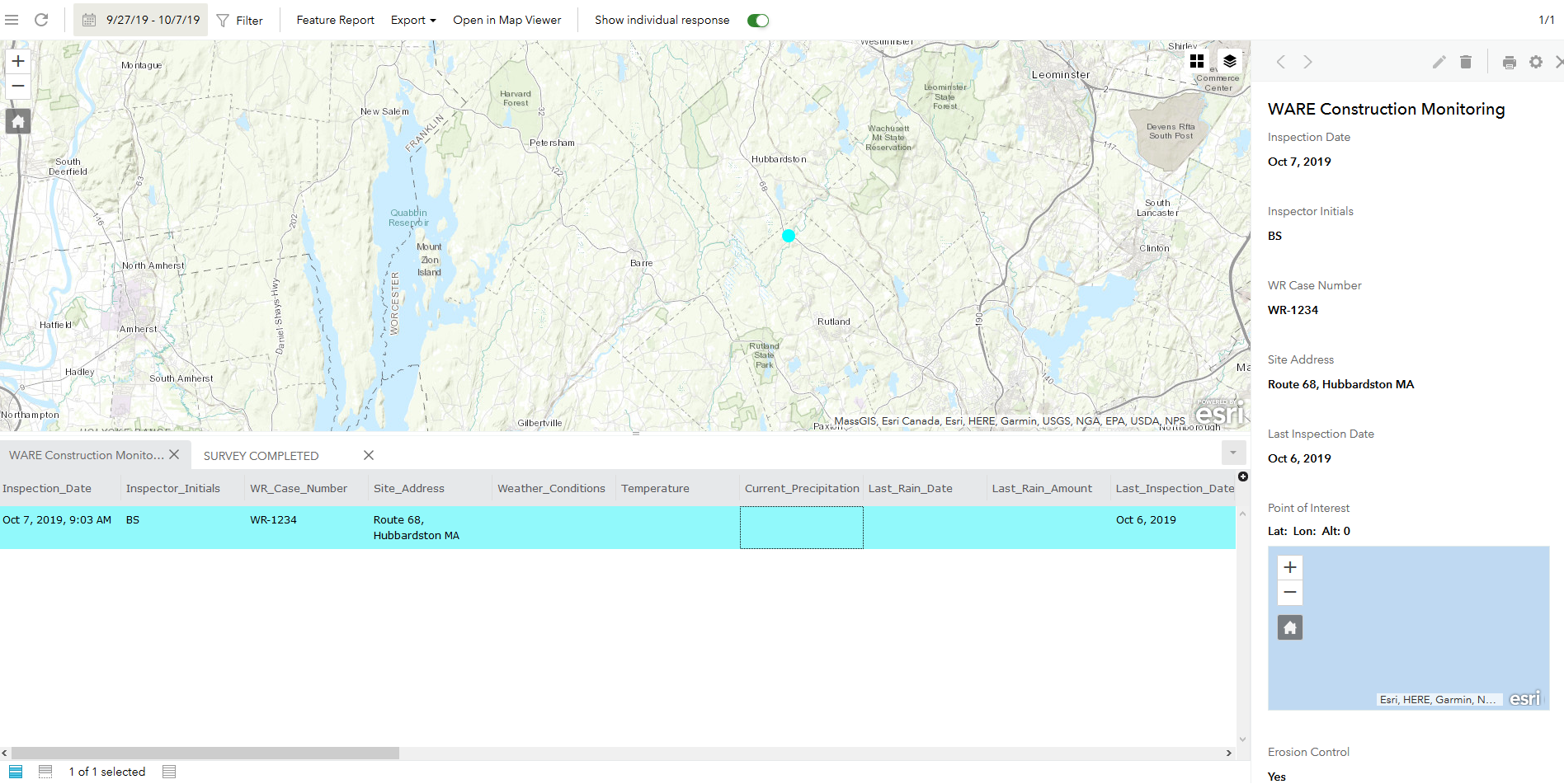
I have a survey that I created in Survey123 Connect (v 3.6) on top of a hosted feature service. I am able to collect data in the survey successfully, and the geopoint shows up in the proper location if I open the feature service in a new web map, and when I view the preview map from the Data tab of the Survey (accessed via the Survey123 website). When I click on a feature to select it in the table on the Data page, and the "print preview" pane opens along the right side of the screen, the map preview shows a location of 0,0 and the map is centered in the ocean off the coast of Africa.
Within my custom report template for this survey, I also have the map preview embedded in the report and it also shows the map as 0,0 with the map centered off the coast of Africa when I export my feature to a report.
I've been unsuccessful in my own testing to fix this and would appreciate any suggestions as to what is going wrong here.
I've pasted a screen shot of the 'Data' page - you can see the point in the correct location on the map, however within the 'preview' pane on the right you can see the map showing a 0,0 location.
Thanks,
Erica