I'm having issues using Python in ArcGIS Pro. I'm using Pro 2.2.4 and Spyder (Python 3.6). I can't get 'arcpy.mp.ArcGISProject' to read my Pro project. I'm running a script to overwrite vector tile packages written by Kelly Gerrow. I added some code to create a vector tile package that worked just fine until this week. Now whenever I try to point to a Pro project it fails with the error below:

I am able to interact with my Pro Project in the python window using 'CURRENT' but not with the arcpy.mp function.
Here is the error I get when trying to create a vector package using the Python window and the 'CURRENT' project:
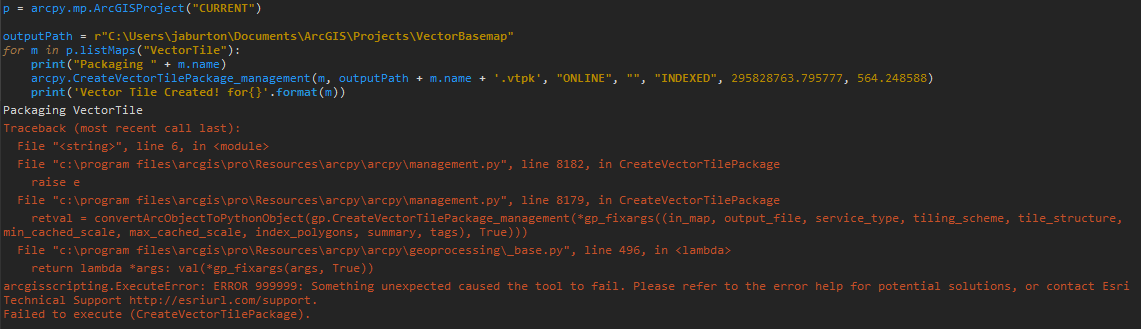
Has anyone seen this before? I'm stumped. Dan Patterson Joe Borgione

Not much of a fan of users directory either, but that install comes free of charge with the ESRI local gov't solutions package. (The dashes '-' are particularly troublesome for me...) Just for fun:
p <SPAN class="operator token">=</SPAN> arcpy<SPAN class="punctuation token">.</SPAN>mp<SPAN class="punctuation token">.</SPAN>ArcGISProject<SPAN class="punctuation token">(</SPAN>r<SPAN class="string token">'C:\Dans_Folder\copy.aprx'</SPAN><SPAN class="punctuation token">)</SPAN> <SPAN class="keyword token">for</SPAN> m <SPAN class="keyword token">in</SPAN> p<SPAN class="punctuation token">.</SPAN>listMaps<SPAN class="punctuation token">(</SPAN><SPAN class="punctuation token">)</SPAN><SPAN class="punctuation token">:</SPAN> <SPAN class="keyword token">print</SPAN><SPAN class="punctuation token">(</SPAN>m<SPAN class="punctuation token">.</SPAN>name<SPAN class="punctuation token">)</SPAN> Schematic Local Government Scene Map Map1 Basic Local Government Scene Realistic Local Government Scene<SPAN class="line-numbers-rows"><SPAN></SPAN><SPAN></SPAN><SPAN></SPAN><SPAN></SPAN><SPAN></SPAN><SPAN></SPAN><SPAN></SPAN><SPAN></SPAN><SPAN></SPAN><SPAN></SPAN></SPAN>
This works for me in spyder as well as the python window in Pro. Need to look at James' install, and maybe reinstall.
Something isn't right...
I never use Users folder (we have an expression for that folder).
And as for the rest of the file path... can we squeeze any more punctuation in there!
In a 'normal', simple path. No problem
Try putting the file in a different location.
pth <SPAN class="operator token">=</SPAN> r<SPAN class="string token">"C:\Git_Dan\arraytools\array_tools_testing\array_tools.aprx"</SPAN> <SPAN class="keyword token">import</SPAN> arcpy p <SPAN class="operator token">=</SPAN> arcpy<SPAN class="punctuation token">.</SPAN>mp<SPAN class="punctuation token">.</SPAN>ArcGISProject<SPAN class="punctuation token">(</SPAN>pth<SPAN class="punctuation token">)</SPAN> dir<SPAN class="punctuation token">(</SPAN>p<SPAN class="punctuation token">)</SPAN> Out<SPAN class="punctuation token">[</SPAN><SPAN class="number token">275</SPAN><SPAN class="punctuation token">]</SPAN><SPAN class="punctuation token">:</SPAN> <SPAN class="punctuation token">[</SPAN><SPAN class="string token">'__class__'</SPAN><SPAN class="punctuation token">,</SPAN> <SPAN class="string token">'__delattr__'</SPAN><SPAN class="punctuation token">,</SPAN> <SPAN class="string token">'__dict__'</SPAN><SPAN class="punctuation token">,</SPAN> <SPAN class="string token">'__dir__'</SPAN><SPAN class="punctuation token">,</SPAN> <SPAN class="string token">'__doc__'</SPAN><SPAN class="punctuation token">,</SPAN> <SPAN class="string token">'__eq__'</SPAN><SPAN class="punctuation token">,</SPAN> <SPAN class="string token">'__format__'</SPAN><SPAN class="punctuation token">,</SPAN> <SPAN class="punctuation token">.</SPAN><SPAN class="punctuation token">.</SPAN><SPAN class="punctuation token">.</SPAN><SPAN class="punctuation token">.</SPAN> snip<SPAN class="punctuation token">.</SPAN><SPAN class="punctuation token">.</SPAN><SPAN class="punctuation token">.</SPAN><SPAN class="punctuation token">.</SPAN> <SPAN class="string token">'activeMap'</SPAN><SPAN class="punctuation token">,</SPAN> <SPAN class="string token">'dateSaved'</SPAN><SPAN class="punctuation token">,</SPAN> <SPAN class="string token">'defaultGeodatabase'</SPAN><SPAN class="punctuation token">,</SPAN> <SPAN class="string token">'defaultToolbox'</SPAN><SPAN class="punctuation token">,</SPAN> <SPAN class="string token">'documentVersion'</SPAN><SPAN class="punctuation token">,</SPAN> <SPAN class="string token">'filePath'</SPAN><SPAN class="punctuation token">,</SPAN> <SPAN class="string token">'homeFolder'</SPAN><SPAN class="punctuation token">,</SPAN> <SPAN class="string token">'importDocument'</SPAN><SPAN class="punctuation token">,</SPAN> <SPAN class="string token">'listBrokenDataSources'</SPAN><SPAN class="punctuation token">,</SPAN> <SPAN class="string token">'listColorRamps'</SPAN><SPAN class="punctuation token">,</SPAN> <SPAN class="string token">'listLayouts'</SPAN><SPAN class="punctuation token">,</SPAN> <SPAN class="string token">'listMaps'</SPAN><SPAN class="punctuation token">,</SPAN> <SPAN class="string token">'listReports'</SPAN><SPAN class="punctuation token">,</SPAN> <SPAN class="string token">'save'</SPAN><SPAN class="punctuation token">,</SPAN> <SPAN class="string token">'saveACopy'</SPAN><SPAN class="punctuation token">,</SPAN> <SPAN class="string token">'updateConnectionProperties'</SPAN><SPAN class="punctuation token">]</SPAN><SPAN class="line-numbers-rows"><SPAN></SPAN><SPAN></SPAN><SPAN></SPAN><SPAN></SPAN><SPAN></SPAN><SPAN></SPAN><SPAN></SPAN><SPAN></SPAN><SPAN></SPAN><SPAN></SPAN><SPAN></SPAN><SPAN></SPAN><SPAN></SPAN></SPAN>
Spyder latest version 3.3.2
python 3.6.6 64 bit
ArcGIS PRO Beta 2.3 (although that doesn't make a difference)
To further elaborate: when I use the arcpy.mp.ArcGISProject() method as shown in James' PythonError.png path to a aprx file on my computer, it works when I run it in a python window. But I get the same error when I run it in a spyder window....
<SPAN class="keyword token">import</SPAN> arcpy p <SPAN class="operator token">=</SPAN> arcpy<SPAN class="punctuation token">.</SPAN>mp<SPAN class="punctuation token">.</SPAN>ArcGISProject<SPAN class="punctuation token">(</SPAN>r<SPAN class="string token">'C:\Users\JBorgione\Documents\ArcGIS\Packages\LocalGovernment3DBasemaps_F9C2F2D1-1C82-4CB8-B571-1E74A1281032\p20\copy.arpx'</SPAN><SPAN class="punctuation token">)</SPAN> <SPAN class="comment token">##### error below #####</SPAN> Traceback <SPAN class="punctuation token">(</SPAN>most recent call last<SPAN class="punctuation token">)</SPAN><SPAN class="punctuation token">:</SPAN> File <SPAN class="string token">"<ipython-input-25-10564330aca1>"</SPAN><SPAN class="punctuation token">,</SPAN> line <SPAN class="number token">1</SPAN><SPAN class="punctuation token">,</SPAN> <SPAN class="keyword token">in</SPAN> <SPAN class="operator token"><</SPAN>module<SPAN class="operator token">></SPAN> p <SPAN class="operator token">=</SPAN> arcpy<SPAN class="punctuation token">.</SPAN>mp<SPAN class="punctuation token">.</SPAN>ArcGISProject<SPAN class="punctuation token">(</SPAN>r<SPAN class="string token">'C:\Users\JBorgione\Documents\ArcGIS\Packages\LocalGovernment3DBasemaps_F9C2F2D1-1C82-4CB8-B571-1E74A1281032\p20\copy.arpx'</SPAN><SPAN class="punctuation token">)</SPAN> File <SPAN class="string token">"C:\Program Files\ArcGIS\Pro\Resources\ArcPy\arcpy\_mp.py"</SPAN><SPAN class="punctuation token">,</SPAN> line <SPAN class="number token">299</SPAN><SPAN class="punctuation token">,</SPAN> <SPAN class="keyword token">in</SPAN> __init__ self<SPAN class="punctuation token">.</SPAN>_arc_object <SPAN class="operator token">=</SPAN> arcgisscripting<SPAN class="punctuation token">.</SPAN>_mapping<SPAN class="punctuation token">.</SPAN>ArcGISProject<SPAN class="punctuation token">(</SPAN><SPAN class="operator token">*</SPAN>gp_fixargs<SPAN class="punctuation token">(</SPAN><SPAN class="punctuation token">(</SPAN>aprx_path<SPAN class="punctuation token">,</SPAN><SPAN class="punctuation token">)</SPAN><SPAN class="punctuation token">,</SPAN> <SPAN class="token boolean">True</SPAN><SPAN class="punctuation token">)</SPAN><SPAN class="punctuation token">)</SPAN> OSError<SPAN class="punctuation token">:</SPAN> C<SPAN class="punctuation token">:</SPAN>\Users\JBorgione\Documents\ArcGIS\Packages\LocalGovernment3DBasemaps_F9C2F2D1<SPAN class="number token">-1C82</SPAN><SPAN class="operator token">-</SPAN><SPAN class="number token">4CB8</SPAN><SPAN class="operator token">-</SPAN>B571<SPAN class="number token">-1E74A1281032</SPAN>\p20\copy<SPAN class="punctuation token">.</SPAN>arpx<SPAN class="line-numbers-rows"><SPAN></SPAN><SPAN></SPAN><SPAN></SPAN><SPAN></SPAN><SPAN></SPAN><SPAN></SPAN><SPAN></SPAN><SPAN></SPAN><SPAN></SPAN><SPAN></SPAN><SPAN></SPAN><SPAN></SPAN><SPAN></SPAN><SPAN></SPAN><SPAN></SPAN></SPAN>
Not sure what the OSError is all about. I can set a variable that paths to the same file just fine in spyder:
file <SPAN class="operator token">=</SPAN> r<SPAN class="string token">'C:\Users\JBorgione\Documents\ArcGIS\Packages\LocalGovernment3DBasemaps_F9C2F2D1-1C82-4CB8-B571-1E74A1281032\p20\copy.arpx'</SPAN> file <SPAN class="string token">'C:\\Users\\JBorgione\\Documents\\ArcGIS\\Packages\\LocalGovernment3DBasemaps_F9C2F2D1-1C82-4CB8-B571-1E74A1281032\\p20\\copy.arpx'</SPAN> <SPAN class="line-numbers-rows"><SPAN></SPAN><SPAN></SPAN><SPAN></SPAN><SPAN></SPAN></SPAN>
As James mentioned, this came to us in a script from ESRI, and we are trying to get to work....
Dan Patterson
Les membres connectés peuvent publier, suivre les mises à jour, et plus encore. Nouveau ici ? Inscrivez-vous gratuitement.
Find useful guides, FAQs, and documents to help you navigate and make the most of Esri Community.