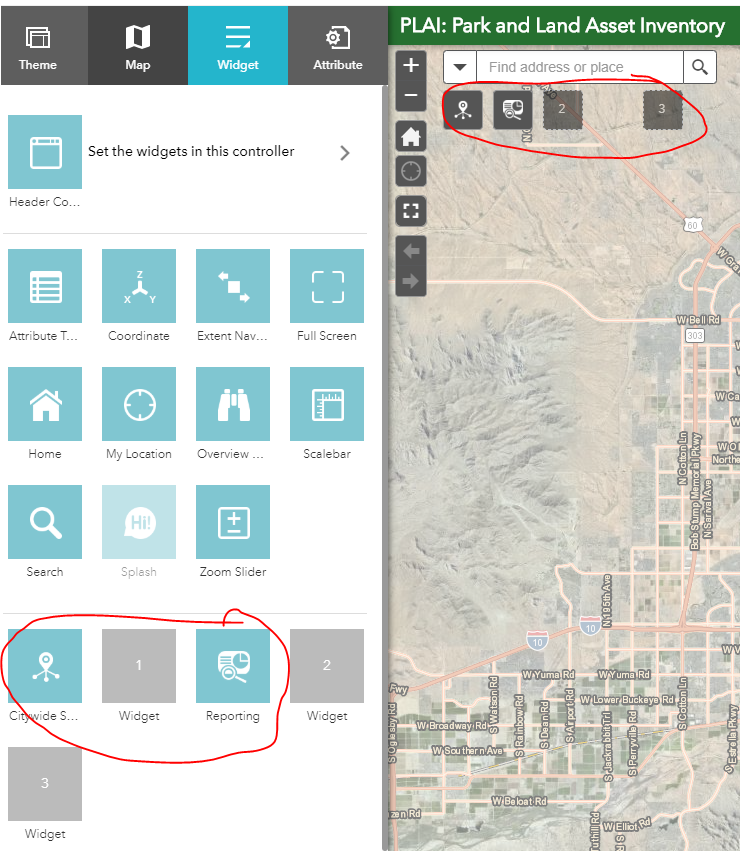
I'm using the Foldable Theme in AGOL WebApp Builder and the widget arrangement under the search bar has gotten glitchy. The location of the widget in the control panel doesn't align with how they appear on the app. Its problematic with adding new ones and editing existing widget settings. Has anyone experienced this/have solutions?
Logan,
This is normally the result of someone manually editing the main config.json file outside of the WAB UI. The fix is fairly simple though. In the apps main config.json open it in a editor and find the first widget with a "placeholderIndex". The first one should have a "position" of "left" 55 then each subsequent one should have a left +50
Strange.. That is why I said normally. Either way my advice is still the correct fix.
I actually have not modified the json, I have only worked through the Web App Builder interface.
Les membres connectés peuvent publier, suivre les mises à jour, et plus encore. Nouveau ici ? Inscrivez-vous gratuitement.
Find useful guides, FAQs, and documents to help you navigate and make the most of Esri Community.