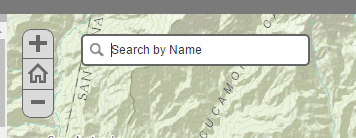
I'm working in the latest beta release of the shortlist storymap and would like to add a search box / geocoder to the map. I'm sure this is doable but I'm not sure how. I added by geocoding service to the config.js. I'm not a developer and am not sure where to look next to to enable the functionality. Similar to this
-Melissa
Hi Melissa,
In the custom-scripts.js file, use this:
<SPAN class="token function">define</SPAN><SPAN class="punctuation token">(</SPAN><SPAN class="punctuation token">[</SPAN><SPAN class="string token">"dojo/topic"</SPAN><SPAN class="punctuation token">,</SPAN> <SPAN class="string token">"esri/dijit/Search"</SPAN><SPAN class="punctuation token">,</SPAN><SPAN class="punctuation token">]</SPAN><SPAN class="punctuation token">,</SPAN> <SPAN class="keyword token">function</SPAN><SPAN class="punctuation token">(</SPAN>topic<SPAN class="punctuation token">,</SPAN> Search<SPAN class="punctuation token">)</SPAN> <SPAN class="punctuation token">{</SPAN> <SPAN class="comment token">/* * Custom Javascript to be executed while the application is initializing goes here */</SPAN> <SPAN class="comment token">// The application is ready</SPAN> topic<SPAN class="punctuation token">.</SPAN><SPAN class="token function">subscribe</SPAN><SPAN class="punctuation token">(</SPAN><SPAN class="string token">"tpl-ready"</SPAN><SPAN class="punctuation token">,</SPAN> <SPAN class="keyword token">function</SPAN><SPAN class="punctuation token">(</SPAN><SPAN class="punctuation token">)</SPAN><SPAN class="punctuation token">{</SPAN> <SPAN class="comment token">/* * Custom Javascript to be executed when the application is ready goes here */</SPAN> <SPAN class="keyword token">var</SPAN> search <SPAN class="operator token">=</SPAN> <SPAN class="keyword token">new</SPAN> <SPAN class="token class-name">Search</SPAN><SPAN class="punctuation token">(</SPAN><SPAN class="punctuation token">{</SPAN> map<SPAN class="punctuation token">:</SPAN> app<SPAN class="punctuation token">.</SPAN>map <SPAN class="punctuation token">}</SPAN><SPAN class="punctuation token">,</SPAN> <SPAN class="string token">"search"</SPAN><SPAN class="punctuation token">)</SPAN><SPAN class="punctuation token">;</SPAN> search<SPAN class="punctuation token">.</SPAN><SPAN class="token function">startup</SPAN><SPAN class="punctuation token">(</SPAN><SPAN class="punctuation token">)</SPAN><SPAN class="punctuation token">;</SPAN> <SPAN class="punctuation token">}</SPAN><SPAN class="punctuation token">)</SPAN><SPAN class="punctuation token">;</SPAN> <SPAN class="punctuation token">}</SPAN><SPAN class="punctuation token">)</SPAN><SPAN class="punctuation token">;</SPAN><SPAN class="line-numbers-rows"><SPAN></SPAN><SPAN></SPAN><SPAN></SPAN><SPAN></SPAN><SPAN></SPAN><SPAN></SPAN><SPAN></SPAN><SPAN></SPAN><SPAN></SPAN><SPAN></SPAN><SPAN></SPAN><SPAN></SPAN><SPAN></SPAN><SPAN></SPAN><SPAN></SPAN><SPAN></SPAN></SPAN>
-Mark
This is not currently built into the Shortlist app, but is something we look to add in the future.
To add it yourself, Esri's JS API has a nice sample showing how it can be implemented here: Search basic | ArcGIS API for JavaScript 3.19
Darn! Yeah I saw this sample however I couldn't figure out how to get it to work. I will have to try that again.
Thanks -Melissa
Hi Mark I was able to add the search widget however it doesn't appear to search anything. I am seeing a defineAlreadyDefined error. Do you have any clues on how I might fix this?
Thanks Mark that did it!
Hi Mark, the story is coming along nicely thanks to your help however one more question.
1. I'm trying to apply my one geocode service and have changed it in the Config.js however it still appears to use the ESRI World location service. Any ideas???
Have a look at the geocoder construction method, there is a geocoders parameter you can use to add your own. Geocoder | API Reference | ArcGIS API for JavaScript 3.19
Hi Mark,
Thank you for pointing me in the right direction. I believe I have added the geocoders to the custom-script.js
...........
define(["dojo/topic", "esri/dijit/Search", "esri/layers/FeatureLayer", "esri/InfoTemplate", "esri/dijit/Geocoder", "esri/tasks/locator"], function (topic, Search, FeatureLayer, InfoTemplate, Geocoder, locator) { /* * Custom Javascript to be executed while the application is initializing goes here */
// The application is ready topic.subscribe("tpl-ready", function () { /* * Custom Javascript to be executed when the application is ready goes here */ var search = new Search({ enableButtonMode: false, //this enables the search widget to display as a single button enableLabel: false, enableInfoWindow: true, showInfoWindowOnSelect: true, map: app.map }, "search");
var sources = search.get("sources");
//Push the sources used to search, by default the ArcGIS Online World geocoder is included. In addition there is a feature layer of US congressional districts. The districts search is set up to find the "DISTRICTID". Also, a feature layer of senator information is set up to find based on the senator name.
sources.push({ featureLayer: new FeatureLayer("http://anrmaps.vermont.gov/arcgis/rest/services/map_services/ACCD_Tourism/FeatureServer/8"), searchFields: ["name"], displayField: "name", exactMatch: false, outFields: ["name"], name: "Roadside Historic Markers", placeholder: "Vermont at Cedar Creek", maxResults: 6, maxSuggestions: 6,
//Create an InfoTemplate and include three fields infoTemplate: new InfoTemplate("name", "location: ${location}</br><a href=${pic_url} target=_blank;'></a>"), enableSuggestions: true, minCharacters: 0 });
var geocoder = [{ url: "http://maps.vcgi.vermont.gov/arcgis/rest/services/EGC_services/GCS_E911_COMPOSITE_SP/GeocodeServer",name: "E911 Address", singleLineFieldName: "Single Line Input" }]; var geocoder = new Geocoder({ map: map, geocoders: geocoders, arcgisGeocoder: false }); //Set the sources above to the search widget search.set("sources", sources);
search.startup(); });});
However I am still getting the ESRI World Geocoder
Can my geocode service show up there instead?
Les membres connectés peuvent publier, suivre les mises à jour, et plus encore. Nouveau ici ? Inscrivez-vous gratuitement.
Find useful guides, FAQs, and documents to help you navigate and make the most of Esri Community.