I'm using ArcGIS JS 4.6.
I can't get images to display in my popups on mobile devices when using Chrome, neither iOS or Android Chrome browsers will work. Safari on iOS works fine.
When I inspect the DOM while running the webpage in the Chrome device emulator as iPhone 6/7/8 I see the attributes of the img tag as this:
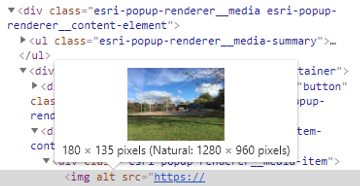
But doing this for Galaxy S5 gives this:
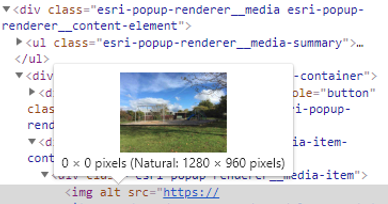
Notice the size here is 0 x 0 pixels, but the one that is working properly is 180 x 135 pixels.
This is my code for the popup template content property
<SPAN class="keyword token">function</SPAN> <SPAN class="token function">getPlayGroundPopupContent</SPAN><SPAN class="punctuation token">(</SPAN>feature<SPAN class="punctuation token">)</SPAN> <SPAN class="punctuation token">{</SPAN>
<SPAN class="keyword token">var</SPAN> retVal <SPAN class="operator token">=</SPAN> <SPAN class="punctuation token">[</SPAN><SPAN class="punctuation token">]</SPAN><SPAN class="punctuation token">;</SPAN>
<SPAN class="keyword token">var</SPAN> assetId <SPAN class="operator token">=</SPAN> feature<SPAN class="punctuation token">.</SPAN>graphic<SPAN class="punctuation token">.</SPAN>attributes<SPAN class="punctuation token">.</SPAN>assetId<SPAN class="punctuation token">;</SPAN>
_siteImage <SPAN class="operator token">=</SPAN> <SPAN class="string token"><SPAN>"</SPAN><A class="jive-link-external-small" href="https://community.esri.com/external-link.jspa?url=https%3A%2F%2F...%2Fmaps%2Fplaygrounds%2Fimages%2F" target="_blank">https://.../maps/playgrounds/images/</A><SPAN>"</SPAN></SPAN> <SPAN class="operator token">+</SPAN> assetId <SPAN class="operator token">+</SPAN> <SPAN class="string token">".jpg"</SPAN><SPAN class="punctuation token">;</SPAN>
<SPAN class="keyword token">var</SPAN> text<SPAN class="punctuation token">;</SPAN>
text <SPAN class="operator token">=</SPAN> <SPAN class="punctuation token">{</SPAN>
type<SPAN class="punctuation token">:</SPAN> <SPAN class="string token">"text"</SPAN><SPAN class="punctuation token">,</SPAN>
text<SPAN class="punctuation token">:</SPAN> <SPAN class="string token">"<span class='playgrounds-expression-toilet'>{expression/toilet}</span></br>{playEquip}"</SPAN>
<SPAN class="punctuation token">}</SPAN><SPAN class="punctuation token">;</SPAN>
<SPAN class="keyword token">var</SPAN> media <SPAN class="operator token">=</SPAN> <SPAN class="punctuation token">{</SPAN>
type<SPAN class="punctuation token">:</SPAN> <SPAN class="string token">"media"</SPAN><SPAN class="punctuation token">,</SPAN>
mediaInfos<SPAN class="punctuation token">:</SPAN> <SPAN class="punctuation token">[</SPAN><SPAN class="punctuation token">{</SPAN>
type<SPAN class="punctuation token">:</SPAN> <SPAN class="string token">"image"</SPAN><SPAN class="punctuation token">,</SPAN>
value<SPAN class="punctuation token">:</SPAN> <SPAN class="punctuation token">{</SPAN>
sourceURL<SPAN class="punctuation token">:</SPAN> <SPAN class="string token"><SPAN>"</SPAN><A class="jive-link-external-small" href="https://community.esri.com/external-link.jspa?url=https%3A%2F%2F...%2Fmaps%2Fplaygrounds%2Fimages%2F" target="_blank">https://.../maps/playgrounds/images/</A><SPAN>"</SPAN></SPAN> <SPAN class="operator token">+</SPAN> assetId <SPAN class="operator token">+</SPAN> <SPAN class="string token">".jpg"</SPAN>
<SPAN class="punctuation token">}</SPAN>
<SPAN class="punctuation token">}</SPAN><SPAN class="punctuation token">]</SPAN>
<SPAN class="punctuation token">}</SPAN><SPAN class="punctuation token">;</SPAN>
retVal<SPAN class="punctuation token">.</SPAN><SPAN class="token function">push</SPAN><SPAN class="punctuation token">(</SPAN>text<SPAN class="punctuation token">)</SPAN><SPAN class="punctuation token">;</SPAN>
retVal<SPAN class="punctuation token">.</SPAN><SPAN class="token function">push</SPAN><SPAN class="punctuation token">(</SPAN>media<SPAN class="punctuation token">)</SPAN><SPAN class="punctuation token">;</SPAN>
<SPAN class="keyword token">return</SPAN> retVal<SPAN class="punctuation token">;</SPAN>
<SPAN class="punctuation token">}</SPAN><SPAN class="line-numbers-rows"><SPAN></SPAN><SPAN></SPAN><SPAN></SPAN><SPAN></SPAN><SPAN></SPAN><SPAN></SPAN><SPAN></SPAN><SPAN></SPAN><SPAN></SPAN><SPAN></SPAN><SPAN></SPAN><SPAN></SPAN><SPAN></SPAN><SPAN></SPAN><SPAN></SPAN><SPAN></SPAN><SPAN></SPAN><SPAN></SPAN><SPAN></SPAN><SPAN></SPAN><SPAN></SPAN><SPAN></SPAN><SPAN></SPAN><SPAN></SPAN><SPAN></SPAN><SPAN></SPAN></SPAN>Updated
I've solved this problem. My stylesheet was hiding this element in a media query.
This was the css:
<SPAN class="selector token">.esri-popup-renderer__content-element:last-child</SPAN> <SPAN class="punctuation token">{</SPAN>
<SPAN class="property token">display</SPAN><SPAN class="punctuation token">:</SPAN> none<SPAN class="punctuation token">;</SPAN>
<SPAN class="punctuation token">}</SPAN><SPAN class="line-numbers-rows"><SPAN></SPAN><SPAN></SPAN><SPAN></SPAN></SPAN>
