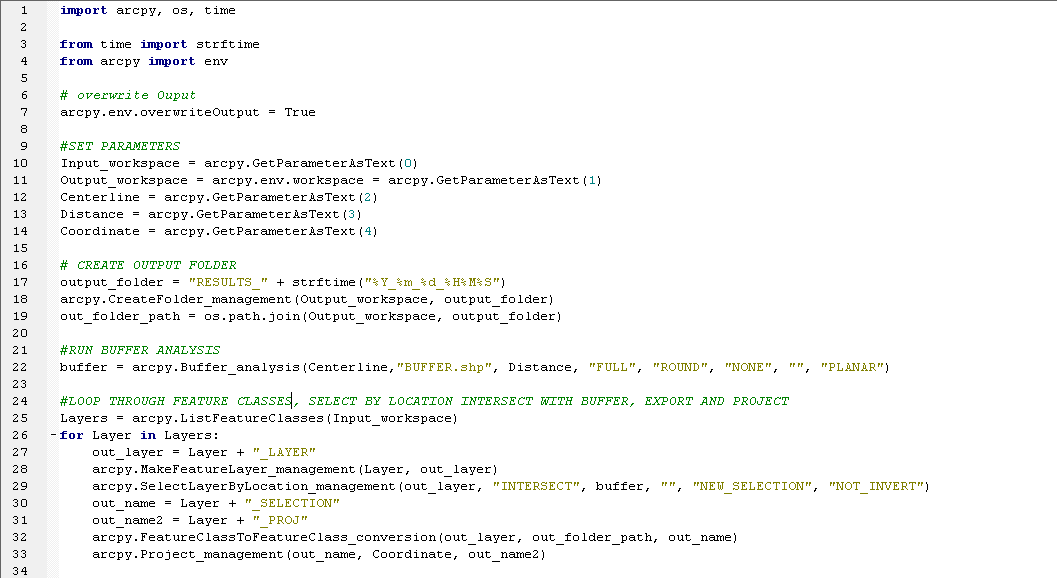
I'm writing a script tool to take a large data set select by location export and project it. I cannot get the for loop to work and I am at a loss because the script runs without errors, but creates no outputs except for the buffer used for selection. When debugging I've found that when I put the beginning part of the script before the for loop in there and have it try to print(Layers) it returns no values.
See attached script. Any help is greatly appreciated.
between lines 25 and 26, add a
<SPAN class="keyword token">print</SPAN><SPAN class="punctuation token">(</SPAN><SPAN class="string token">"Layers found {}"</SPAN><SPAN class="punctuation token">.</SPAN>format<SPAN class="punctuation token">(</SPAN>Input_workspace<SPAN class="punctuation token">)</SPAN><SPAN class="punctuation token">)</SPAN><SPAN class="line-numbers-rows"><SPAN></SPAN></SPAN>
If you get nothing, then the input workspace isn't any good, or it isn't a full path.
Also add a
<SPAN class="keyword token">print</SPAN><SPAN class="punctuation token">(</SPAN><SPAN class="string token">"Layer name {}"</SPAN><SPAN class="punctuation token">.</SPAN>format<SPAN class="punctuation token">(</SPAN>Layer<SPAN class="punctuation token">.</SPAN>name<SPAN class="punctuation token">)</SPAN><SPAN class="punctuation token">)</SPAN><SPAN class="line-numbers-rows"><SPAN></SPAN></SPAN>
on line 26.5
Also
/blogs/dan_patterson/2016/08/14/script-formatting
so people can copy and paste your code and have it formatted properly. Screen grabs can be use.
ListFeatureClasses—Help | Documentation is designed to have the workspace already set:
The workspace environment must be set before using several of the list functions, including ListDatasets, ListFeatureClasses, ListFiles, ListRasters, ListTables, and ListWorkspaces.
For starters, you have to set the workspace. Secondly, passing a workspace as a wildcard search will likely result in nothing being returned even if the workspace is set.
I had a feeling this was the problem, I need to have multiple workspaces in the script and it's causing issues I think I need a larger for loop to go through the workspaces instead of setting up the for loop for one workspace. Thanks for pointing it out.
Most, if not all, geoprocessing tools accept full paths to data sets, and I strongly encourage passing/using full paths instead of relying on the workspace being set.
I've made the following correction to list through multiple workspaces but the arcpy.MakeFeatureLayer is not running it's erroring out at the project step because there are no inputs.
Les membres connectés peuvent publier, suivre les mises à jour, et plus encore. Nouveau ici ? Inscrivez-vous gratuitement.
Find useful guides, FAQs, and documents to help you navigate and make the most of Esri Community.