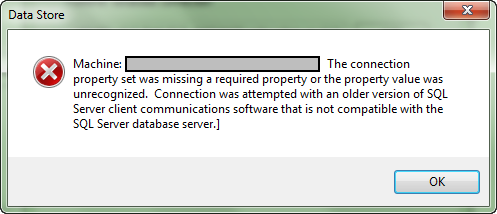
I am trying to register a SQL DB with my server, but getting the following error:
The connection property set was missing a required property or the property value was unrecognized. Connection was attempted with an older version of SQL Server client communications software that is not compatible with the SQL Server database server.
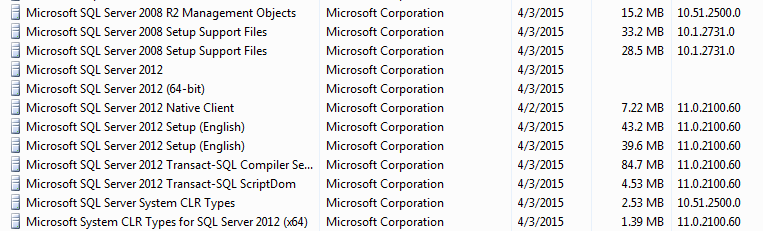
This is similar to Connection was attempted with an older version of SQL Server client communications, but I am pretty sure I have the same versions. Here are the SQL Server applications installed:
Installations:
ArcGIS for Desktop 10.3
ArcGIS for Server 10.3
SQL Server 2012
The SQL Server Native Client bit level doesn't depend on the Application, but rather the OS bit level. So, that may not be the issue here.
What kind of Authentication are you using to register the database (Windows Authentication or Database Authentication)?
Try using a Database Authenticated login and check if you still face this issue.
Make sure the native client is the SQLServer2012_NativeClient_64 version for the 64-bit ArcGIS Server client. ArcGIS Desktop will need the 32-bit version. The programs and features list won't indicate 64 or 32 bit. You have to find the .msi file used to install the client to see which version is installed.
hope that helps.
Are you installing software on different servers or is everything on one machine?
This is all on one machine.
This error can occur if your ArcGIS Server Service Account doesn't have access to your Geodatabase.
Using Database Authentication got me past this error, but now I am getting a new error:
Machine: <machine name> [<databasename>: (null)]
I have created a new discussion for this error - Register data store error - Machine: [: (null)]
Hey there
Had the same issue and adding the arcgis server account to the database did allow me to generate or register a database successfully.
Woohoo
Cheers
Peter
My case I have a PostgreSQL database and try to register with ArcGIS Server database, he acknowledges, makes the connection , but the following error appears :.
" The set of binding properties missing a required property or the property value was not recognized.
Invalid database name "
Can anyone help me ?
The database and arcgis desktop is on my machine and the arcgis server is on another machine.
Configuração:
ArcGIS Server 10.3
ArcGIS Desktop 10.3
PostgreSQL 9.3.10
With Postgres you need to add the machine IP to the pg_hba.conf. It's like a whitelist for access to the database. This file can normally be found under ..\PostgreSQL\9.3\data directory.
I'll put an environment together and respond shortly,
Thanks Peter. I solved it. Not sure how but I did J
Hi John
Good to hear
I just tried it and seems to work find
And as per Andrews response
I needed to set up a separate account for the account used to run the ArcGIS service on Postgres
and I added the IP address of the ArcGIS server to the pg_hba file with md5 permission
This seems to then allow publish rights.
Yep this was my issue too.
More than eight years later and this tip is still saving people's bacon (e.g. mine).
Had this same error. I had to check the ArcGIS Server machine to make sure it had the ODBC driver on it. Add that and it fixed it for database authentication.
It still wasnt working for operating system authentication to fix that we made sure out authentication high some higher permissions within SQL. Fixed bag login user error and the one that started this stream.
Hope that helps if anyone experiences this issue again.
Les membres connectés peuvent publier, suivre les mises à jour, et plus encore. Nouveau ici ? Inscrivez-vous gratuitement.
Find useful guides, FAQs, and documents to help you navigate and make the most of Esri Community.