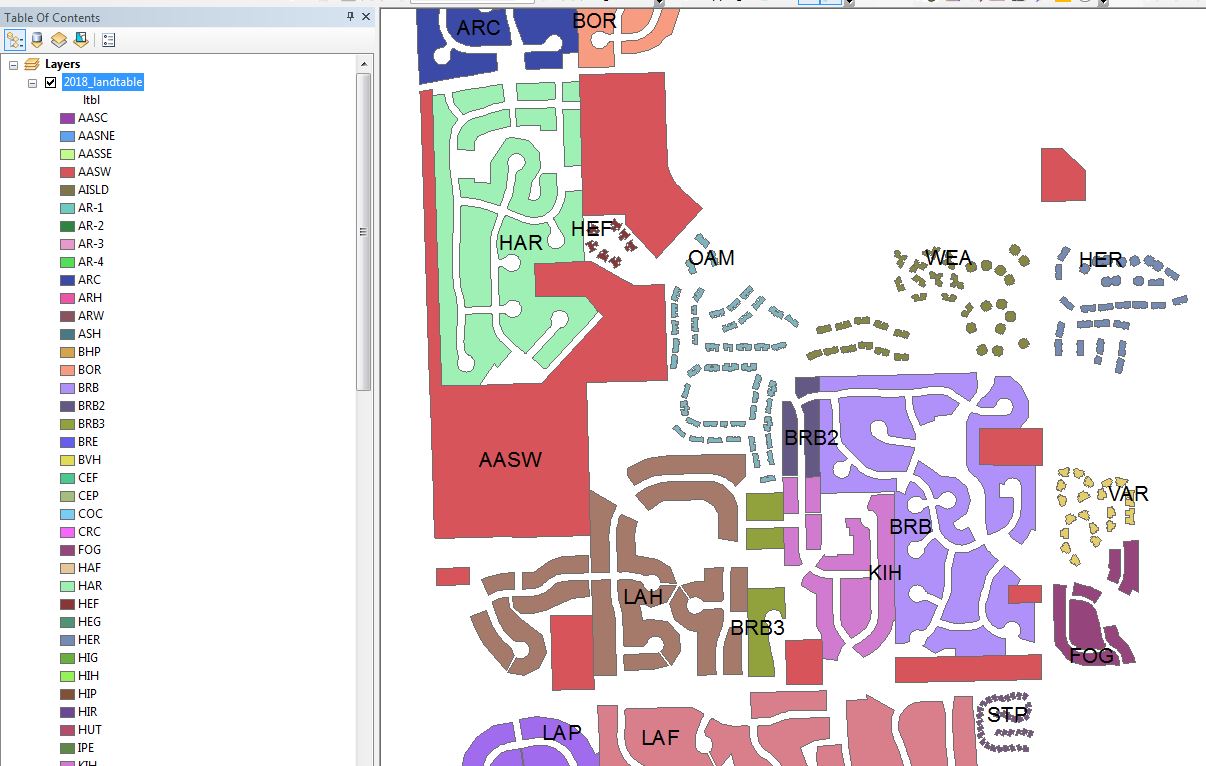
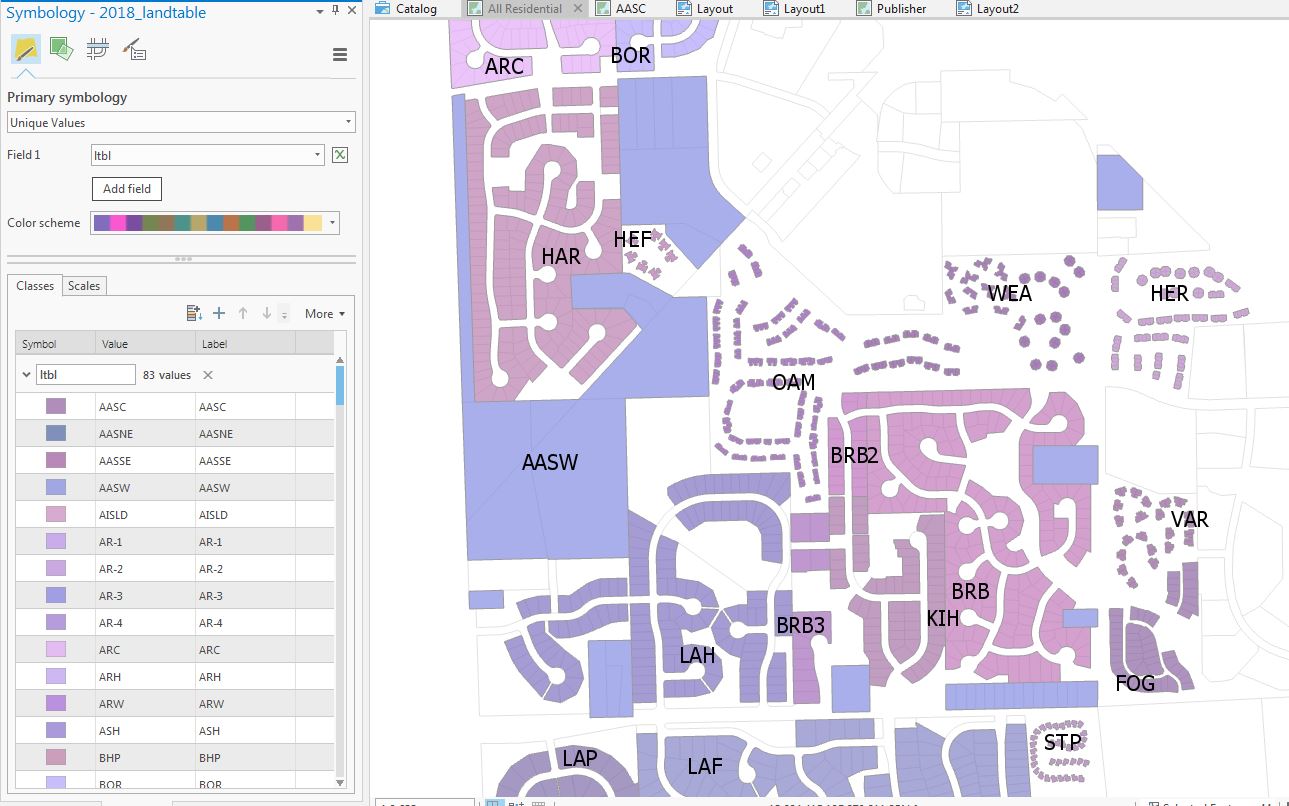
I am trying to replicate the automated random color symbology in ArcMap for tax neighborhoods but ArcPro tends to group unique values together (or use only about 6 different colors) defeating the point of unique value symbolization... is there a work around? See screen shots for exact example
ArcMap:
ArcPro
Have you upgraded to ArcGIS Pro 2.3 yet? The new update has more color schemes to choose from. I read somewhere that AGP 2.3 now displays data similar to ArcMap in with default symbologies and default colors. Haven't checked the Random Color Scheme yet.
Great! Happy to hear! If you would, please mark what feel is the correct answer to close out the thread. Enjoy AGP 2.3!
Yes, thanks. After 2.3 upgrade I have been successfully generating genuine random color schemes.
I have upgraded to 2.3 and after using for a few days, I am much happier with the random color patterns. It appears to be working as expected now. Thank you ESRI for looking into this and fixing it.
The current "What's New at 2.3 ArcGIS Pro" is currently INTERNAL only and will be made public upon the release of AGP 2.3. I have not worked with AGP 2.3 BETA and will download the new app upon release.
Robert - Where can I find the What's new article for Pro 2.3? I actually have beta 2, but cannot find what's new.
I do see a lot of new color schemes, but they do not seem very useful. Most are tones of the same basic color and so not very useful for showing a lot of different colors.
I tried displaying the same data I have been having trouble with in beta 2 with the regular "Basic Random". No improvements...
Thomas
Thomas - from what I'm reading of "What's New in 2.3 ArcGIS Pro", there will be 24 new random color schemes from ArcMap added to ArcGIS Colors to improve upon the random symbology issues. I believe AGP 2.3 is listed for a Q1 2019 release time frame.
I am having this problem as well. None of the workarounds introduced here work for me and I cannot in good conscience recommend Pro over ArcMap to customers with this (pretty basic) need.
Sure, exporting a lyr file from ArcMap gives a better color scheme in Pro, but only until we get new values in the feature class to classify by, which is a common and frequent workflow for us.
It seem like Pro really goes out of its way to make sure that features that are geographically close together get the same or almost the same colors. I even tried generating random values for the field that I am classifying by to see if that helps. Does not help.
It is really stupid.
I have contacted support and they referred me to this thread. Wonderful...
I am still having this issue as well. The "Random" symbology is not very random. Most of the time I get groups of varying shades of the same colors. I feel like the random symbology in Desktop gave a much better color spread. I have been using the work around of importing symbology from a layer created in Desktop, but what happens when Desktop goes away? I would really like to just pick "Random" and get a random symbology instead of tinkering around with all of the settings. I'm hoping it is something ESRI is looking into.
Unfortunately that did not provide different outcome, but I am satisfied with the Layer file export from ArcMap for now.
Why don't you add a second field to the symbology classification. You could probably use an existing field, just make sure it isn't one that has the same pattern as your main field... that might mess with the apparent sequential pattern
True. Try this - export the feature class out to a new feature class and/or geodatabase. Does the error persist on the copy?
Thanks!This is actually is a workable solution that I was working towards. After some trial and error, it seems only this layer has the issues mentioned but others that I use the random color scheme for turn out fine, however doesn't explain why it looks good in ArcMap and not ArcPro.
Hmmm...this is odd for sure. Here's one possible workaround until I can figure what's going on. In ArcMap, add your feature class, assign the random color ramp that you prefer to see, save it out as a *.lyr file and add the *.lyr file in an AGP map. Not ideal granted but preserves the randomness you prefer to see. I'll keep digging!
Thanks again,
you might on to something Dan with the colors being alphabetically assigned.
I've tried the to replicate the exact setting you have Robert but am not getting the mix your getting : (.
even in your example while the colors are spread out better, there isn't that much variety, some next to each other look very similar (lowland broad-leaf).
Found something interesting! It has to do with the circular color ramp on the Color Scheme Editor. One can grab a dot and vary the angle to expose more "random" colors. See my screen grab below.
min max color
it might be assigning alphabetically along the colors. Is there a way to set the min/max to None or something (don't have Pro open now)
Thanks,
Dan - it's definitely the random one which is why it is strange that I'm having trouble getting a diverse variety of colors.
Robert - I have tried that as well and can't seem to get anything better. It seems as if in ArcMap there was a better color-method that followed a 4 or 5 color theorem. I am surprised that i wasn't able to find anyone else with a similar problem.
Does "Basic Random" do a better job for anyone else? in my case there are 83 unique values(neighborhoods).
Regenerated "Basic Random" Scheme in ArcPro
One thing I've tried to better randomize the colors is the following workflow:
Does the randomness along polygon borders improve?
in both scenarios, you can "show name" on the dropdown (or rightclick ??) on the color ramp.
Go to both and get the color ramp name. Your Pro color map seems to be something other than the random one
Les membres connectés peuvent publier, suivre les mises à jour, et plus encore. Nouveau ici ? Inscrivez-vous gratuitement.
Find useful guides, FAQs, and documents to help you navigate and make the most of Esri Community.