I am trying to install (IIS Local - Windows 10) the Widget code of this DevSummit 2007:
Customizing the ArcGIS API for JavaScript Widgets
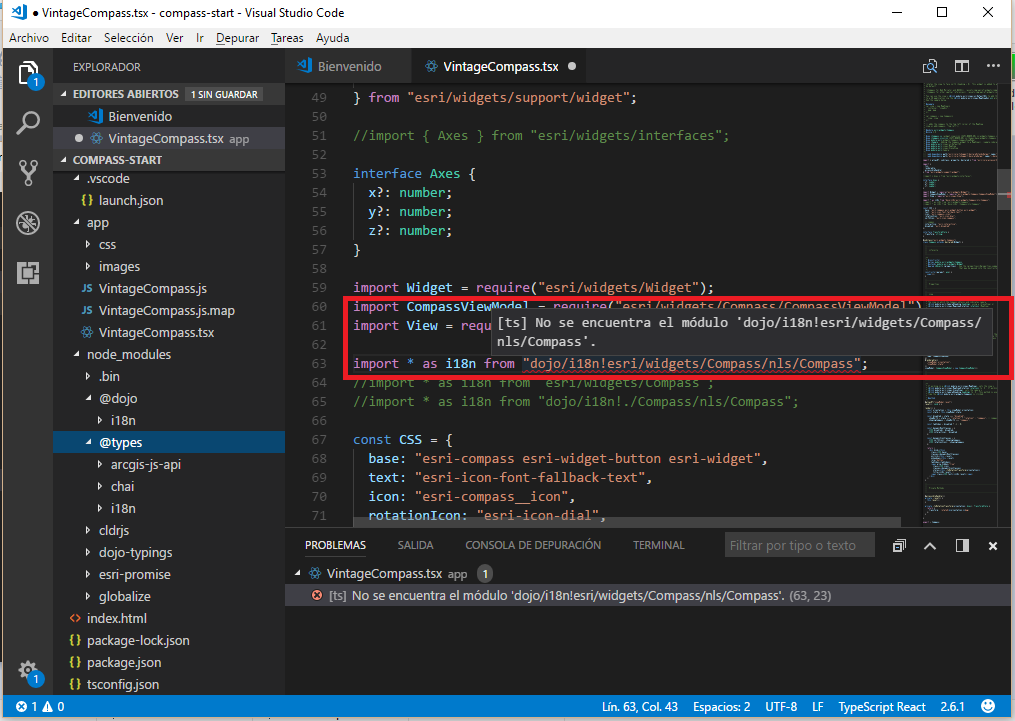
But it is not possible to use (compile or run) the Compass Widget, because I have this error in my Visual Studio Code editor:
Cannot find module 'dojo/i18n!esri/widgets/Compass/nls/Compass'.
[ts] No se encuentra el módulo 'dojo/i18n!esri/widgets/Compass/nls/Compass'.
I followed the steps provided:
dev-summit-2017-customizing-widgets/compass.md at master · jcfranco/dev-summit-2017-customizing-widgets · GitHub
I tried to change the paths, but I think there is a problem with the Typings of dojo. I ran the previous steps to configure the Widget Folder:
I created the package.json: npm init --yes
I installed Dojo Typings: npm install dojo-typings --save-dev
I installed typings for JASAPI ArcGis: npm install --save @types/arcgis-js-api
I created the config.json
As you can see in the image, I tried to install i18n and its typing .. but nothing, the same problem!
How can I fix the access to dojo/i18n module?
Cheers!
Alexys H




